
Microsoft Dynamics 365 Business Central gives distributors a strong foundation for managing transactions, inventory, financials, customers, and other core areas of the business.
But the operational challenge is everything that has to happen between order entry and completion. A distributor may need to know:
- Does this order need approval because the margin is too low?
- Should available inventory be reserved for this order or another one?
- What happens when an item is backordered?
- Does this line need to be drop shipped?
- Who needs to review an order before it moves forward?
- Where is an order currently stuck?
These aren’t unusual exceptions for a distributor. They’re part of everyday order management. But distributors often end up relying on manual steps, institutional knowledge, separate automations, or customizations to manage these processes inside of Business Central.
Looking at where employees still have to step in can help distributors identify gaps in their BC workflows.
1. When every order doesn’t follow the same path
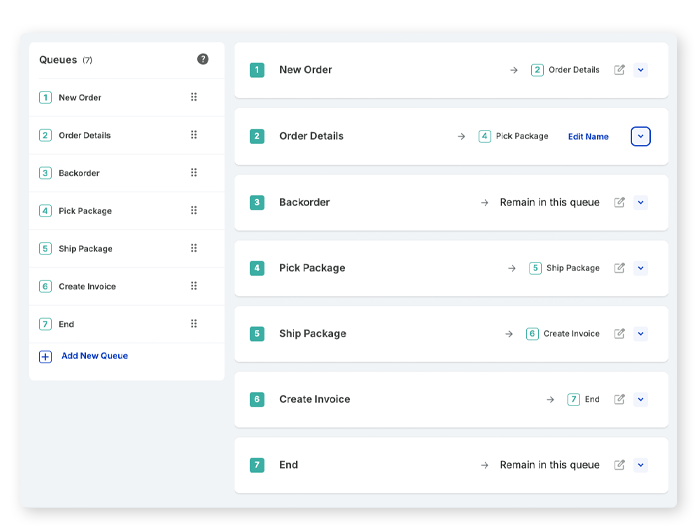
The basic path of an order – enter it, process it, fulfill it, and invoice the customer – is straightforward. Real orders in a distribution business introduce more variation. Margin thresholds, credit issues, order value, and customer or product requirements can all determine whether an order moves forward or needs additional review or approval.
A distributor’s workflow needs to recognize these differences or risk leaving money on the table. That requires more than automating a standard sequence of steps. Distributors need business rules that determine what should happen to a specific order based on the information within it.
Instead of relying on employees to recognize every exception and remember every rule, SalesPad for Business Central adds configurable order workflows and a business rules engine that can use information such as margins, customer attributes, dimensions, and values to determine where the order should go next.
2. When an order needs approval before it can move
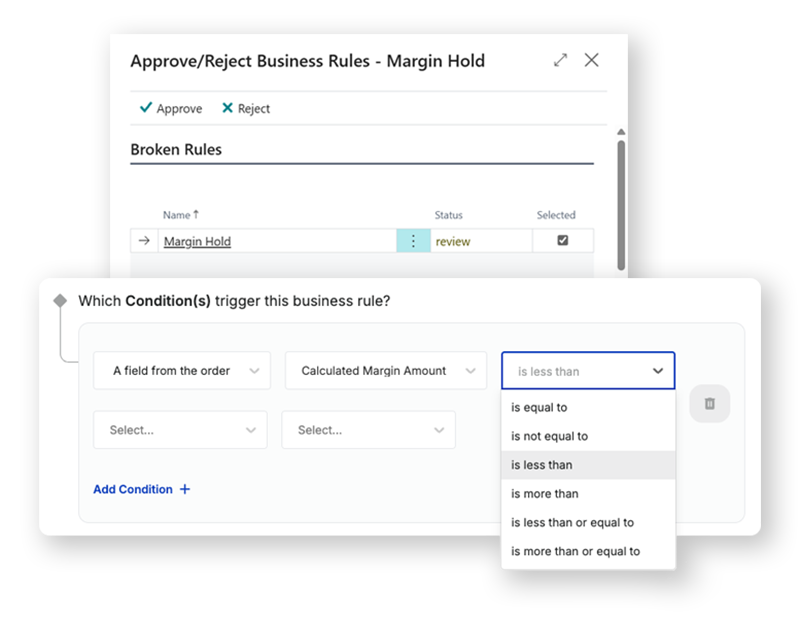
Sometimes pricing exceptions make strategic sense. But a distributor also doesn’t want an order with an exception proceeding unnoticed. Someone needs to see it, decide whether the exception makes sense, and approve or reject it.
The same issue can arise with credit holds, unusually large orders, and other conditions the distributor decides warrant additional review.
SalesPad for Business Central can identify those conditions and automatically route the order to the appropriate person for approval. Instead of relying on an employee to send an email or track down a manager, the workflow determines when approval is required and who needs to provide it. Real-time margin visibility also gives the approver information about the value of the order while there is still time to act.
3. When inventory exceptions create more work
Some of the biggest workflow challenges in Business Central are routine for a distributor. Let’s use backorders as an example. An order arrives, but the distributor doesn’t have enough inventory to fulfill it.
That triggers a series of steps. Does purchasing need to order the product? Should a purchase order be created? When inventory becomes available, which customer should receive it? Does someone need to return to the sales order and manually move it forward?
Drop shipments and special orders create similar handoffs between sales, purchasing, and fulfillment.
Inventory allocation can be complicated, as well. Available inventory doesn’t necessarily belong to the first open order in the system. A distributor may have an order that doesn’t need to ship for several weeks while another customer needs the same product immediately. That can result in false stockouts.
SalesPad’s Mission Control uses workflows to manage scenarios such as backorders, purchasing, inventory reservations, drop shipments, and special orders. For example, a workflow can identify inventory reserved against an order with a future ship date and make it available to an order that needs to ship sooner.
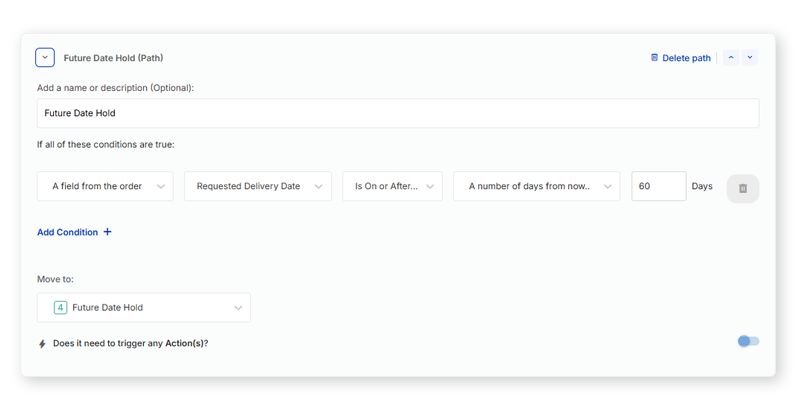
The goal is to make sure the right actions happen in the right sequence without requiring employees to continually check orders and initiate the next step themselves.
4. When an order status doesn’t tell the whole story
As more decisions and exceptions enter the process, distributors also need a better way to understand where each order stands. Knowing that an order is “open” doesn’t tell you whether it is progressing normally.
Is it waiting for approval? On credit hold? Backordered? Waiting for inventory? Ready for fulfillment? Has something happened that requires an employee to intervene?
SalesPad for Business Central provides configurable document statuses for every stage of the order lifecycle that can be incorporated into workflows. Managers and employees can see where an order is in the process rather than relying on individual employees to know its current state.
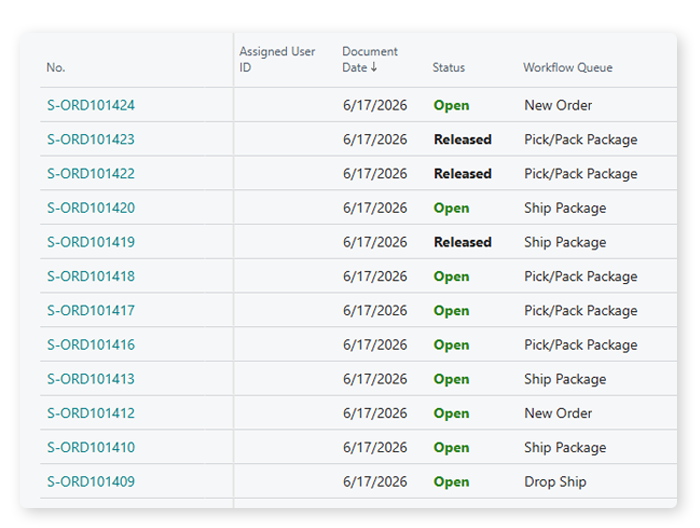
That visibility makes it easier to manage by exception. Instead of checking every order to make sure it is moving forward, employees can focus on the orders that have stalled or require a decision.
5. When you need to know what happened to an order
Sometimes managers need to understand the history behind an order. Who approved the pricing exception? Why did the order go on hold? When did its status change? What happened before it reached its current status?
When multiple employees or departments touch an order, this is important. An audit history from quote through cash creates a record of how the order moved through the workflow. That gives managers a way to investigate exceptions, understand why an order took the path it did, and see where delays occurred.
It can also expose process problems that aren’t obvious from a final transaction. If similar orders repeatedly sit in one status, require the same manual intervention, or encounter the same exception, the issue may be the workflow. And that can be fixed.
6. When changing a workflow requires technical help
A distributor’s operating rules don’t stay the same. For example, approval thresholds and customer requirements can change, and new products can create new processes. If every workflow change requires custom development, even relatively small process improvements could become technology projects.
Business Central users can build additional automation with tools such as Power Automate, but they may still end up piecing together multiple flows or relying on technical resources as their requirements become more specific.
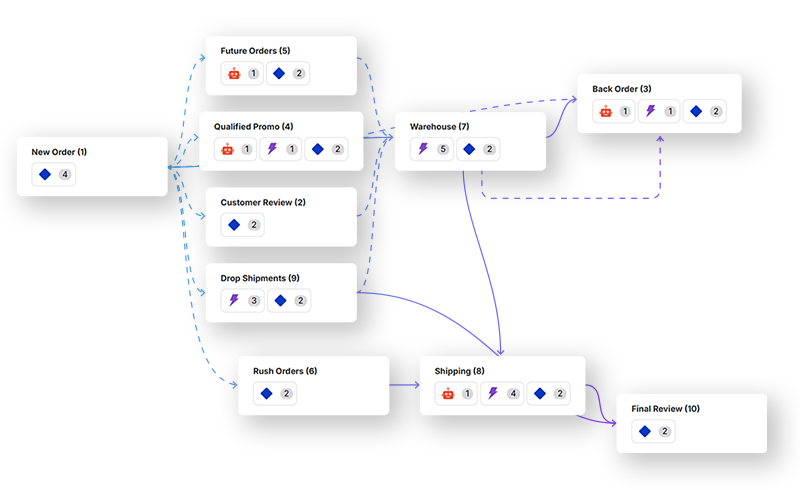
SalesPad for Business Central takes a different approach through Mission Control’s no-code workflow builder. Distributors can configure document statuses, business rules, approvals, and routing around the way their business operates.
Make Business Central Work for Your Distribution Business
Business Central can remain a reliable and powerful system of record without being responsible for every operational rule a distributor needs.
Manual touches show you where the standard ERP transaction and operating processes have diverged. Look for places where employees repeatedly make the same decisions, manage the same exceptions, or take the same extra steps to keep orders moving. Those patterns can point to workflows that should reflect how your distribution business operates rather than relying on employees to fill the gaps.
Learn more about how SalesPad for Business Central and Mission Control can help.
