
Mission control
Intelligent Order Management for Distributors
Scale your distribution without adding headcount. Mission Control automates your order lifecycle with intelligent workflows that protect margins and provide real-time order visibility, no custom code required.
Acceleration of order processing through fewer manual touchpoints.
%
Faster approvals with automated conditional routing.
%
Improvement in revenue per employee.
“One business rule in SalesPad saves me seven figures a year.”

Kyle Forman
President, Krowne
Workflow that just works
Bridging the gap between standard Business Central and your unique distribution process
Process complexity is the primary reason distributors struggle to scale with Business Central. When unique business rules don’t align with standard, fixed workflows, institutional knowledge and manual workarounds become the only way to get orders out the door—leaving both profit and productivity on the table. Mission Control gives you the flexibility to adapt your processes in real-time, eliminating the need for expensive custom code and the margin-eroding frustration of toggling between multiple screens to track a single order. By removing this operational friction, you protect your bottom line and solve the critical fulfillment challenges that typically stall your growth.
Costly Customizations
Over 75% of cloud ERP implementations require customizations that lead to support contracts, retraining, and upgrade delays. A single custom automated flow can cost $15,000 annually to build and maintain.
Hidden Bottlenecks
Standard Business Central tells you if an order is “open,” but it doesn’t show you the friction points slowing your cash cycle. These visibility gaps force your team into manual followups and toggling multiple screens to find answers, driving up the cost to serve for every order.
Margin Leaks
Relying on month-end reviews to catch unprofitable orders is a reactive strategy that leaves profit on the table.
The solution
Mission Control
Get the flexibility to adapt your processes in real time, eliminating dependency on expensive custom code. By providing absolute visibility into exactly where every order sits and why, Mission Control surfaces hidden bottlenecks so you can process higher volumes without adding headcount. Automates manual tasks, enforce strategic guardrails, and ultimately ensure your unique distribution workflow runs exactly the way you want it to.
Better, Faster, & Easier
How distributors can control order management in three steps
Step 1
Map your unique workflow (without custom code)
Move your business logic out of SOPs and institutional knowledge and directly into Business Central. Using a drag-and-drop builder, map your exact order journey—from quote to cash—without writing a single line of code. While standard Business Central struggles to handle complex distribution scenarios, Mission Control allows you to design unique lifecycles for every document type, ensuring quotes, orders, invoices, and returns follow purpose-built operational steps. By automatically routing documents based on margins, dimensions, or customer data, you eliminate the technical bottlenecks and IT delays that cause your business to suffer. This reclaimed agility ensures your ERP adapts to your business, rather than the other way around.
Step 2
Automate repetitive tasks and compliance
Mission Control takes over the heavy lifting by executing the high-volume tasks that stall your sales cycle. Instead of relying on staff to manually reserve inventory, create pick documents, or process payments, the system triggers these actions the instant a document meets your specific criteria. Beyond task automation, it acts as a continuous safeguard, monitoring every order for risk. By automatically flagging low-margin or non-compliant orders for immediate review, you ensure perfect process compliance without creating the manual bottlenecks that slow down your team or negatively impact profits.
Step 3
Gain complete visibility across the order journey
Mission Control provides the clarity to focus only on the orders that actually require your attention. It transforms complex routing logic into a clear visual map, where you can troubleshoot and optimize workflows at a glance through a real-time dashboard. You can track every step of the order journey with event-based checkpoints and one-click access to the full document chain, eliminating the need for manual searches or digging through menus for related POs and invoices. To protect your bottom line, the system provides instant margin visibility at the line, document, and queue levels to stop accidental profit erosion. By maintaining an uneditable history of every action, the system ensures accountability and a permanent audit trail, so you never have to guess who touched an order or why it moved.
Step 1
Map your unique workflow (without customer code)
Move your business logic out of SOPs and institutional knowledge and directly into Business Central. Using a drag-and-drop builder, map your exact order journey—from quote to cash—without writing a single line of code. While standard Business Central struggles to handle complex distribution scenarios, Mission Control allows you to design unique lifecycles for every document type, ensuring quotes, orders, invoices, and returns follow purpose-built operational steps. By automatically routing documents based on margins, dimensions, or customer data, you eliminate the technical bottlenecks and IT delays that cause your business to suffer. This reclaimed agility ensures your ERP adapts to your business, rather than the other way around.
Step 2
Automate repetitive tasks and compliance
Mission Control takes over the heavy lifting by executing the high-volume tasks that stall your sales cycle. Instead of relying on staff to manually reserve inventory, create pick documents, or process payments, the system triggers these actions the instant a document meets your specific criteria. Beyond task automation, it acts as a continuous safeguard, monitoring every order for risk. By automatically flagging low-margin or non-compliant orders for immediate review, you ensure perfect process compliance without creating the manual bottlenecks that slow down your team or negatively impact profits.
Step 3
Gain complete visibility across the order journey
Mission Control provides the clarity to focus only on the orders that actually require your attention. It transforms complex routing logic into a clear visual map, where you can troubleshoot and optimize workflows at a glance through a real-time dashboard. You can track every step of the order journey with event-based checkpoints and one-click access to the full document chain, eliminating the need for manual searches or digging through menus for related POs and invoices. To protect your bottom line, the system provides instant margin visibility at the line, document, and queue levels to stop accidental profit erosion. By maintaining an uneditable history of every action, the system ensures accountability and a permanent audit trail, so you never have to guess who touched an order or why it moved.
Where it fits
Six distribution scenarios where standard Business Central falls short (and how to solve them)

Translate complex business logic into automated results. By moving beyond the limitations of standard Business Central workflows, you can solve these six common operational friction points, reducing manual overhead while increasing fulfillment accuracy.
Automated backorder management
Eliminate the manual search for available stock. Mission Control automatically routes orders to specialized backorder queues the moment inventory is unavailable, ensuring they are staged and ready for fulfillment the second stock arrives.
Drop ship orchestration
Stop manually identifying vendor-direct orders. The system instantly identifies drop ship items and autogenerates matching purchase orders directly from the sales order, allowing your team to bypass requisition worksheets and eliminate manual data entry.
Priority inventory reservations
Prevent stockouts for your most important accounts. Automatically allocate and lock down inventory at the moment of order entry to ensure high-priority customers always receive their shipments on time, regardless of overall stock levels.
Advanced validations & approvals
Replace manual oversight with automated guardrails. Set precise rules for credit holds, margin thresholds, or technical reviews that stop non-compliant orders and route them to the right manager for immediate action.
Integrated payment automation
Stop wasting warehouse labor on declined credit cards. Mission Control automatically authorizes credit cards upfront and captures the final payment upon shipment. Combined with automated paylinks and prepayment invoices, this guarantees funds are validated before your team ever picks or packs an order.
Automated printing & email routing
Eliminate the bottleneck of manual printing and paperwork delays. Pair Mission Control with Smart Printing to route documents and communications completely unattended. Simply define your workflow milestones—like releasing an order or posting a shipment—to automatically trigger pick tickets, packing slips, invoices, and customer email notifications, sending them instantly to the right warehouse printers and customer inboxes.
Interactive Tour
Experience Mission Control in action
Ready to see how easy it is to automate your workflows? Step inside our interactive product tour and discover how Mission Control eliminates manual touchpoints and protects your margins in real time.
Supercharge business central
Purpose-built functionality for modern distribution
Mission Control extends Business Central’s core capabilities to eliminate manual bottlenecks and protect your margins.
Sales & Service
SalesPad for BC
Map, enforce, and evolve unique business processes without developers or custom code.
Map, enforce, and evolve unique business processes without developers or custom code.
Map, enforce, and evolve unique business processes without developers or custom code.
Automatically route documents through alternate paths based on margins, dimensions, customer data, or document values.
Design purpose-built workflows specifically for quotes, orders, invoices, and returns.
Eliminate manual tasks and accelerate fulfillment by automatically executing actions and advancing documents.
Eliminate manual tasks and accelerate fulfillment by automatically executing actions and advancing documents.
Eliminate manual tasks and accelerate fulfillment by automatically executing actions and advancing documents.
Automatically execute tasks—like PO generation, inventory reservation, and email alerts—the instant a document meets your criteria.
Continuously evaluate system conditions to automatically advance documents the moment criteria are met, without human intervention.
Execute batch operations across multiple documents simultaneously to drastically reduce manual effort.
Automatically authorize, capture, or trigger PayFabric paylinks at any stage of your workflow.
Guarantee every order is compliant and profitable with automated guardrails and strict audit trails.
Guarantee every order is compliant and profitable with automated guardrails and strict audit trails.
Guarantee every order is compliant and profitable with automated guardrails and strict audit trails.
Automatically evaluate and flag risky orders—like low margins or credit holds—for manager review.
Trigger automated, contextual email alerts the instant business rules are broken, approved, or rejected.
Maintain a transparent, unalterable history of exactly what action occurred, when, and by whom.
Know exactly where every order is, what needs attention, and why, without opening a single document.
Know exactly where every order is, what needs attention, and why, without opening a single document.
Know exactly where every order is, what needs attention, and why, without opening a single document.
Track every step of the order journey with event-based statuses that go far beyond Business Central’s generic “open” and “released” labels.
View workflow queues, resolve bottlenecks, and assess operational margins at a glance from a single, real-time dashboard.
Access the full document chain—POs, picks, ships, and invoices—with one click directly from the sales document.
Assess profitability instantly using real-time margin metrics at the line, document, and queue levels.
Streamline your supply chain with automated purchasing, intelligent reservations, and hands-free dropship logic.
Streamline your supply chain with automated purchasing, intelligent reservations, and hands-free dropship logic.
Streamline your supply chain with automated purchasing, intelligent reservations, and hands-free dropship logic.
Generate POs automatically for backordered quantities while seamlessly reserving in-stock inventory to the sales line.
Integrate inventory reservations into your automated workflow to reduce clicks and prevent premature allocation.
Automatically generate vendor POs for drop ship items and cleanly link them back to the original sales line.
Mold the ERP to your exact operational needs by instantly creating custom fields and leveraging data from other third-party extensions.
Mold the ERP to your exact operational needs by instantly creating custom fields and leveraging data from other third-party extensions.
Mold the ERP to your exact operational needs by instantly creating custom fields and leveraging data from other third-party extensions.
Instantly create and publish new fields to Business Central without writing a single line of code.
Integrate fields from other third-party extensions (like Avalara) to automatically trigger workflow logic and business rules.
Automatically flow custom data from the customer card to the document header and line items to eliminate repetitive data entry.
Supercharge business central
Purpose-built functionality for modern distribution
Mission Control extends Business Central’s core capabilities to eliminate manual bottlenecks and protect your margins.
Sales & Service
SalesPad for BC
Map, enforce, and evolve unique business processes without developers or custom code.
Map, enforce, and evolve unique business processes without developers or custom code.
Map, enforce, and evolve unique business processes without developers or custom code.
Automatically route documents through alternate paths based on margins, dimensions, customer data, or document values.
Design purpose-built workflows specifically for quotes, orders, invoices, and returns.
Eliminate manual tasks and accelerate fulfillment by automatically executing actions and advancing documents.
Eliminate manual tasks and accelerate fulfillment by automatically executing actions and advancing documents.
Eliminate manual tasks and accelerate fulfillment by automatically executing actions and advancing documents.
Automatically execute tasks—like PO generation, inventory reservation, and email alerts—the instant a document meets your criteria.
Continuously evaluate system conditions to automatically advance documents the moment criteria are met, without human intervention.
Execute batch operations across multiple documents simultaneously to drastically reduce manual effort.
Automatically authorize, capture, or trigger PayFabric paylinks at any stage of your workflow.
Guarantee every order is compliant and profitable with automated guardrails and strict audit trails.
Guarantee every order is compliant and profitable with automated guardrails and strict audit trails.
Guarantee every order is compliant and profitable with automated guardrails and strict audit trails.
Automatically evaluate and flag risky orders—like low margins or credit holds—for manager review.
Trigger automated, contextual email alerts the instant business rules are broken, approved, or rejected.
Maintain a transparent, unalterable history of exactly what action occurred, when, and by whom.
Know exactly where every order is, what needs attention, and why, without opening a single document.
Know exactly where every order is, what needs attention, and why, without opening a single document.
Know exactly where every order is, what needs attention, and why, without opening a single document.
Track every step of the order journey with event-based statuses that go far beyond Business Central’s generic “open” and “released” labels.
View workflow queues, resolve bottlenecks, and assess operational margins at a glance from a single, real-time dashboard.
Access the full document chain—POs, picks, ships, and invoices—with one click directly from the sales document.
Assess profitability instantly using real-time margin metrics at the line, document, and queue levels.
Streamline your supply chain with automated purchasing, intelligent reservations, and hands-free dropship logic.
Streamline your supply chain with automated purchasing, intelligent reservations, and hands-free dropship logic.
Streamline your supply chain with automated purchasing, intelligent reservations, and hands-free dropship logic.
Generate POs automatically for backordered quantities while seamlessly reserving in-stock inventory to the sales line.
Integrate inventory reservations into your automated workflow to reduce clicks and prevent premature allocation.
Automatically generate vendor POs for drop ship items and cleanly link them back to the original sales line.
Mold the ERP to your exact operational needs by instantly creating custom fields and leveraging data from other third-party extensions.
Mold the ERP to your exact operational needs by instantly creating custom fields and leveraging data from other third-party extensions.
Mold the ERP to your exact operational needs by instantly creating custom fields and leveraging data from other third-party extensions.
Instantly create and publish new fields to Business Central without writing a single line of code.
Integrate fields from other third-party extensions (like Avalara) to automatically trigger workflow logic and business rules.
Automatically flow custom data from the customer card to the document header and line items to eliminate repetitive data entry.
Customer Success Story
Krowne
Krowne, a leader in stainless steel manufacturing, moved from a click-heavy, manual process to intelligent automation with Cavallo. By building their specific business rules directly into automated workflows, Krowne moved away from a manual, high-touch process. This took the guesswork out of their distribution, allowing orders to move through the system correctly and consistently every time. The result? A 60% reduction in order touchpoints and customer service resolution times slashed from five minutes to two.
“One business rule in SalesPad saves me seven figures a year.”
Kyle Forman, President at Krowne
Better together
The SalesPad for BC product suite
Mission Control™ is the cornerstone of the SalesPad for BC product suite, providing the workflow intelligence needed to scale without adding headcount. Add to that the power of Profit Scan™, Customer IQ™, and integrated credit card processing with PayFabric by Global Payments, and you replace manual workarounds with a high-velocity sales cycle that automatically protects margins, prioritizes your best customers, and accelerates cash flow.

Order workflow intelligence
Supercharge your sales order management with no-code workflows, process automation, and real-time visibility that streamlines fulfillment and enforces operational safeguards.

Real-time margin protection
Protect your bottom line with real-time margin scanning that detects financial risk and flags low-margin or non-compliant orders before they are processed.

AI-powered customer insights
Transform customer data into actionable strategy. Gain immediate visibility into an account’s financial contribution and use AI-powered behavioral analysis to identify customers at risk of leaving.
All within

Automated document & email routing
Orchestrate your entire paperwork flow, instantly routing invoices, pick tickets, and labels to the correct printers based on the unique rules and fields of each transaction.

Automated pricing logic
Take complete control over your calculation logic. Instantly execute complex customer agreements, specialized cost-plus rules, and targeted exceptions directly at the sales desk without manual calculations.

Integrate essential data
Instantly build custom fields or pull in data from third-party applications natively within Business Central.
Mission control + Advanced Pricing
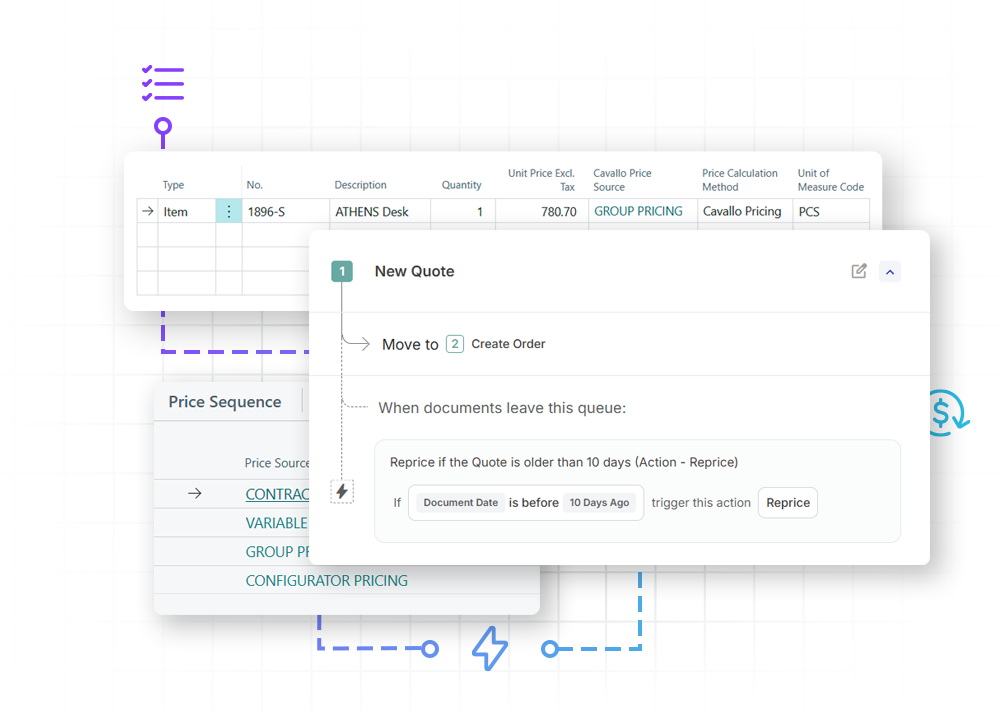
Enforce automated margin guardrails
Take total control over your sales floor. Pairing your active workflows with an automated pricing engine allows Mission Control to instantly catch and route non-compliant orders, holding the document for manager approval the exact moment a line drops below your defined gross-margin floor.
Mission Control + Smart Printing
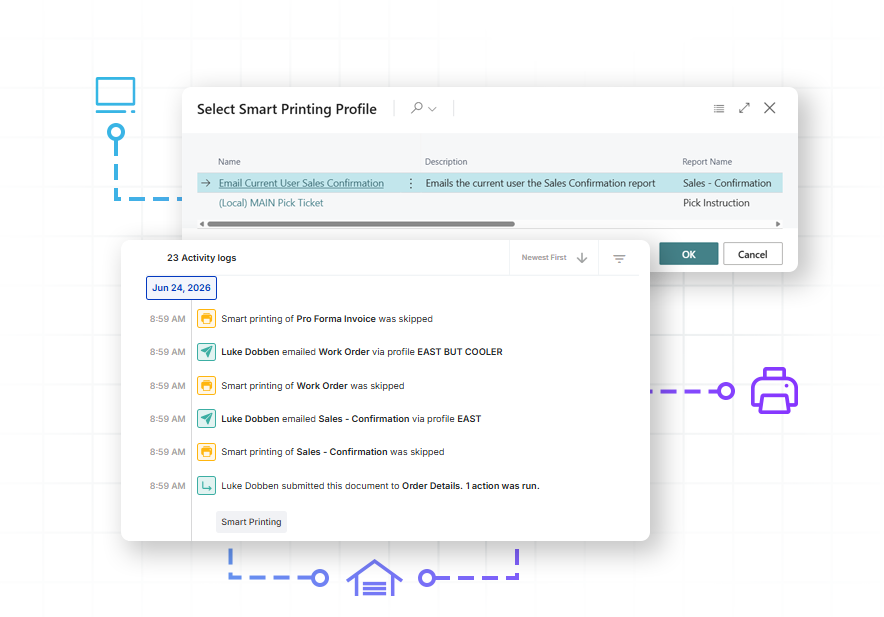
Achieve hands-off fulfillment
Let your workflows handle the paperwork. Mission Control automatically triggers Smart Printing to fire off complete document packs—from pick tickets to invoices—the second an order hits a workflow milestone, keeping your shipping dock moving with zero manual clicks.
Mission control + profit scan
Protect bottom line revenue with automated guardrails
Stop unprofitable orders before they reach the warehouse by uniting your business rules and process with your profit guardrails. While Profit Scan acts as your real-time source of truth for margin targets, Mission Control automatically reads those statuses to intercept and flag low-margin orders for review. This ensures that every automated workflow is governed by your actual profitability, not just generic price lists.

Mission Control + Customer IQ
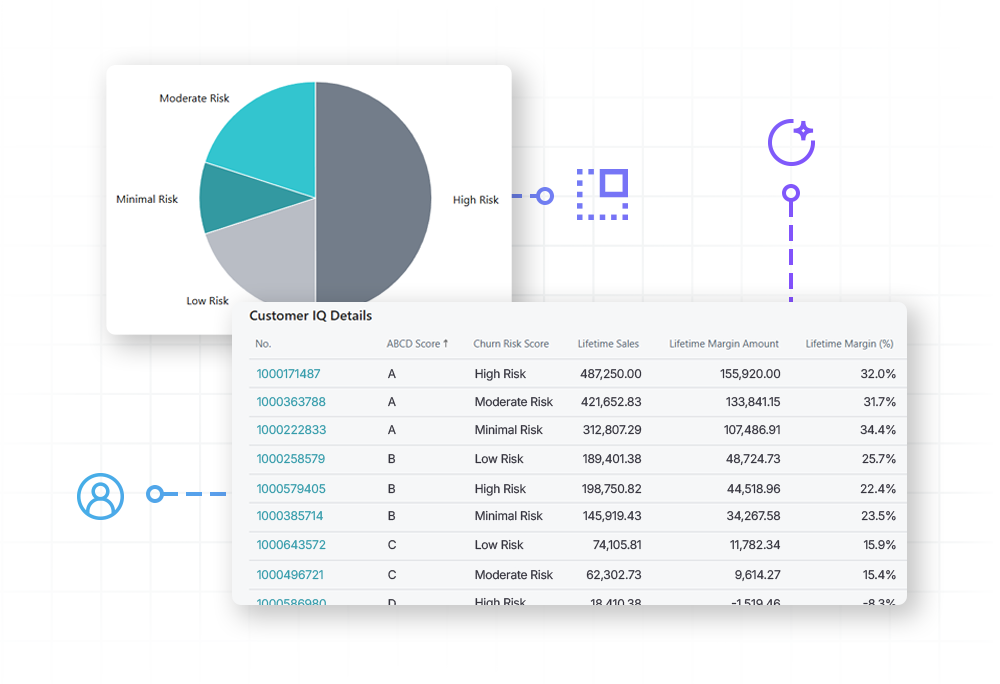
Transform customer data into actionable strategy
Connect customer insights directly to your fulfillment strategy by embedding AI-driven behavioral data into your order logic. Leverage both historical profitability and AI-driven predictive health scores from Customer IQ to drive unique routing within Mission Control. This allows you to automatically prioritize fulfillment for your most valuable accounts while triggering specialized workflows to save customers at risk of churn.
Mission Control + PayFabric
Accelerate cash flow with automated payments


Mission control + Custom Fields
Turn specialized data into workflow action
Stop letting unique business requirements drive up development costs. Instantly build custom fields or pull in data from third-party applications natively within Business Central. Transform that specialized data directly into active routing conditions and business rules, automatically evaluating and moving orders without writing a single line of code.
FAQ
How long does it take to implement Mission Control?
Unlike traditional ERP customizations that take months, Mission Control is a no-code engine. Most distributors can map their first automated workflow and go live in a matter of weeks, not months. Because it sits directly inside Business Central, there’s no complex integration or external data syncing required.
How hard is it to build and configure workflows? Do I need a developer?
Not hard at all—everything is completely customizable via no-code tools built directly inside Business Central. Easily map routing logic, create approval rules, and set up automated actions in minutes, entirely eliminating the need to rely on IT.
Our implementation partner said they could build custom workflows for us. Why use Mission Control?
Custom-coded workflows are static; the moment your business process changes, your code is obsolete, requiring more developer hours to fix or adjust. This leads to high maintenance costs, upgrade delays, and reliance on IT for simple changes. Mission Control is a no-code engine. Instead of waiting weeks for a developer to hard-code a new rule, your operations team can use a drag-and-drop builder to adapt your process instantly. You get the exact same custom functionality, but with the ability to scale and evolve your fulfillment strategy without the cost of custom support.
Can Mission Control handle high-volume batch printing on a schedule?
Yes. Beyond real-time workflow triggers, Mission Control can execute scheduled printing actions using Smart Printing. For example, you can configure a workflow to automatically batch-print the entire overnight pick queue right before the morning warehouse shift arrives, ensuring your team can start working immediately without waiting on manual document staging.
How do Custom Fields work with workflows in Mission Control?
Custom Fields turn specialized data into actionable workflow conditions. Once newly created or third-party fields are published to Business Central, they instantly appear in the Mission Control workflow builder. This allows the system to automatically route, flag, and evaluate documents based on highly unique business criteria without writing a single line of custom code.
Can Mission Control automatically block unauthorized price overrides or low-margin orders?
Yes. Standard pricing setups only suggest a price, leaving it up to salespeople to manually alter it at the sales desk. When you pair Mission Control with Advanced Pricing, your workflow transforms into an automated enforcement shield. The exact microsecond an unauthorized markdown is attempted or an order line drops below your defined gross-margin floor, Mission Control instantly locks the document and routes it to a manager approval queue before it can ever release to the warehouse.
Can Mission Control work with the automations we already have in Power Automate or Zapier?
Yes. Mission Control acts as your overarching business process engine and can easily trigger your existing external flows. Using automated webhooks, Mission Control can execute actions across platforms like Power Automate, Zapier, and n8n the instant a document reaches a specific step in your workflow.
We already use Business Central. Why do we need Mission Control?
While Business Central is a powerful ERP, its out-of-the-box workflows are generic, and manual processes often allow costly errors to slip through. Mission Control layers natively into your Business Central environment, adding event-based checkpoints and automated guardrails so you can completely codify and enforce your unique quote-to-cash process.