
Advanced pricing
The Right Price on Every Line, Every Time.
Stop letting thin-margin orders slip through Business Central undetected. Advanced Pricing layers a powerful rules engine over your order entry, instantly calculating and verifying the expected price the moment a line is entered, preventing thin margin lines, and providing a complete audit trail of exactly how every single price was determined.
complete margin control
The challenges of managing complex distribution pricing in Business Central
Business Central’s native pricing architecture is structurally thin. It defaults to a rigid “lowest-price-wins” logic, forces complex multi-tiered contract tracking into external spreadsheets, and offers no native path to update open orders when supplier costs shift. Instead of matching the pricing models real distributions rely on, it creates visibility blind spots that cause quiet margin leak and operational friction.
Invisible Margin Erosion
Without rules built into your order entry process, it’s easy for reps to accidentally sell at prices that eat into your profits. When there isn’t an automatic block to catch low-margin lines during a quote, these costly mistakes slip right through your system completely unnoticed.
Inflexible Cost-Plus Pricing
Standard Business Central calculates markup pricing strictly off an item’s fixed base cost. If your true costs shift due to freight, vendor fees, or tariffs, your profit margins are left exposed. Because the native system can’t dynamically point to alternate cost fields, teams are forced to run complex cost-plus math out-of-app using spreadsheets—a manual process rife with human error.
Outdated Pricing on Unshipped Orders
When a supplier issues a sudden tariff or a raw material cost moves, Business Central leaves your open sales queues untouched. Orders that haven’t shipped yet continue to sit at outdated, lower price points, meaning you absorb the cost hike while customers are billed against stale data, directly shrinking your expected margins on active deals.
Guesswork in Multirate Calculations
When a customer qualifies for multiple overlapping promotional, group, or contract rates, Business Central offers no native way to audit the outcome. The system simply spits out a final number, leaving sales reps completely blind as to how it got there. Unable to see which rule actually won or what else qualified, your team is left guessing.
The solution
Advanced Pricing
A powerful pricing decision layer built specifically to handle complex distributor workflows. By centralizing your matrix pricing, contract quantity commitments, and everyday line markups under a single automated framework, you get the exact pricing behavior your business needs, minimizing the reliance on massive price sheets by instead supporting rules-based pricing.

Distribution pricing software built for Business Central
SalesPad Advanced Pricing gives distribution companies greater control over pricing inside Microsoft Dynamics 365 Business Central. The distribution pricing software adds flexible rules to your ERP, making it simpler to replace spreadsheet work. Pricing managers can easily apply contract terms, alternate cost fields, and customer-specific logic as each line is entered, creating predictable prices across all quotes, orders, and invoices.
By linking pricing decisions to real-time order data, Advanced Pricing protects margins across distribution operations while giving sales, pricing, and finance teams access to the same records. Taking a centralized approach can meaningfully reduce manual errors, improve revenue visibility, and strengthen customer satisfaction. Advanced Pricing also works right alongside SalesPad for BC tools, such as Mission Control for workflow automation and Profit Scan for margin monitoring.
How it works
An automated pricing layer
Advanced Pricing positions an intelligent rules engine directly over Business Central, working alongside your current setup without overwriting your data. The engine automatically evaluates complex, pre-defined rules the moment an item is added to an order. It instantly determines a predictable winning price and details the exact logic in a native price trace. Deploying this advanced pricing toolset into your Business Central environment takes just three simple steps:
Step 1
Map your custom logic and cost fields
First, establish your foundational parameters within the intuitive pricing rules engine. This includes defining the exact customer attributes, such as buying groups or document categories, that trigger your rules. From there, you choose your ruleset, whether you are creating broad tiered pricing matrices, specific volume contracts, or cost-plus markups. Instead of being locked into standard ERP base inventory costs, you can leverage any alternate line cost field to reflect true landed costs or vendor freight.
Step 2
Sequence your execution priority
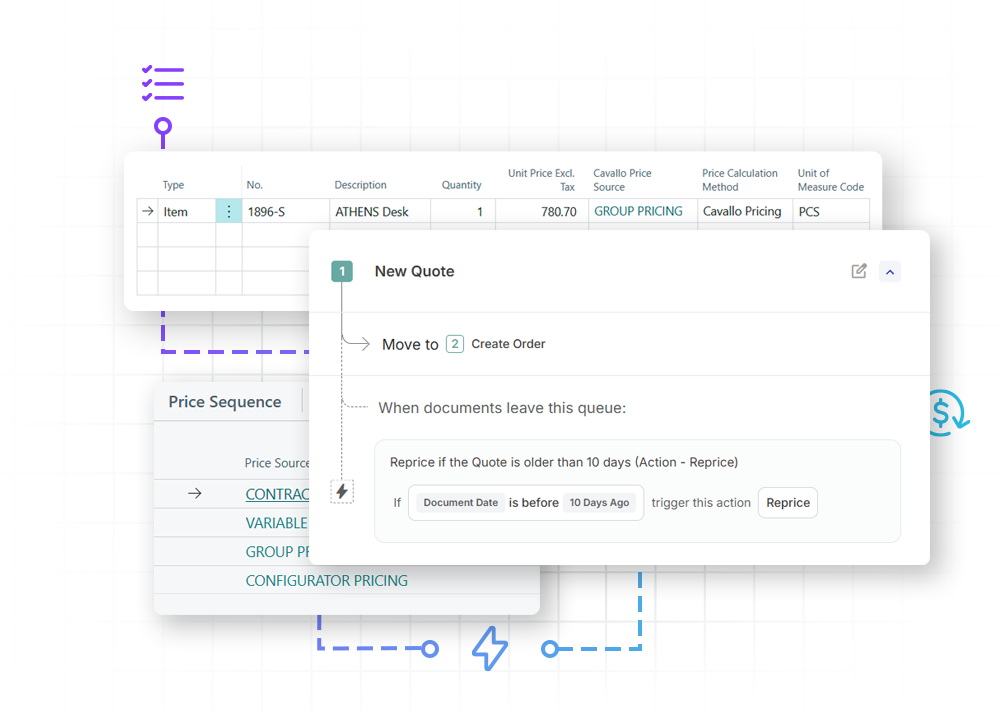
Next, eliminate the guesswork of overlapping policies. Instead of relying on a rigid “lowest-price-wins” model that erodes margins, you arrange your rules in a strict, pre-configured execution order. By stacking tailored account exceptions directly above broad buying group policies, you can see exactly which rule will win before your ruleset ever goes live.
Step 3
Automated pricing by line at order entry
The moment a sales rep adds an item to an order line, the pricing engine calculates the final amount in real time. The compliant price instantly populates on the sales line, complete with a full pricing trace showing which rules were considered and which won, completely eliminating manual math and spreadsheet lookups.
eliminate pricing errors
Real-world pricing scenarios, automated in Business Central
Distributors need a pricing engine that responds dynamically to customer behavior. Advanced Pricing layers directly over Business Central to translate live order data into automated, predictable calculations. Whether you are managing buying groups, volume-tracked customer contracts, or shifting cost-plus markups, the engine ensures the correct price lands the moment a line is entered.
Broad policies and targeted exemptions
Define sweeping pricing rules across entire customer tiers or item segments while seamlessly overlaying tailored, account-specific promises. The engine resolves conflicting rules predictably, ensuring your unique customer agreements apply perfectly without disrupting your global strategy.
Attribute and custom field filtering
Instantly qualify pricing rules using specific customer, document, or line details, including your own custom fields. When a new account is assigned to a specific territory or buying group, it automatically receives the correct pricing on day one without any extra pricing setup.
Stateful contract tracking and rollover
Honor committed contract pricing for specific items and quantities over a set term. Advanced Pricing dynamically tracks the agreement balance as orders flow through, protecting your margins by shifting the customer back to standard pricing the exact moment their contract volume runs out.
Configurable cost-plus pricing
Point your pricing logic at an alternate line cost field rather than relying solely on rigid base inventory costs. Protect your exact markups against a truer representation of your landed expenses, displaying the cost basis and resulting gross margin directly where your team can see it.
Automatic workflow-based repricing
Combine with Mission Control to automatically reprice documents at any stage of your sales process based on specific conditions. When costs or tariffs change, open orders automatically recalculate as they move through your workflow, eliminating manual updates and protecting your margins.
Instant Pricing Audit & Traceability
Equip your support and accounting teams with absolute visibility into the calculation history of every quote, order, and invoice respectively. Every price change is written to a permanent log that persists per document even after it transfers to history, transforming customer disputes into a quick, confident lookup.
Interactive Tour
Experience Advanced Pricing in action
See how real-time price calculations and automated contract tracking eliminate margin mistakes without a single manual calculation.
Better, faster, easier
Take control of your pricing logic in Business Central
Discover how our core platform capabilities transform daily pricing friction into automated, error-free margin protection.
Embeds everyday line markdowns directly into the rules engine for standard compliance tracking.
Marks up prices based on your chosen alternate cost fields, keeping your real cost basis and profit margins visible.
Lets you build custom pricing formulas using native item details and your own custom data fields, alongside live data from the sales line, sales header, or customer record.
Checks rules in a strict, pre-configured order to guarantee a predictable winning price that honors your agreements every time.
Raises or lowers a set of prices by a percentage or amount with a native, pre-publish preview step.
Stacks tailored, account-specific exceptions right above broad group policies within a single calculation engine.
Lets you instantly see which rule will win before an order is ever placed.
Automatically counts down committed order quantities, adds back returned quantities, and rolls over to standard pricing when exhausted.
Instantly shows which rule won, the cost basis used, and other qualifying prices directly on the sales line.
Permanently records every single price modification at the line item level, logging what changed and why.
Automatically monitors sales lines against your profit targets, visually flagging low-margin lines instantly.
Instantly intercepts manual pricing changes at order entry and triggers a required approval workflow.
Automatically halts below-floor orders at the source, routing them to a manager approval queue before release.
Updates all open, unshipped sales documents against your active pricing rules as they progress through workflow.
Maps your legacy group, contract, and customer-special pricing setups cleanly into modern Advanced Pricing rules.
Customer Success Story
Chadwell Supply
Chadwell Supply is the leading supplier of maintenance and flooring products in the United States, keeping multi-family residential properties running smoothly across more than 100 major metropolitan areas. Processing nearly 5,000 sales orders a day across 16 nationwide locations, the company required a powerful, deeply integrated solution to scale its distribution operations without breaking its unique business rules.
“We’ve been able to take advantage of the pricing features in SalesPad to make our business better. […] It helped us structure sales programs that attracted national customers, and it allowed us to create a new incentive program for other customers to give them a percentage discount on certain product categories that they buy from us. That was a really nice business driver for us.”
Robert Chadwell, Owner at Chadwell Supply
Better together
The SalesPad for BC product suite
Advanced Pricing gives you complete control over your price calculation logic and integrates seamlessly with the rest of the SalesPad for BC ecosystem. Linking your pricing engine directly with other products in the suite removes manual steps from order entry through to fulfillment, keeping your profit margins protected at every step.

Order workflow intelligence
Command your sales and service document management with no-code workflows, process automation, and real-time order visibility that streamlines fulfillment and enforces process controls.

Automated pricing logic
Take complete control over your calculation logic. Execute complex customer agreements, specialized cost-plus rules, and targeted exceptions directly at the sales desk without manual calculations.

Automated document & email routing
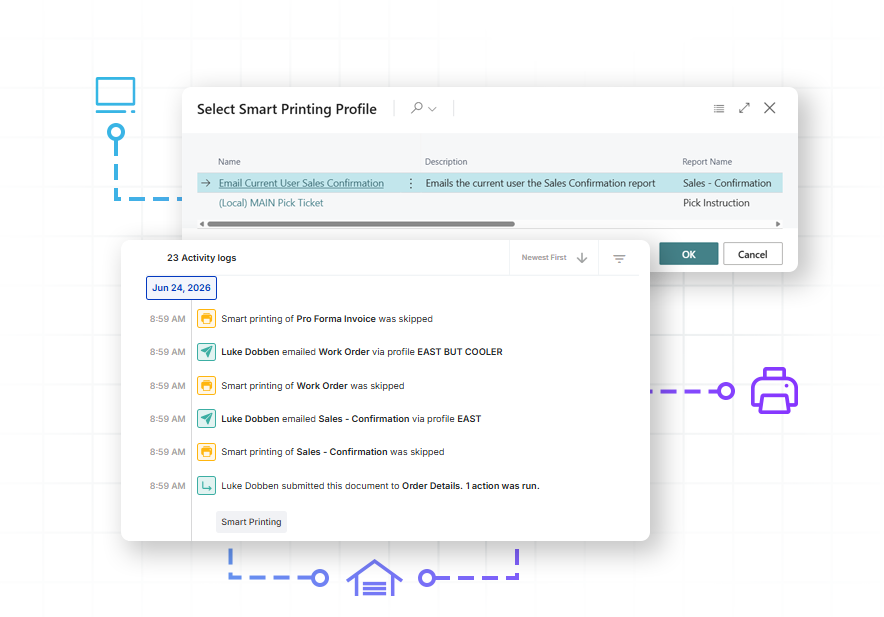
Orchestrate your entire paperwork flow, instantly routing invoices, pick instructions, and labels to the correct printers based on the unique rules and fields of each transaction.
All within

Real-time margin protection
Protect your bottom line with real-time margin scanning that detects financial risk and flags low-margin or non-compliant orders before they are processed.

AI-powered customer insights
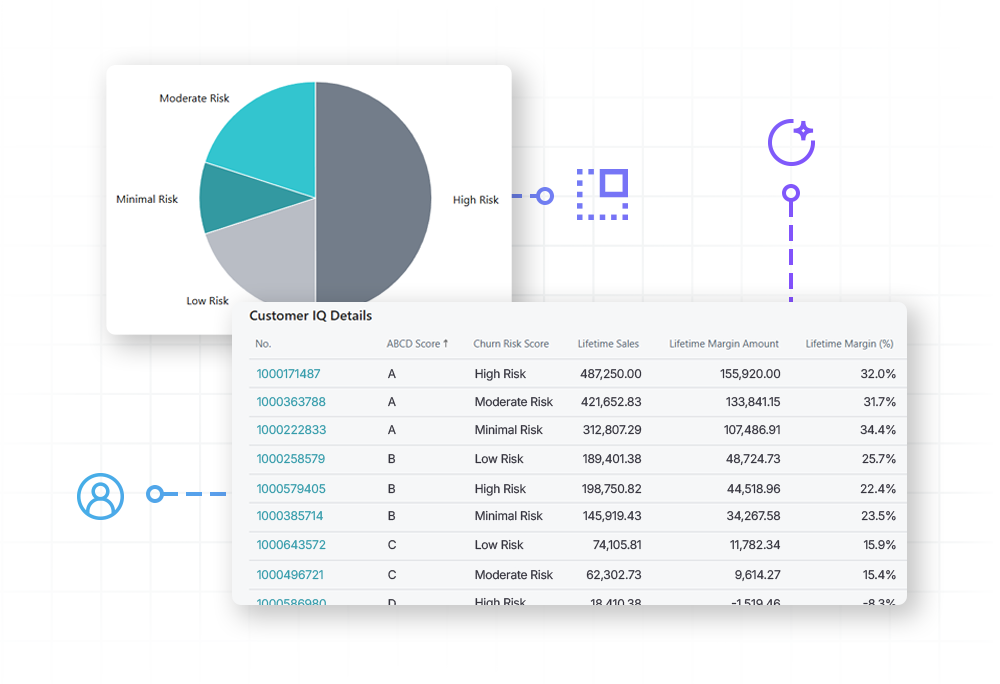
Transform customer data into actionable strategy. Gain immediate visibility into an account’s financial contribution and use AI-powered behavioral analysis to identify customers at risk of leaving.

Integrate essential data
Build custom fields or pull in data from third-party applications natively within Business Central.
Advanced pricing + Mission Control
Stop below-floor pricing with automated workflows
Lock down profit margins at the point of order entry. The moment a salesperson attempts a manual price override or a line drops below your defined gross margin floor, Mission Control automatically holds the order and routes it to a manager approval queue before it can be released to the warehouse.


advanced pricing + Profit Scan
Catch pricing errors before they ship
Bridge the gap between complex pricing strategy and profit protection. Advanced Pricing applies your pricing rules instantly, while Profit Scan automatically scans those calculated lines against your minimum margin targets. Any low-margin issues are flagged instantly, providing immediate visibility to protect your bottom line.
advanced pricing + Customer IQ
Protect vital customer relationships
Incorporate account health metrics, overall profitability, or live churn risk directly into your pricing logic. Automatically enable sales reps to offer more aggressive markdowns for high-value accounts showing active retention risks to deliberately secure long-term business.

Advanced Pricing + Custom fields
Turn any user-defined field into a pricing rule
Stop paying for custom code just to handle your complex pricing rules. Instantly transform any user-defined field—whether built in-house or introduced by a third-party extension—into active pricing conditions, driving specialized group or district rates automatically.
smart printing
Eliminate warehouse paperwork delays
Smart Printing routes documents automatically based on live Business Central data, instantly matching specialized forms, pick instructions, packing slips, shipping labels, and compliance tags to the correct printers and trays, completely eliminating manual print menus and setup selections.

Payment Processing
Secure funds before fulfillment
Eliminate manual payments by embedding native payment processing directly into your order lifecycle. This integration allows you to automatically authorize or capture payments, or email a secure payment link via PayFabric by Global Payments, the moment an order hits a specific workflow milestone. By removing the manual friction between finance and fulfillment, you ensure that orders move to the warehouse only after payment is secured.
Requires Mission Control.
FAQ
Does Advanced Pricing replace Business Central's native price lists entirely?
No. Advanced Pricing layers directly over your existing environment. It hooks into the native price-calculation interface and evaluates your custom rules first; if no specialized Advanced Pricing rule qualifies a line, the system gracefully falls back to standard Business Central pricing logic.
How does the system track cost-plus pricing if our costs shift at posting?
Advanced Pricing features an alternate line cost capability. While the engine doesn’t calculate your underlying ledger value, you can track truer operational overhead and incoming freight within a custom field. The engine then dynamically references that data to calculate, display, and enforce markups based on your real margins rather than a general base inventory cost.
Can we update pricing parameters across orders that are already open in our system?
Yes. While line prices natively update when you modify line details (like quantity, unit of measure, variant, or item number), Advanced Pricing adds a dedicated action that lets you reprice the entire document at once. You can trigger this on-demand directly from the sales document, or use Mission Control to automatically reprice open orders as they progress through your workflow to protect your margins against sudden cost or tariff changes.
What happens to the pricing audit trail when a sales invoice goes historical?
The pricing audit trail remains fully intact. While standard Business Central processes remove the original sales order or quote record when it posts or is archived to history, Advanced Pricing deliberately leaves its audit data untouched. Because we don’t clean up or delete these records during the transition, the complete line-level price history and trace details are permanently preserved and remain accessible via the historical document.
Does this engine support the contract pricing structures found in SalesPad for GP?
Yes. Advanced Pricing was engineered to give migrating SalesPad for GP users a seamless transition. It maps legacy Customer-Special, Group, and Contract Pricing frameworks cleanly into our modern rules architecture, ensuring your historical pricing intelligence moves with you.
What happens when we import orders into BC instead of manually entering them?
Because Advanced Pricing hooks into BC’s native pricing calculations, your rules are respected regardless of how orders enter the system.