
Salespad for GP
High-Volume Order Management and Fulfillment for Distributors on Dynamics GP
Your reps shouldn’t need a dozen screens open to enter one order, but usually do. With SalesPad® for GP, those screens collapse into just a few clicks, so your team can handle more volume without more headcount. (And it all runs on your live Dynamics GP data).
Customer success story | Geckobrands
Same GP, same team. A whole lot more orders out the door.
Brian O’Connell’s reps were 20+ clicks and 3 screens deep on every order. He explains what happened to their day when it dropped to 6 clicks and 1 screen with SalesPad.
Why salespad for gp?
GP keeps your books in order, SalesPad keeps your orders moving
Dynamics GP wasn’t designed for the pace of a warehouse floor, or for the kind of volume distributors handle every day. Your team feels it as wasted time everywhere: entering orders, tracking down answers on behalf of customers, or unknowingly shipping orders that should’ve been held for payment first. SalesPad addresses all three, using the same GP data your business runs on.
Click-Heavy Order Entry
Entering one order in standard GP can take 20+ clicks and up to 80 seconds (while the customer is still waiting on hold). SalesPad gets that down to six clicks and 30 seconds, so reps spend less time clicking and more time selling.
Fragmented Customer Data = Slow Service
Answering one customer question can often mean digging through multiple screens for order status, A/R, or their history. SalesPad puts it all on a single screen, so reps get the answer in seconds, and can resolve issues without a callback.
Manual Order Routing
Credit holds flagged manually are credit holds that sometimes slip through the cracks. SalesPad properly routes those orders automatically, turning the hold into leverage to collect. For SalesPad customers, that means improving their days sales outstanding (DSO).
BUILT FOR DISTRIBUTION’s ORDER-TO-CASH CYCLE
The power of GP, extended (so it works how distribution does)
Order in, cash out (and every step in between runs on auto-pilot). That’s a distributor’s dream. From the first click to the last payment, here’s how SalesPad gets you there. SalesPad sits directly on top of your GP data, giving you the tools to sell, service, replenish, and report without the clicks, gaps, and manual workarounds GP forces on teams.
The Challenge
Sales management and workflow
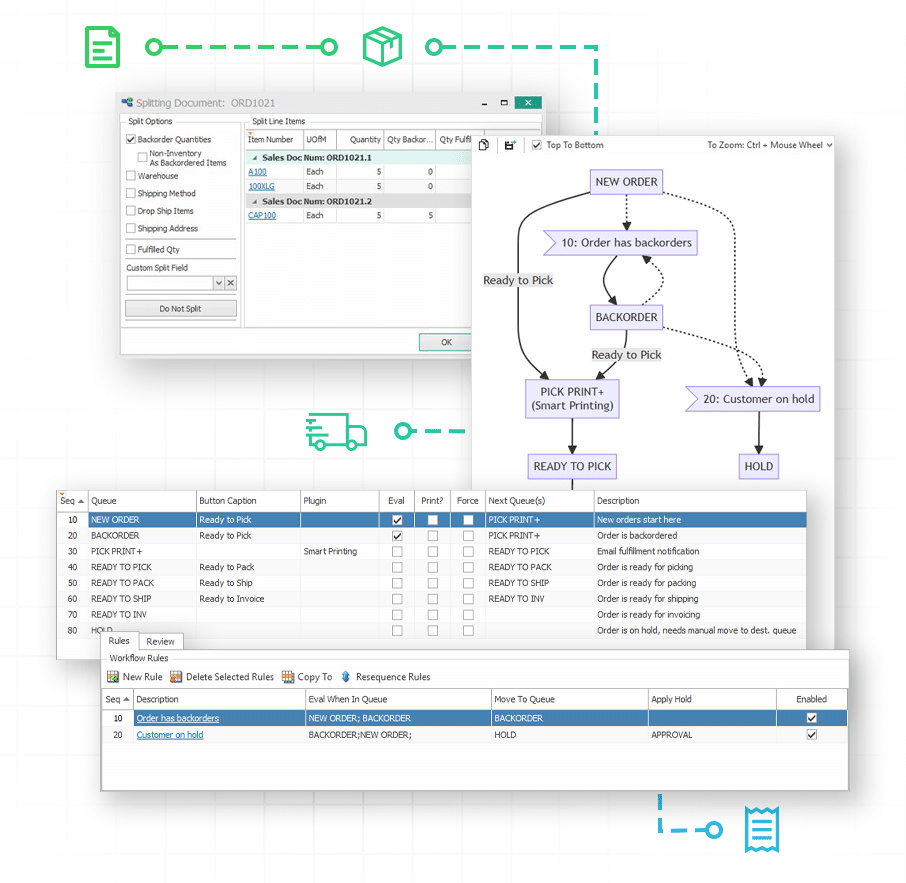
Manual data entry and physical check-ins mean quotes, orders, invoices, and returns don’t move predictably from entry to processing, and orders can stall on someone’s desk with no way to see where.
Standard GP treats every transaction type, whether it’s a quote, a return, or a walk-in sale, as its own manual routine, so one missed step can affect the process while the customer waits for a resolution. With SalesPad, that gap-filled process becomes a single workflow that routes every document type automatically.
How SalesPad Solves it
Keep every order moving
Workflow for quotes, orders, invoices, and returns
Build custom, rule-based workflows so every document type moves automatically from entry to processing.
Sales Monitor
Real-time, bird’s-eye view of the entire sales process, so managers see exactly where every document sits and can easily pinpoint bottlenecks and stuck orders.
Counter sales
Fast, secure walk-in and POS transactions that integrate directly into your ERP workflow, processing cash, card, or check payments.
Recurring sales
Auto-generate repeating orders for your most consistent customers instead of manually rebuilding them each cycle.
The Challenge
Customer relationship management
Answering a customer’s question often means digging through multiple reports or disparate systems, and prospects, tasks, and follow-ups fall through the cracks without a central place to track them.
GP keeps order history, A/R, and interactions on separate screens, which means a CSR has to hunt across modules just to answer one question or resolve one call. SalesPad brings all of it into a single customer view, where instant visibility of contacts, billing information, and order history lets teams handle steady growth without adding headcount to keep pace.

How SalesPad Solves it
See the full customer picture
Customer Card
Centralized, 360-degree hub consolidating current order status, order history, pricing, and interactions on one screen.
National Accounts support
Native parent/child customer hierarchies, ensuring pricing and billing rules roll down correctly for complex corporate accounts. To maximize visibility, reports for parent customers can encompass all the information for their child customers, e.g. A/R statements.
Prospect & opportunity management
Track potential business before it hits the ledger, then convert prospects to customers and opportunities to quotes instantly.
Interaction & task scheduling
Schedule, assign, and review interactions and tasks with the SalesPad Today calendar for daily task management.
Salesperson & territory maintenance
Maintain and configure sales reps and designated territories directly within the application.
The Challenge
Item & pricing maintenance
Manually maintaining item data, tracking compliance-critical serials and lots, and calculating pricing tiers by hand leads to errors and missed margin.
Dynamics GP fragments item master setup across endless stacking windows, making it painful to keep descriptions, vendors, and multi-tier price lists in sync. SalesPad consolidates catalog management into a single, intuitive Item Maintenance screen. From there, you can easily maintain costs, pricing tiers, and reorder points in one centralized location.
How SalesPad Solves it
Keep every item and price in sync
Item maintenance
Manage item details, warehouse assignments, vendor- and customer-specific details, and currency types from one centralized location.
Serial/lot number tracking
Track all details critical for compliance in medical, food, and tech industries, manage warranties, and autogenerate new serial/lot numbers on receipt.
Pricing hierarchy
Group pricing, customer special pricing, contract pricing, tiered pricing, and price levels apply in a prioritized, predictable order, replacing manual price overrides.
Promotions, coupons, discounts, & gift cards
Flexible promotions and gift card processing to drive top-line sales.
Cross-sell, upsell, quick pick, & item substitutions
Automatically prompt reps with pitch-ready upgrade options and companion items during order entry.
Kitting, distribution BOMs, & item matrix configurations
Handle complex inventory including kits, assemblies, and lightning-fast variant selection for size and color.
The Challenge
Inventory visibility and management
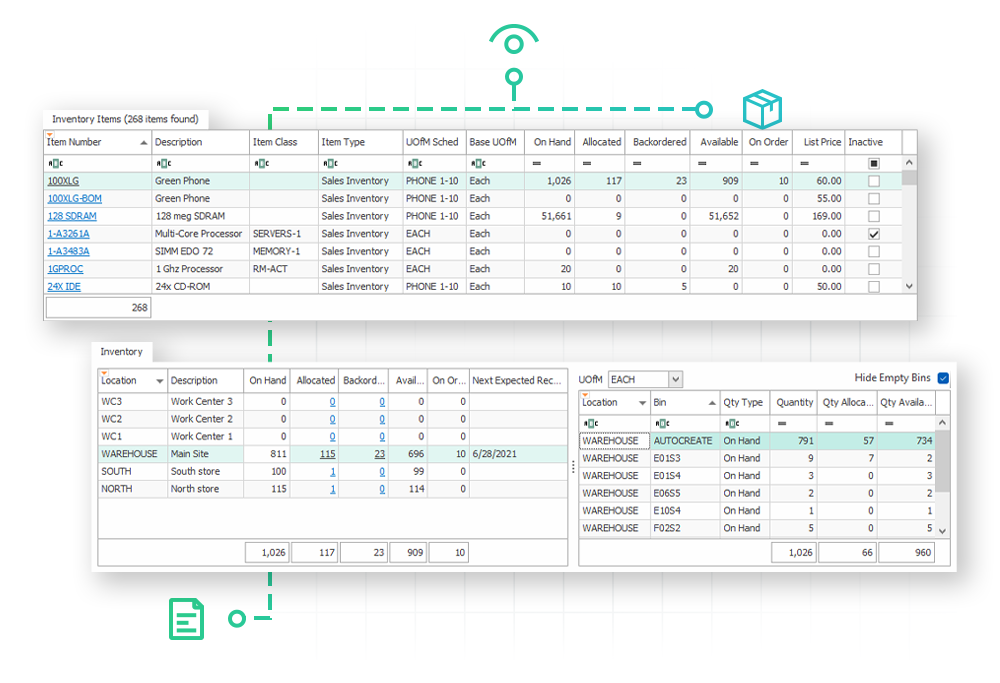
Without real-time cross-warehouse visibility, reps can’t confidently commit to delivery dates, and handling bulk inventory movement across bins and sites is a manual, error-prone process. Confirming whether an item is actually available often means a rep calling the warehouse or digging through separate reports before quoting a date.
SalesPad puts that visibility on the same screen where the order’s entered, so reps can confirm stock and pricing in real time, even across complex, attribute-heavy inventory.

How SalesPad Solves it
Never lose track of inventory
Available quantity visibility
Instantly view what’s available, allocated, fulfilled, backordered, in transit, or on order across every warehouse and bin.
Bin, site & in-transit transfers, and adjustments
Process transfers and adjustments in and out with ease.
License plating
Track large pallets of goods using unique license plate numbers for fast bulk inventory movements.
Warehouse & barcode maintenance
Maintain physical warehouse locations and configure customized item barcodes to streamline fulfillment.
The Challenge
Vendor management, purchasing, & receiving
Buyers relying on manual spreadsheet calculations to figure out what to reorder can’t keep pace with real-time demand. Without a built-in reorder engine, GP users typically export sales and inventory data to a spreadsheet and calculate what to reorder by hand, a time-consuming process that repeats at every location.
SalesPad centralizes it instead, turning hours of manual reorder work into a task one person handles in a fraction of the time.
How SalesPad Solves it
Purchasing automation driven by real-time demand
PO & receipt workflows
Purpose-built workflows for tracking purchase orders and receipts, bringing the same sales automation power to purchasing.
Purchasing advisor
Aggregates sales document backorder demand and inventory reorder points to intelligently auto-generate purchase orders.
Vendor management
Centralized visibility of purchase orders, payment terms, and buying history for every vendor.

The Challenge
Highly configurable reporting, workflows, fields, & user access
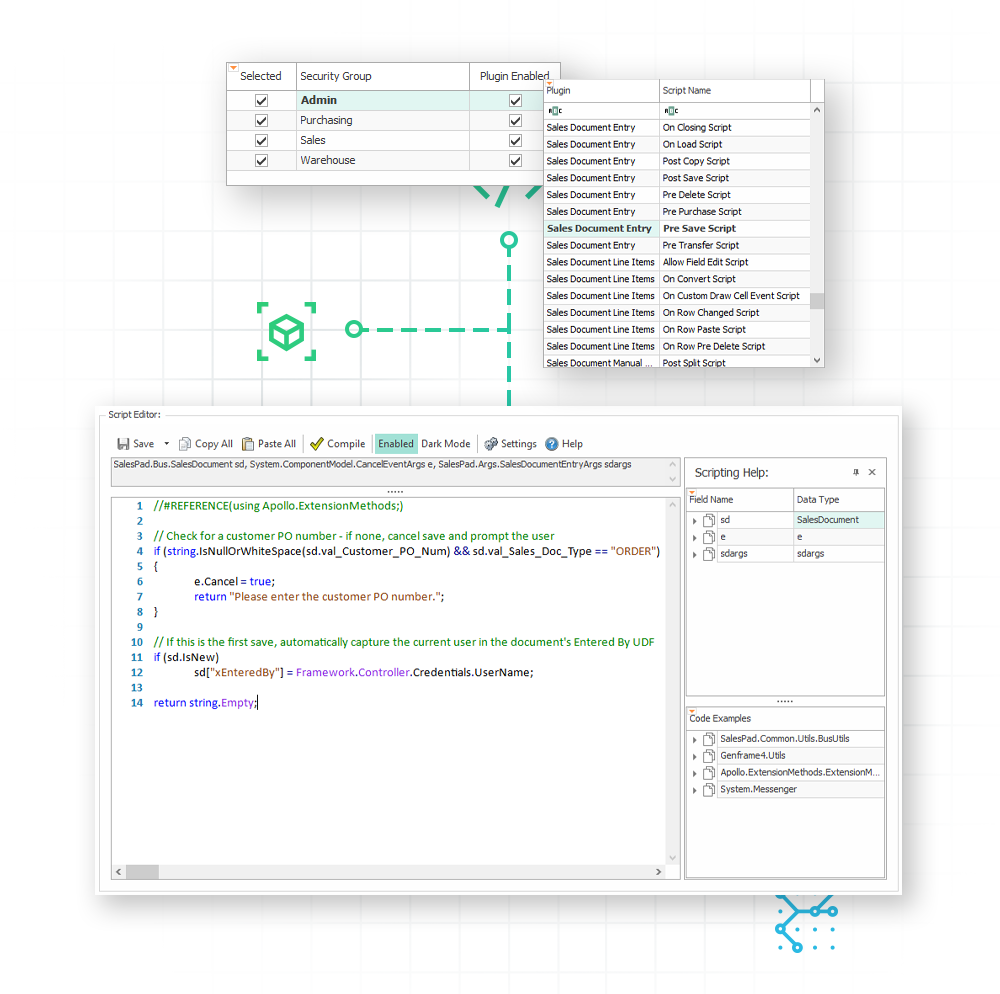
Every business runs differently, and rigid, one-size-fits-all software forces expensive custom code just to capture the data or reporting a team actually needs. GP’s fields and screens are fixed, so capturing something GP wasn’t built to track, like a vendor’s own item number, usually means paying a developer to customize the app or database directly.
SalesPad skips that step entirely: unlimited user-defined fields let teams build the exact data access they need without touching core GP code, and ultra-configurable reporting options let people see whatever they need, however they need to see it.
How SalesPad Solves it
Built to work the way you do
Configurable reporting
Dynamic Quick Reports, printed reports, visual dashboards, and Sales Analysis for pivot-grid visibility into historical trends.
Configurable workflows
Automated rules and trigger-based validation and actions across 15+ business objects.
Unlimited user-defined fields
Custom fields across 60+ business objects to capture exactly the data that matters to your business.
Unlimited attached resources
Attach files like PDFs, spec sheets, or safety documents to 18+ different business objects, tied directly to your workflow.
Trigger-based scripting
Built-in script hooks for highly custom validation and specialized processing on save or load.
Bulk updates & imports
Sales Document Mass Update and Import Manager save hours of manual data entry.
Role-based access & layout management
Hyper-granular security and a Layout Manager that strips away irrelevant fields for role-specific interfaces.

Unwavering support for our SalesPad customers.
You’re in control of your timeline.
The Salespad suite
Built to Master Every Distribution Challenge
When standard ERP functionality isn’t enough, SalesPad steps in. Our suite of specialized products is designed to solve the most difficult challenges in distribution—from the field and the warehouse to the shipping dock and beyond.
Standalone Products
Core software sold in a bundle or separately.
Add-ons
Specialized tools that sit on top of SalesPad products.
SalesPad
Drive operational efficiency for sales, purchasing, inventory management, and beyond.
SalesPad Mobile
Empower field reps to enter orders and check inventory on the go.
Inventory Manager
Mobile-first warehouse management for picking, packing, receiving, and more.
ShipCenter
Native shipping platform with carrier integrations and real-time rate shopping.
ShipTo
Connect SalesPad to UPS WorldShip and FedEx Ship Manager.
Web API
Seamlessly connect SalesPad to your external web stores and third-party apps.
Customer Portal
24/7 self-service B2B web application for order creation, inventory visibility, and invoice payments.
Automation Agent
The background engine that automates document transfers, reporting emails, and customer AR communication.
Customer IQ
Identify high-value accounts and detect early churn signs with AI-driven insights. This intelligence triggers automated workflows to prioritize at-risk outreach and protect your most profitable relationships.
Configurator
Build complex made-to-order items with guided attribute selection.
Manufacturing
Specialized tools for work order management and production tracking.
RMA
Unified customer history and streamlined returns management.
Returns Tracker
Deep visibility into return root causes to protect your margins.
Dispatch
Manage your internal fleet with digital routing and delivery confirmation.
Standalone Products
Core software sold in a bundle or separately.
SalesPad
Drive operational efficiency for sales, purchasing, inventory management, and beyond.
SalesPad Mobile
Empower field reps to enter orders and check inventory on the go.
Inventory Manager
Mobile-first warehouse management for picking, packing, receiving, and more.
ShipCenter
Native shipping platform with carrier integrations and real-time rate shopping.
ShipTo
Connect SalesPad to UPS WorldShip and FedEx Ship Manager.
Web API
Seamlessly connect SalesPad to your external web stores and third-party apps.
Customer Portal
24/7 self-service B2B web application for order creation, inventory visibility, and invoice payments.
Add-ons
Specialized tools that sit on top of SalesPad products.
Automation Agent
The background engine that automates document transfers, reporting emails, and customer AR communication.
Customer IQ
Identify high-value accounts and detect early churn signs with AI-driven insights. This intelligence triggers automated workflows to prioritize at-risk outreach and protect your most profitable relationships.
Configurator
Build complex made-to-order items with guided attribute selection.
Manufacturing
Specialized tools for work order management and production tracking.
RMA
Unified customer history and streamlined returns management.
Returns Tracker
Deep visibility into return root causes to protect your margins.
Dispatch
Manage your internal fleet with digital routing and delivery confirmation.
Customer Success Story
Steiner Tractor Parts
As a leading distributor of antique tractor parts, Steiner Tractor Parts needed to move away from the “click-heavy” limitations of standard Dynamics GP to keep up with their high volume of customer inquiries. By centralizing their customer data and order entry into a single screen, they transformed their front office from a data entry hub into a proactive sales engine.
“We have all different types of documents and types of customers and we use the workflow to differentiate and make those go through our process as fast as possible. Right now we’re shipping orders the same day that they come in. That’s really only possible through using automated tools, so that we’re not touching every order with multiple people.”
Elizabeth Whiting, Steiner Tractor Parts
FAQ
What is SalesPad, and does it replace Microsoft Dynamics GP?
No. SalesPad is an order management, fulfillment, and customer service platform built to extend Dynamics GP. It reads and writes to the same GP tables in real time, so GP remains your system of record.
How is SalesPad licensed?
SalesPad is primarily licensed on a per-concurrent-user basis. Because the platform is modular, you only pay for the seats and specific products, like ShipCenter or Customer Portal, that your business actually needs.
How long does implementation take?
A standard implementation typically takes 90 to 120 days, covering business process discovery, data configuration, workflow design, and team training, with zero downtime for your existing GP environment.
Is our data stored in the cloud or on-premises?
SalesPad lives where your Dynamics GP data lives, usually on your local servers or a private cloud. You keep full ownership and control of your data at all times.
Can we customize the screens and fields for our team?
Yes. Admins can adapt the interface by role using the Layout Manager, and the system supports virtually unlimited user-defined fields across 60+ business objects.
Can SalesPad handle multiple warehouses or international entities?
Yes. SalesPad is built for multisite distribution, natively handling multiple warehouse locations, bin-level tracking, and multicurrency transactions while keeping GP financial records in sync. The Binary Stream MEM add-on for SalesPad unlocks support for multiple entity management.
How does SalesPad make sure I don't have to manually match receiving to backorders?
SOP-to-POP linking, a native GP concept, connects your sales orders directly to their purchase orders. The moment backordered inventory hits the dock, it’s automatically allocated to the specific sales order that’s been waiting on it, no manual matching required.
We're considering a move to Business Central. Will we lose our investment?
No. Our license exchange program lets you transition your SalesPad for GP investment toward our Business Central solutions, so you can solve today’s challenges on GP with your path to the cloud already protected.
What happens when Microsoft ends support for Dynamics GP?
GP won’t stop working. Microsoft’s own end-of-support milestones are December 2029 for updates and April 2031 for security patches, but Cavallo’s 10-year commitment to SalesPad for GP runs through at least 2035, and longer if customers continue using it. That means your day-to-day operations keep running smoothly well past Microsoft’s own timeline.