
Add-ons for SalesPad for gp
Extending the power of SalesPad to meet distributors’ specialized needs
Not every distributor needs the same tools and capabilities in place to keep business running smoothly. Some build made-to-order products and need to handle that complexity, online and offline, with ease. Others are in search of a cleaner way to handle returns or coordinate deliveries. Built to extend SalesPad, each add-on solves a specific problem that plagues distributors today, and all five work seamlessly with the SalesPad platform your team already knows and loves.
Find your fix
Start with pinpointing the problem you’re trying to solve
If your reps are still building custom quotes from scratch or struggling with properly managing returns, or if your whole delivery schedule depends on a single, static spreadsheet as your source of truth, there’s a fix for you in one (or a combination of) SalesPad add-ons. Each is specially built to solve the most common challenges caused by the complexity of distributors’ operations, while keeping your team’s work streamlined inside SalesPad.
Explore how they work, and how to use them together, when appropriate.
made-to-order workflows
Building and selling custom products
Whether you manufacture made-to-order items, assemble them from stock components, or both, two SalesPad add-ons can help — and they can also, but don’t have to, be used together.
Which one do you need?
Configurator handles guided selling and quoting, and it works whether or not the item it builds ever touches GP Manufacturing, so it’s just as useful for simple kits and assemblies as it is for manufactured products. Manufacturing gives your shop floor visibility into BOMs, routes, and production status for anything running through GP’s Manufacturing Extended Pack, whether or not that item was built with Configurator. Some teams use both so they can streamline the selling process for complex made-to-order items and ensure only valid builds are sold, while others use just Manufacturing if they only create standardized or made-to-stock options. Businesses who craft made-to-order kits or assemblies can use Configurator without Manufacturing. And advanced production facilities that have a mix of products and complexity use both add-ons and apply them situationally, based on the product line.
Configurator
Guided selling for made-to-order products. Reps select options, the quote builds itself.

The Challenge
Selling made-to-order products often means your reps and engineering are playing a game of telephone during quoting and production handoff. Worse, while that’s costing you time, your team might forget an upcharge, select an option the customer didn’t ask for, or sell a combination you can’t build.
How Configurator Helps
Configurator puts the decision tree right on the sales line. Reps pick dimensions, materials, and finishes, and your restriction rules take anything incompatible (like ineligible color options or material combinations) off the table. Once the last option is picked, SalesPad calculates the price with every upcharge included and, for BOM-based configurations, builds the new item number and bill of materials.
What’s Included
- Configurations for manufacturing BOMs, assembly BOMs, and kit items
- Guided attribute selection on the sales line during order entry
- Flexible pricing by option, by configuration, or by formula (price a product by its width and height)
- Automatic item number and BOM generation for BOM-based configurations
- Selection summary saved to a user-defined field so it can print on quotes, packing slips, and invoices
- Easy reconfiguration if a customer changes their mind before production
Manufacturing
A window into Dynamics GP Manufacturing, right inside SalesPad.

The Challenge
Turning a sales order into production instructions is usually a slow and paper-heavy process. That often means the floor can’t easily see specs or tolerances, and the front office can’t easily see where a job stands, in real time.
How Manufacturing Helps
Your team can search, view, and edit BOMs, manufacturing orders, and routing setup in SalesPad, and attach the specs and tolerance checks to each item. When a manufactured item isn’t available, they can cut a new MO directly from the sales order, which auto-links the MO to that sales line. The add-on works on top of Dynamics GP’s Manufacturing Extended Pack: MOs created in SalesPad start as Quote or Open, and releasing them and printing pick lists still takes place in Dynamics GP.
What’s Included
- Search, view, and edit BOMs, MOs, and routings directly in SalesPad, with linked MO visibility on sales orders
- Indented hierarchical BOM views (phantom BOMs supported)
- Manufacturing order workflow with your own rules, routing, and automated actions
- User-defined fields by item class for specs, tolerances, and cosmetic standards
- Mobile issue, reverse issue, scrap, and reverse scrap transactions through Inventory Manager (licensed separately)
From request to resolution
Handling Returns
Return volume and process complexity vary a lot by business, so there are multiple ways to handle this.
Which one do you need?
RMA is the lighter option: reps log Dynamics GP’s native RMAs without leaving SalesPad, but there’s no workflow, and posting still happens in GP. Returns Tracker is built for teams who need approval steps before a credit or replacement goes out, plus root-cause reporting across every case. If you’re not sure which fits, the volume of returns you’re processing and whether you need steps for troubleshooting or reviewing before credits go out are the questions that usually decide it.
RMA
Create and manage Dynamics GP’s native RMAs in SalesPad.
The Challenge
If you already run returns through Dynamics GP’s RMA process, you know that reps have to leave SalesPad and open GP every time a customer wants to send something back, which leaves customers waiting on the line while they switch systems and manage information in two places.
How RMA Helps
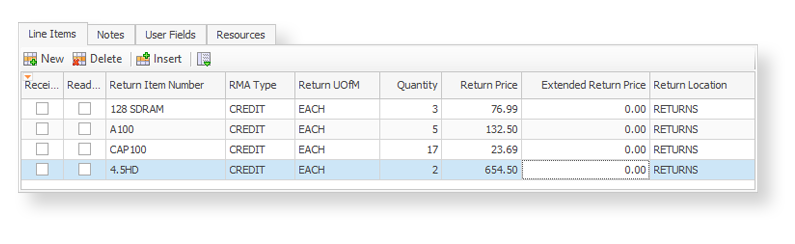
RMA brings Dynamics GP’s return authorizations right into SalesPad. Reps can create an RMA from a posted invoice or from scratch, and look up any RMA whether it started in Dynamics GP or SalesPad. Plus, it’s intentionally lightweight: receiving, closing, and posting still happen in Dynamics GP.
What’s Included
- RMA entry, editing, and lookup in SalesPad
- Replace, receive-repair-return, credit-only, and cross-ship return types
- Invoice-based returns that copy matching header fields from the original invoice, or on-the-fly entry when there’s no invoice to start from
- Customer email updates with RMA details and attachments, sent right from the RMA
- Resources tab for attaching files and customer photos to the return
Returns Tracker
Full workflow-enabled returns management and troubleshooting.
The Challenge
When return volume is high, credits and replacements can go out before anyone checks whether the return is valid. And if no one on your team records why returns happen, the same problems will keep costing you.
How Returns Tracker Helps
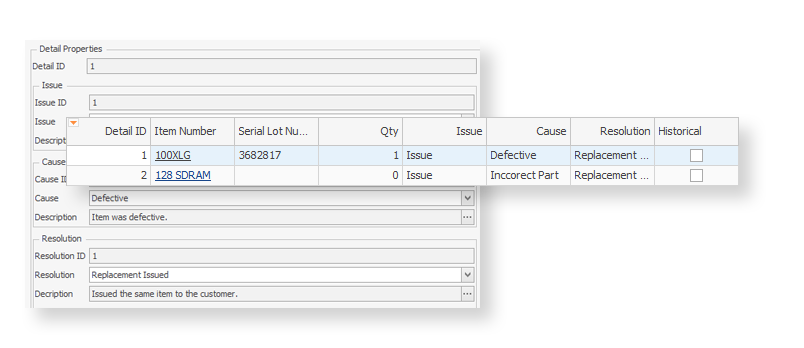
Returns Tracker runs cases through SalesPad workflow, so you can build in review and approval steps before a credit or replacement goes out. For every case, your team logs a standardized issue, cause, and resolution. Over time, a manager can, for example, pull a report identifying the one carrier that keeps damaging shipments, with certainty.
What’s Included
- SalesPad workflow for returns cases, with your own review and approval queues
- Standardized issues, causes, and resolutions you define, for root-cause and solution reporting
- Linked documents: create orders, reorders, and returns from the case, all tied back to it for centralized visibility
- Cases can be started from the customer card or a sales document, then managed from one place
- Automatic field roll-down from the customer, ship-to, sales document, and item master
Smarter route coordination
Managing deliveries
If your delivery schedule lives in a spreadsheet and your in-office team doesn’t know where your drivers are, this is the add-on created to fix that.
Dispatch
Connect your dispatch desk to your drivers on the road.
The Challenge
If your delivery schedule only lives in a spreadsheet, every last-minute change requires an urgent call, and your dispatcher never knows where a driver really is — or which of their deliveries are done, on time, or behind.
How Dispatch Helps
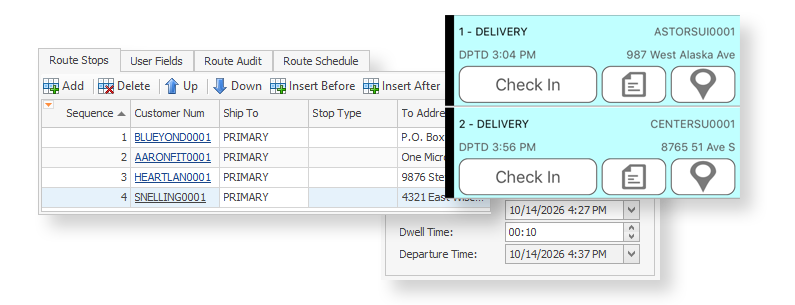
Coordinators build schedules on drag-and-drop boards in SalesPad, and drivers see their route schedules and stops in real-time in SalesPad Mobile (via iOS or Android). When a driver checks in or out, the stop’s arrival or departure time and status update on the board, so your in-office team knows where things stand at a glance.
What’s Included
-
Boards for managing by driver or by vehicle, with drag-and-drop scheduling (move an appointment and its route resequences)
-
Mobile check-in and check-out that stamps arrival and departure times and locations, and updates the stop status
-
Linked sales documents for every stop, so drivers unload the right product
-
Digital signature capture that writes back to your Dynamics GP database
-
Vehicle profiles with VIN, mileage, notes, and audits
Looking for our other automation and integration possibilities? Explore Customer IQ, Automation Agent, and more, to learn how SalesPad enhanced with the right integrations can open up new productivity gains and growth opportunities for your business.
Customer Success Story
Why SalesPad? Without it, your team wastes time checking 5 different places to track down one answer.
“One problem SalesPad has helped us solve is [increasing our] speed when giving answers to customers. Before, when customers needed answers about deliveries, or to know if an order had shipped, our customer service team had to check in many different places. With SalesPad, the information is all together, so they can give the customer a quick answer.”
– Steve Kahan, President of Regal Fabrics

Unwavering support for our SalesPad customers.
You’re in control of your timeline.
The Salespad suite
Built to Master Every Distribution Challenge
When standard ERP functionality isn’t enough, SalesPad steps in. Our suite of specialized products is designed to solve the most difficult challenges in distribution—from the field and the warehouse to the shipping dock and beyond.
Standalone Products
Core software sold in a bundle or separately.
Add-ons
Specialized tools that sit on top of SalesPad products.
SalesPad
Drive operational efficiency for sales, purchasing, inventory management, and beyond.
SalesPad Mobile
Empower field reps to enter orders and check inventory on the go.
Inventory Manager
Mobile-first warehouse management for picking, packing, receiving, and more.
ShipCenter
Native shipping platform with carrier integrations and real-time rate shopping.
ShipTo
Connect SalesPad to UPS WorldShip and FedEx Ship Manager.
Web API
Seamlessly connect SalesPad to your external web stores and third-party apps.
Customer Portal
24/7 self-service B2B web application for order creation, inventory visibility, and invoice payments.
Automation Agent
The background engine that automates document transfers, reporting emails, and customer AR communication.
Customer IQ
Identify high-value accounts and detect early churn signs with AI-driven insights. This intelligence triggers automated workflows to prioritize at-risk outreach and protect your most profitable relationships.
Configurator
Build complex made-to-order items with guided attribute selection.
Manufacturing
Specialized tools for work order management and production tracking.
RMA
Unified customer history and streamlined returns management.
Returns Tracker
Deep visibility into return root causes to protect your margins.
Dispatch
Manage your internal fleet with digital routing and delivery confirmation.
FAQ
How do add-ons work with Dynamics GP and Salespad?
How does Configurator prevent order errors and engineering bottlenecks?
What's the difference between BOM and kit configurations?
BOM configurations work with either GP Manufacturing or with distribution assemblies. You pick the BOM type and tie selection options to component items. Then when someone configures that type of item for an order, Configurator automatically creates that BOM structure if it doesn’t already exist. That means you don’t need to create and maintain those thousands of end combinations ahead of time: just set up the selection options, and Configurator will auto-create the combos your customers order.
Kit configurations work with GP kit items. You pick whether this creates a standard GP kit or a SalesPad package item (a post-exploded kit for easier component visibility and editing). Connect the selection options to kit components, then Configurator automatically creates kit items where applicable. You can choose whether pricing rolls up to the parent line or stays on each component.
Can we release and manage manufacturing orders in SalesPad?
What's the lighter distribution BOMs (Assemblies) option?
What's the difference between RMA and Returns Tracker?
How does Returns Tracker cut down on double entry?
Returns Tracker guarantees accuracy and eliminates redundancy by rolling down fields onto the case automatically when created from the customer card or from a posted invoice:
- From the customer card: customer and primary ship-to details
- From an invoice: customer, ship-to, and sales document details
- From invoice line items: item master and sales line details
How does Dispatch connect teams in office with offsite drivers on the road?
In the office, coordinators can drag and drop orders onto the driver or vehicle boards to schedule them, link additional orders to existing route stops, track vehicle details like VIN and mileage and driver details like license and vehicle assignment, and track route progress throughout the day.
On the road, drivers use SalesPad Mobile (iOS or Android) to see each stop’s orders and items, navigate with GPS, check in and out of steps, and capture delivery signatures that save straight to the database.