
Bring SalesPad with you
SalesPad® migration from Dynamics GP to Business Central
Microsoft Dynamics 365 Business Central handles core financials well, but complex distribution demands specialized workflow automation. SalesPad™ for BC by Cavallo bridges the gap across your entire order lifecycle: it automates daily operations through familiar queues, business rules, and the custom logic you’ve relied on for years in SalesPad for GP, delivers complete visibility over every order’s fulfillment progress, and builds guardrails that actively protect your profit margins.
When you’re ready to migrate, the Cavallo team partners with you every step of the way, translating what works in your SalesPad for GP environment directly into SalesPad for BC. Make your move to the cloud without missing a beat. We’re here to ensure your operations transition without down time.
Customer success story | Stokes seeds
“We’re shipping orders 100% of the time, 100% correctly every time… [and] even during our software transition, we were still able to meet that metric.”
When Stokes Seeds transitioned their U.S. business from Dynamics GP to Business Central, they needed an operational cutover with zero disruption to daily fulfillment. By carrying SalesPad forward into their new cloud environment, their team preserved the familiar workflow queues and automated business rules they relied on, shipping orders 100% accurately throughout the entire transition.
SalesPad for GP vs. SalesPad for BC
Your proven GP capabilities, built for the cloud
Ready to make the move to Business Central? You don’t have to leave the power of SalesPad behind. We’ve brought our most relied upon capabilities from Dynamics GP directly into BC, giving you the workflow automation, order-to-cash control, and complete queue visibility your team counts on, built natively for the cloud.
Best of all, your migration is protected
Existing customers receive complimentary access to the SalesPad for BC capabilities that mirror what you already license in SalesPad for GP. See how key SalesPad GP capabilities translate into SalesPad for BC:

SalesPad (Workflow, Sales Monitor)
SalesPad (User Defined Fields)
SalesPad (Smart Printing)
SalesPad (Pricing)
SalesPad (Margin Information)
SalesPad (Scripting)
Automation Agent
Credit Card Processing (PayFabric & Square)
Profit Max Platform™
Customer IQ™
SalesPad Mobile
Inventory Manager, ShipCenter, & Dispatch
Configurator, Manufactuing
Customer Portal, CRM RMA, & Returns Tracker
Integrations
Web API

Mission Control
Custom Fields
Smart Printing
Advanced Pricing
Profit Scan
Scripting
Mission Control (Automatic Actions)
Payment Processing Processing (PayFabric)
Profit Max Platform™
Customer IQ™
SalesPad Mobile* (Coming Soon)
ISV Solution
BC or ISV Solution
BC or ISV Solution
BC, Partner, or ISV Solution
N/A
SalesPad (Workflows, Sales Monitor)
Mission Control
SalesPad (User Defined Fields)
Custom Fields
SalesPad (Smart Printing)
Smart Printing
SalesPad (Pricing)
Advanced Pricing
SalesPad (Margin Information)
Profit Scan
SalesPad (Scripting)
Scripting
Automation Agent
Mission Control (Automatic Actions)
Credit Card Processing (PayFabric & Square)
Payment Processing (PayFabric)
Profit Max Platform
Profit Max Platform
Customer IQ
Customer IQ
SalesPad Mobile
SalesPad Mobile* (Coming Soon)
Inventory Manager, ShipCenter, & Dispatch
ISV Solution
Configurator, Manufacturing
BC or ISV Solution
Customer Portal, CRM RMA, & Returns Tracker
BC or ISV Solution
Integrations
BC, Partner, or ISV Solution
Web API
N/A
*Roadmap items and timelines are subject to change
Product Overview
See SalesPad for BC in action
Discover how distributors maintain complete visibility and automate the entire order-to-cash lifecycle inside Business Central. Watch how SalesPad for BC unifies order processing, margin enforcement, and sales workflows into a single operational interface in this two-minute video.
How it works
Your migration plan
For SalesPad customers on Dynamics GP, moving your ERP shouldn’t disrupt daily fulfillment. While your Microsoft partner builds your financial foundation and migrates master data, the Cavallo team focuses on how your business moves orders every day, carrying forward the workflows, business rules, and configurations you trust in SalesPad. Here’s how our four-step plan brings your proven GP workflows into Business Central with zero operational downtime.
Your organization
Operational workflow
Division of responsibilities
SalesPad services team
- Audits existing sales order routing, scripts, and user-defined fields in GP
- Re-architects holds, approvals, and business logic inside SalesPad for BC
- Configures automated printing, emailing, and payment capture rules
- Leads role-based team enablement and cutover hypercare
Core ERP & data
Division of responsibilities
Your Microsoft partner (VAR)
- Designs and deploys your core Business Central foundation
- Configures core financial structures and accounting controls
- Executes master data migration (customers, vendors, items)
- Connects core ecosystem extensions and platform integrations
Aligned every step of the way
You don’t have to manage two separate vendors. We work directly with your Microsoft partner through recurring check-ins, so your workflow automations and Business Central environment deploy in lockstep.
Step 1
Audit your processes
Before touching any configuration, we audit how your team uses SalesPad today. We evaluate your document queues, approval rules, margin controls, user-defined fields, and more, documenting data formats and field behaviors across customers, items, and transactions. We catalog what makes your team fast and effective and use that to create a blueprint for the migration, eliminating any surprises long before go-live.

Step 2
Migrate your rues & business logic
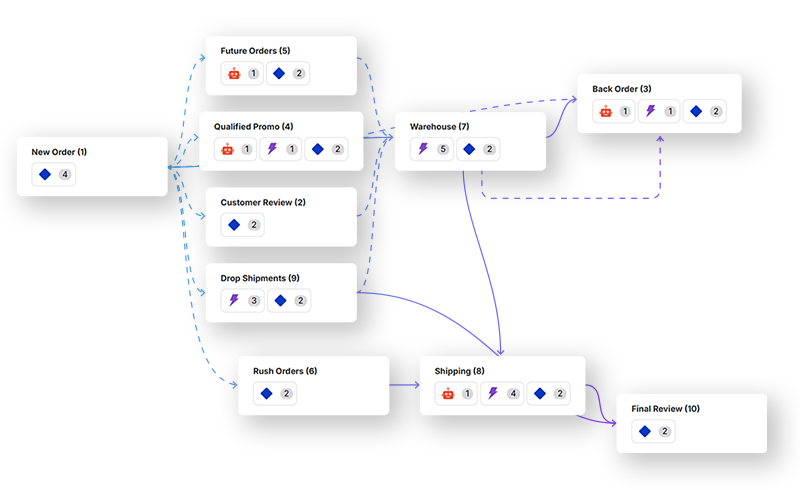
Once we understand how your team works with SalesPad every day, we construct your workflows, automated rules and actions, business logic, and other critical operational processes inside SalesPad for BC. You keep the visual pipelines, progression rules, and auto-forwarding you rely on. Manual checks become automated validation rules that flag discrepancies before they cause downstream issues. And legacy scripts are replaced with maintainable, no-code business logic.
Step 3
Launch without disruption
We work directly with your team to tailor the new environment to support exactly how your business operates on a daily basis. We run live, realistic transaction runs with your key stakeholders before go-live, ensuring everyone understands how work flows through the new system. We provide role-based training, showing different teams how to manage queues, resolve exceptions, and release orders quickly. Cutover timing is coordinated with your Microsoft partner so in-flight work transfers smoothly from the legacy system to active queues in BC.


Step 4
Post go-live hypercare
Go-live is a milestone, not the finish line. Post launch, the SalesPad services team remains available to answer questions, fine-tune routing rules, and keep your teams moving forward. Our goal is to ensure day one after go-live feels like “business as usual.”
Planning your move to the cloud?
See exactly how your SalesPad for GP setup translates to Business Central
Remove the surprises from your ERP transition. We analyze your active SalesPad for GP environment, including workflow queues, business rules, add-ons, and automations, to generate a tailored feature parity and gap report. Afterward, a SalesPad expert will walk you through the findings 1-on-1, highlighting operational risks and showing which SalesPad products would support your business in BC.
Interactive Tour
See how your workflows will look in the cloud
Take the driver’s seat and explore SalesPad for BC before your migration even begins. Click through order queues, trigger automated validation rules, and see firsthand how your daily GP processes translate into a high-speed, modern workspace inside Business Central.
*Mission Control is the foundation of the SalesPad for BC product suite. It provides the workflow, automation, and business rules that drive your sales process. It can be tailored to your operations using Custom Fields and no-code Scripting for custom business logic. We also have solutions for Advanced Pricing, Smart Printing, margin protection through Profit Scan, AI-powered customer churn prediction, and integrated payment processing that round out our offering.
FAQ
Is Mission Control just a cloud version of SalesPad for GP?
Mission Control delivers the core workflow management, queue tracking, and automated business rules you relied on in SalesPad for GP, re-engineered for Business Central. Rather than a direct port of legacy client-server software, it is a cloud-native order management engine built specifically to address the transaction and workflow limitations of standard BC.
How does SalesPad for BC manage complex fulfillment scenarios like backorders and inventory allocation?
Rather than manually splitting lines, Mission Control evaluates live stock and reservations using calculated remaining quantities (qty remaining = outstanding – reserved). Orders with shortages route automatically to backorder queues, generate POs automatically, and release to warehouse fulfillment the moment stock is received.
What document types can have workflows in Mission Control?
Mission Control workflows support all primary sales and services documents in Business Central: Sales Quotes, Sales Orders, Sales Invoices, Sales Returns, Service Quotes, Service Orders, and Service Invoices. Each has its own dedicated pipeline, validation rules, and monitoring dashboard. In the near future, Mission Control will expand to support Purchase Orders and Transfer Orders. Explore this support article for more information.
Where do day-to-day users enter orders?
Day-to-day order entry happens directly within standard Business Central, eliminating the need to learn an external interface. SalesPad supercharges native BC pages by embedding critical data, account health, live margin analysis, reservation statuses, and one-click workflow submission, right on the sales card and role center dashboards.
Can we replicate our GP approval queues, contract reviews, and ship blocks?
Yes. Mission Control enables multivariable business rules without writing AL code. You can automatically place orders on hold for gross margin violations (calculated against dynamic unit costs), credit limit breaches, customer-specific freight rules, or missing compliance fields. Orders route instantly to dedicated management queues for review, sign-off, or release before moving to the warehouse floor.
How do user-defined fields and existing reporting tools like Power BI translate to BC?
You can create no-code custom fields in SalesPad for BC and publish them directly into Business Central extension tables. They deploy immediately across order entry screens, routing conditions, and workflow triggers, and are fully accessible by third-party reporting engines like Power BI and ForNAV.
How are automated printing and emailing handled?
Through automated output actions attached to queue transitions. Moving an order to a “pick release” queue can trigger automated routing of pick tickets or packing slips to specific warehouse network printers (via Smart Printing). Moving an invoice to “complete” triggers automated email delivery of branded PDF invoices, customer notifications, and tracking links without rep involvement.
What is the pricing and subscription model for SalesPad for BC compared to GP?
SalesPad for BC is delivered as a modern, modular cloud subscription. To make your transition seamless, existing customers receive complimentary access to the SalesPad for BC capabilities that mirror what you already license in SalesPad for GP. This allows you the flexibility to tailor additional modules as your Business Central deployment grows.
Can we run Dynamics GP and Business Central in parallel during the transition?
Yes. To de-risk go-live, flexible transition options allow your team to run user acceptance testing, dry runs, and parallel data validation in Business Central alongside your active GP system. This lets order desk teams validate pricing, rules, and workflows against live operational scenarios before making the final cutover.