
SalesPad for BC
Custom Order Workflow Software
B2B distributors operate in an environment where every order affects profitability. Delays in approvals, disconnected systems, inconsistent pricing, manual order entry, and inventory exceptions can all create friction that slows operations and erodes margins. As businesses grow, these challenges become more difficult to manage because order processes often evolve organically rather than through standardized, repeatable workflows.
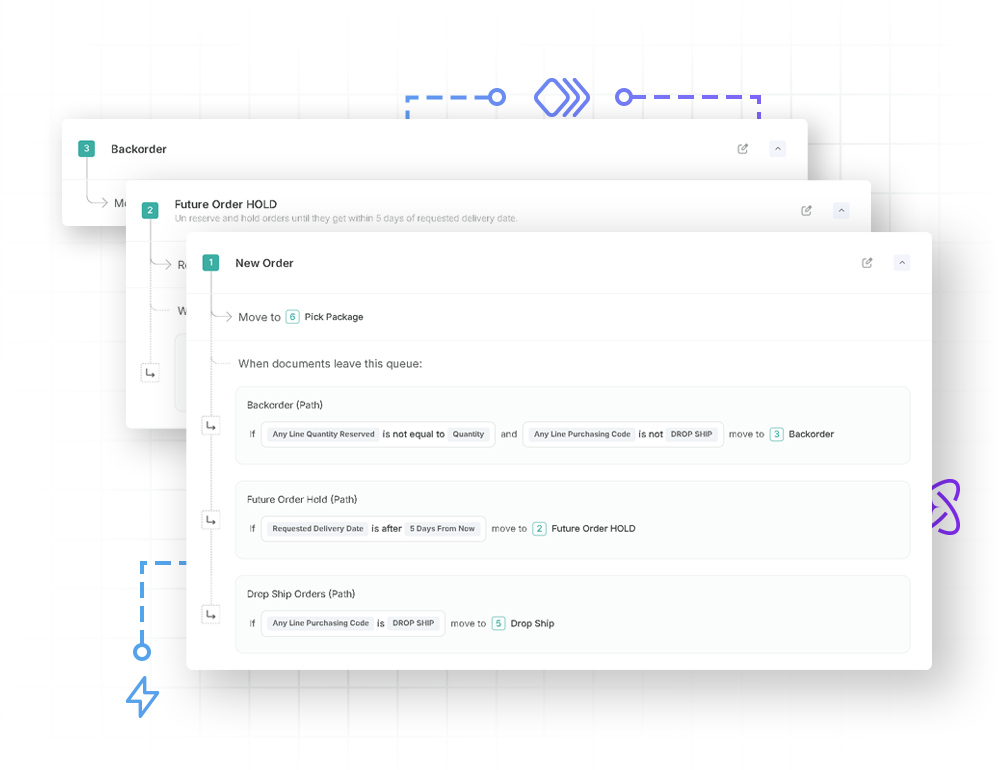
Custom order workflow software helps distributors solve these challenges by creating structured, automated processes that guide every order from quote to payment. Instead of relying on emails, spreadsheets, or manual intervention, businesses can establish intelligent workflows that route orders, trigger approvals, validate pricing, protect margins, update inventory, and notify employees automatically. The result is greater operational efficiency, faster order processing, and improved profitability.
Unlike one-size-fits-all solutions, custom workflows allow distributors to mirror the way their business actually operates. Whether managing complex pricing agreements, customer-specific fulfillment requirements, or multiple warehouse locations, organizations can automate unique business rules without sacrificing flexibility.
For Microsoft Dynamics 365 Business Central users, SalesPad for BC by Cavallo extends the capabilities of Business Central by providing the orchestration layer many distributors need to accelerate the order-to-cash cycle. Through no-code workflow automation, distributors can standardize processes, improve visibility across departments, and protect margins before orders ever leave the warehouse. Combined with Cavallo’s Profit Max Platform, organizations gain far more than workflow automation alone.
The big picture
Order management software overview
At its core, order management software is designed to coordinate and automate the entire lifecycle of a customer order. For B2B distributors, this includes everything from initial quote creation and order entry through inventory allocation, fulfillment, shipping, invoicing, payment collection, and customer follow-up.
Without a centralized platform, information often becomes scattered across multiple systems and departments. Sales teams may not have current inventory information. Customer service representatives may spend valuable time checking order status manually. Finance teams may encounter delays when reconciling invoices or identifying pricing discrepancies.
Modern order management software centralizes these activities into a single operational workflow.
Instead of multiple departments working independently, sales, warehouse personnel, purchasing, finance, and customer service all operate from the same real-time information. Orders move through standardized processes automatically, reducing duplicate work and minimizing preventable errors.
For distributors handling hundreds or even thousands of orders each day, this centralized approach reduces manual effort while improving consistency across the organization. One of the most important characteristics of modern order management software is its ability to integrate directly with enterprise resource planning (ERP) systems. Rather than replacing the ERP, today’s best solutions extend ERP capabilities by automating repetitive processes, improving visibility, and enabling better operational decisions while maintaining a single source of truth for financial and inventory data.
Finding the right fit
Types of order management
Today’s distributors can choose from several approaches when implementing order management software. The right solution depends on existing ERP investments, operational complexity, scalability requirements, and long-term profitability goals. Although deployment models differ, every successful solution should support automation, visibility, and consistent execution across the order-to-cash process.
ERP Integrated Order Management
ERP-integrated solutions are built directly around an organization’s enterprise resource planning system. Platforms such as Microsoft Dynamics 365 Business Central and Microsoft Dynamics GP already manage financial information, inventory, purchasing, and customer records. An integrated order management solution extends these capabilities while maintaining data consistency across departments, allowing sales orders, inventory transactions, invoices, customer information, and accounting data to remain synchronized automatically.
SaaS Order Management Solutions
Software-as-a-Service (SaaS) order management platforms provide cloud-based deployment that supports organizations operating across multiple sales channels and locations. These multi-tenant solutions typically offer standardized workflows that can be implemented quickly while minimizing infrastructure requirements. Cloud deployments are especially attractive for organizations seeking faster time-to-value without maintaining complex on-premises infrastructure. However, distributors with specialized operational requirements frequently require additional workflow customization beyond standard SaaS capabilities.
Custom No-Code Order Management Workflows
Every distributor operates differently. Some require multiple pricing approvals. Others manage customer-specific fulfillment rules. Some need inventory allocation across numerous warehouses. Others have specialized shipping requirements, drop shipments, or value-added services that require unique approval processes. This is where custom order management workflows become valuable. Rather than forcing employees to adapt to rigid software, no-code workflow platforms allow organizations to configure business rules without extensive software development.
For distributors using Microsoft Dynamics 365 Business Central, SalesPad for BC delivers no-code workflow automation that extends the ERP with the orchestration capabilities distributors need to streamline complex operational processes. Instead of relying on manual coordination between departments, organizations can automate repeatable workflows while accelerating the order-to-cash cycle, improving operational intelligence, and protecting margins through standardized business rules.
What to look for
Key features to evaluate in order management software
Not every order management solution delivers the same operational value. For distributors focused on long-term profitability, evaluating features should extend beyond simple order entry capabilities. The most effective solutions improve operational efficiency while helping organizations protect margins throughout every stage of the order lifecycle.
Routine activities such as routing orders, assigning approvals, updating order status, generating notifications, and validating pricing should occur automatically whenever possible. This reduces manual work, minimizes preventable errors, and allows employees to focus on higher-value activities.
Inventory visibility
Inventory directly influences customer satisfaction, working capital, and profitability. Without accurate inventory visibility, distributors risk overselling products, increasing expedited shipping costs, delaying customer deliveries, and carrying unnecessary inventory that ties up capital. Modern order management software should provide real-time inventory visibility across every warehouse, branch, and distribution center.

Order fulfillment workflows
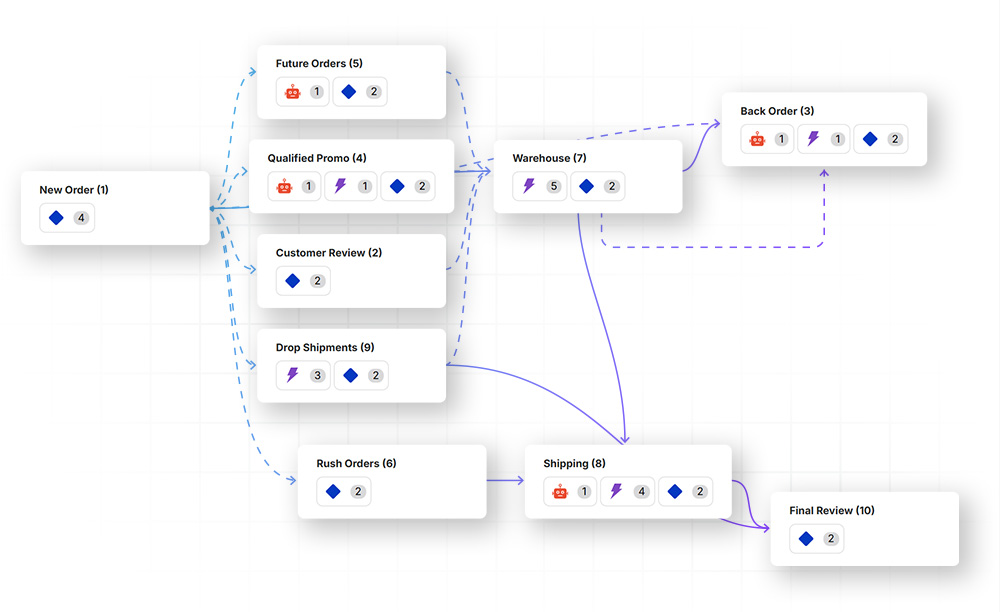
Efficient fulfillment depends on much more than picking products from warehouse shelves. Distributors operate across multiple facilities, regional warehouses, third-party logistics providers, and customer-specific shipping requirements. Order management software should intelligently determine the most efficient fulfillment path based on inventory availability, customer location, shipping costs, promised delivery dates, and warehouse capacity.
Whether orders ship from one warehouse or several, standardized fulfillment workflows can reduce manual coordination and help sales, customer service, and warehouse teams follow the same process. Configurable rules can also route exceptions to the right people when an order requires special handling, approval, or follow-up.
Connecting order workflows with ERP financial data
Order processing does not end when products leave the warehouse. The order information captured throughout the workflow ultimately becomes part of the ERP’s financial and operational record. An integrated order management solution should keep order, pricing, customer, inventory, invoice, and related transaction data synchronized with the ERP, reducing duplicate entry and helping distributors maintain consistent information across teams. SalesPad extends and automates the order workflow directly within the ERP.


Order management solutions security and governance
As order management becomes increasingly automated and interconnected, security and governance become just as important as workflow design. Distributors handle sensitive customer information, pricing agreements, supplier relationships, financial records, and operational data every day. Protecting this information while ensuring employees have the appropriate level of access is essential for maintaining business continuity and customer trust.
A modern order management system should provide comprehensive security controls without slowing down day-to-day operations. Rather than giving every user unrestricted access, distributors should be able to assign permissions based on roles and responsibilities, helping sales, customer service, warehouse, purchasing, and finance teams access the information and actions relevant to their jobs. Clear permissions and workflow rules also support consistent order handling as teams, locations, and order volumes grow.
ERP-native automation
How SalesPad fits into your ERP environment

Distributors often rely on an ERP alongside CRM applications, warehouse tools, shipping systems, and other operational software. SalesPad is designed to strengthen the order management experience directly within the ERP by giving teams a structured way to manage sales orders, approvals, exceptions, and cross-department workflows.
For Microsoft Dynamics 365 Business Central users, SalesPad for BC adds configurable, no-code workflows that help standardize how orders move from entry through fulfillment. Teams can automate approval paths, establish business rules, surface exceptions, and provide employees with clearer visibility into order status without replacing the ERP.
By keeping workflow activity connected to Business Central, SalesPad for BC helps distributors coordinate execution across sales, customer service, warehouse, purchasing, and finance while the ERP remains the system of record for core customer, inventory, order, and financial data.
Prove the impact
Measuring success: Order fulfillment
Implementing custom order workflow software is only the beginning. To understand whether the investment is delivering value, organizations should establish meaningful performance metrics that connect operational improvements to financial outcomes. While every distributor tracks different key performance indicators (KPIs), the most successful organizations monitor a balanced combination of operational, customer service, and profitability metrics.
Order cycle time
Order cycle time measures how long it takes an order to move from initial entry through fulfillment and invoicing. Reducing cycle time often leads to faster customer deliveries, increased warehouse throughput, lower administrative costs, and improved customer satisfaction. Workflow automation eliminates unnecessary manual approvals and repetitive data entry, allowing orders to move through the system more efficiently.
Fulfillment accuracy
Shipping the correct products to the correct customer on the first attempt has a direct impact on profitability. Organizations should monitor perfect order percentage, picking accuracy, shipping accuracy, return rates, and customer service cases related to fulfillment. Improved fulfillment accuracy reduces rework, freight expenses, customer credits, and lost sales opportunities.
Accounting reconciliation
Operational performance should always align with financial reporting. Organizations should reconcile order outcomes with accounting reports on a monthly basis by reviewing invoice accuracy, payment posting timeliness, outstanding receivables, and credit memo activity. When operational workflows and accounting systems remain synchronized, leadership gains greater confidence in both financial reporting and operational decision making.
FAQ
What is custom order workflow software?
What industries use custom order workflow software?
Although many industries benefit from workflow automation, custom order workflow software is particularly valuable for organizations with complex order processing requirements, such as HVAC, industrial, food service, automotive, wholesale, and packaging. These organizations frequently manage customer-specific pricing, multiple warehouse locations, special shipping requirements, vendor-managed inventory programs, contract pricing, and high daily order volumes.
What are the benefits of using custom order workflow software?
How does custom order workflow software integrate with ERP systems?
Most modern custom order workflow software integrates directly with ERP systems to synchronize customer information, inventory, pricing, orders, invoices, and financial data in real time. Rather than replacing the ERP, the software extends its capabilities by automating workflows and providing greater operational visibility. SalesPad for BC works within Microsoft Dynamics 365 Business Central to streamline the order-to-cash process while Business Central remains the system of record for core customer, inventory, order, and financial data.