
Customer portal for dynamics gp
Let your B2B customers order, track and pay (without picking up the phone)
SalesPad Customer Portal for Dynamics GP gives your B2B customers a place to log in anytime, check inventory, place orders, review invoices, and pay what they owe: all tied directly to their own account in SalesPad. (No app to install, and no waiting on your team to answer the phone — just a window into their own account and the power to act independently.)
Why customer portal for dynamics gp?
Give customers a way to help themselves, without giving up control
Every minute your team spends confirming whether a customer’s order has shipped is a minute they’re not spending on the next sale. A public eCommerce site doesn’t fix this, because it wasn’t built for B2B: it can’t handle your negotiated pricing, and it only shows you the orders that came in through your website itself.
Customer Portal ties every customer login to one specific account, so customers always see their own pricing, their own catalog, and their own order history, without pulling your team into the loop every time. That means you can:
See every order, however it was placed
Orders that come in by phone, email, or EDI never show up on a typical eCommerce site.
Customer Portal displays every order tied to a customer’s account, no matter how it got into SalesPad or GP, so customers stop calling to ask if you got their order.
Take orders around the clock
Customers don’t stop needing things or seeking service, no matter the hour, The portal lets them log in whenever it’s convenient for them, place an order against live inventory, and have it flow straight into your SalesPad workflow. (Bonus: no one on your team has to key it in the next morning.)
Let customers manage their own balances
Instead of your accounting team chasing down payments over the phone, customers can see exactly what they owe, review paid history, and pay it themselves with a card on file.
For distributors looking to offer 24/7 b2b self-service
Built around your customers, not a generic storefront
A public eCommerce platform assumes every visitor is a stranger checking out with a credit card. That’s not how most distributors sell. Your customers have negotiated pricing, specific catalogs, and accounts your team already manages inside SalesPad, and a generic storefront has no way to know any of that.
Customer Portal is built the other way around. Every external login is mapped to one specific Customer Card in SalesPad, so customers only ever see what’s tied to their own account. On the other hand, internal users, like your sales reps, get a different view entirely: full visibility across every customer, so they can help from the road or the trade show floor.
The Challenge
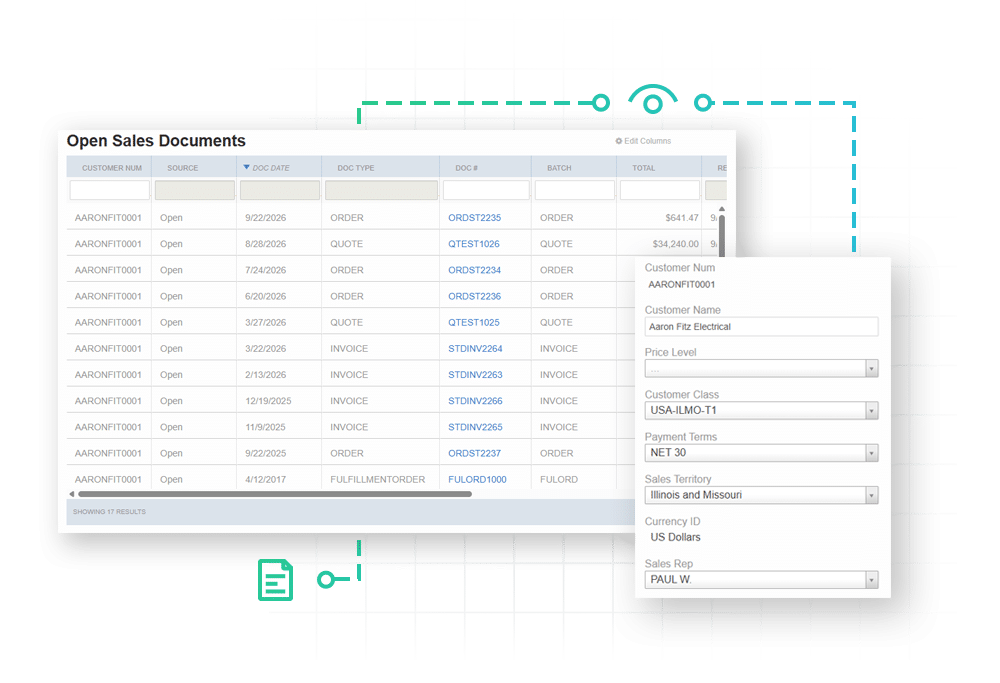
Getting a full picture of every order
Standard eCommerce connectors only show orders placed on the website itself. If a customer calls in an order, emails a rep, or sends one through EDI, it never shows up in their online account, so they call your team just to ask where things stand.
How Customer Portal Solves it
Complete order history and tracking
Every order in one place
The portal shows every open and historical document tied to a customer’s account, regardless of how the order came in.
Live shipping status
Customers can check tracking and shipping status themselves instead of calling your team for an update.
Full catalog browsing
Customers can browse live inventory and pricing before they buy, so there’s no guessing whether something’s in stock or what they’ll pay for it.
The Challenge
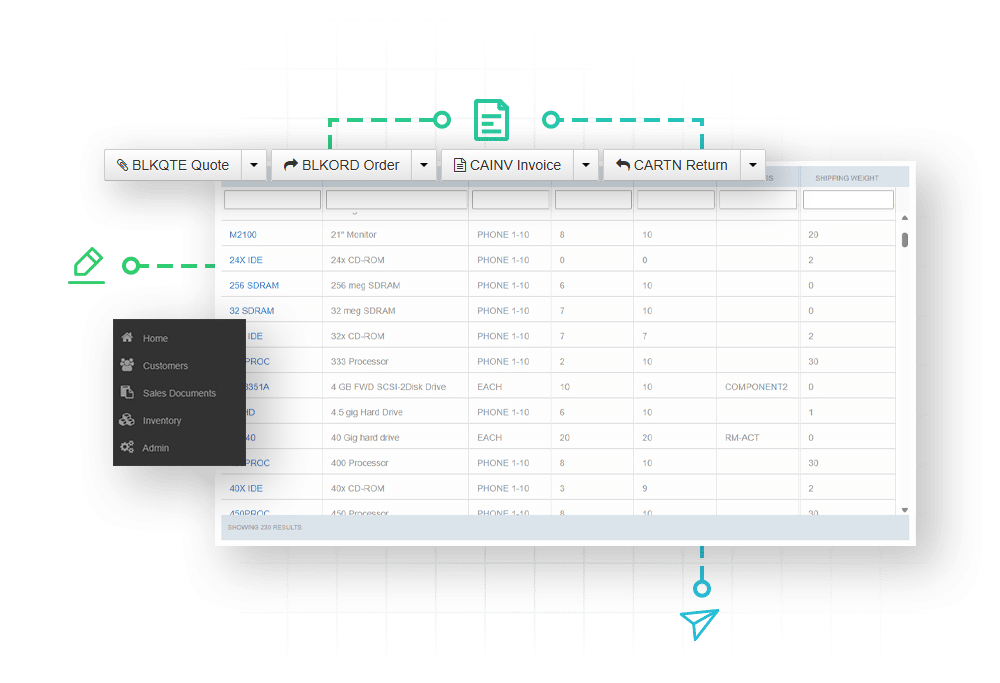
Taking orders when your team isn’t there to take them
If a customer only has phone or email as their options to place an order, anything that comes in after hours sits untouched until the next business day, and your team walks in every morning to a backlog.
How Customer Portal Solves it
Always-on order processing
24/7 Ordering
Customers can log in and place an order any time, day or night, against live inventory.
Instant entry into SalesPad
Orders write directly into SalesPad in real time, so they’re ready for fulfillment without anyone rekeying them the next morning.
Document ID Controls
Admins can set which Document IDs a customer group can use, so web orders land in the right workflow queue automatically and can trigger any extra reviews needed.
The Challenge
Getting customers out of your A/R queue
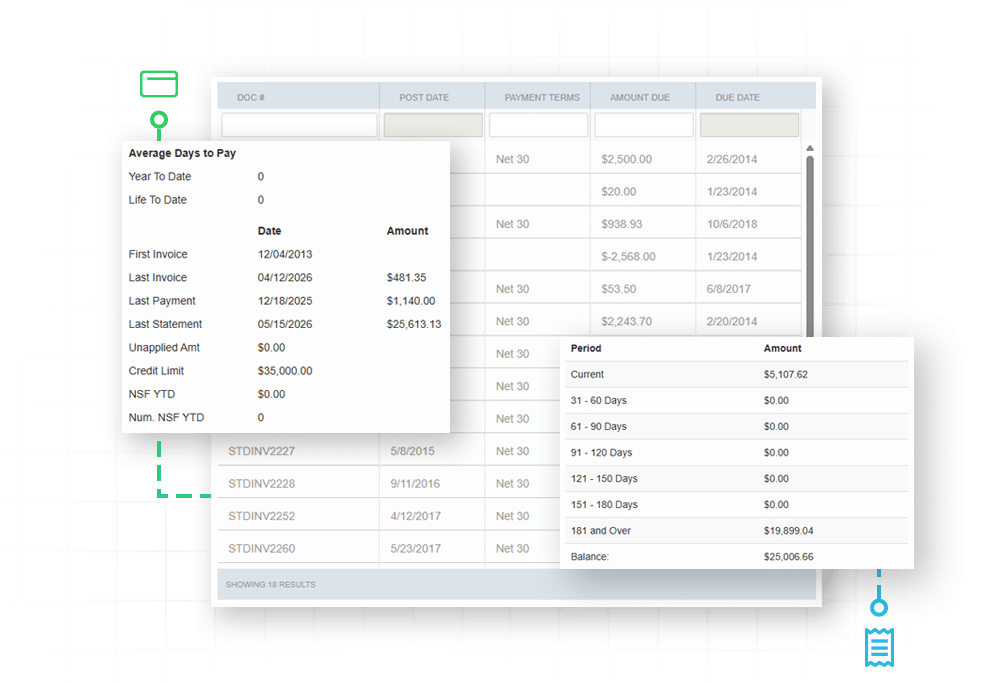
Accounts receivable teams spend hours chasing down balances: printing statements, then following up by phone, and later keying in card numbers by hand once someone pays.
How Customer Portal Solves it
Automated payment & collections
Self-service invoice review
Customers can see exactly which invoices they owe on and look up paid history whenever they want.
A card on file
Customers can pay against outstanding balances with a saved card, on their own schedule, through SalesPad’s native integration with PayFabric by Global Payments.
Cash receipts without the manual entry
Payments made in the portal generate cash receipts in SalesPad automatically, so your accounting team isn’t entering any data in by hand.
The Challenge
Keeping control over what customers see and do
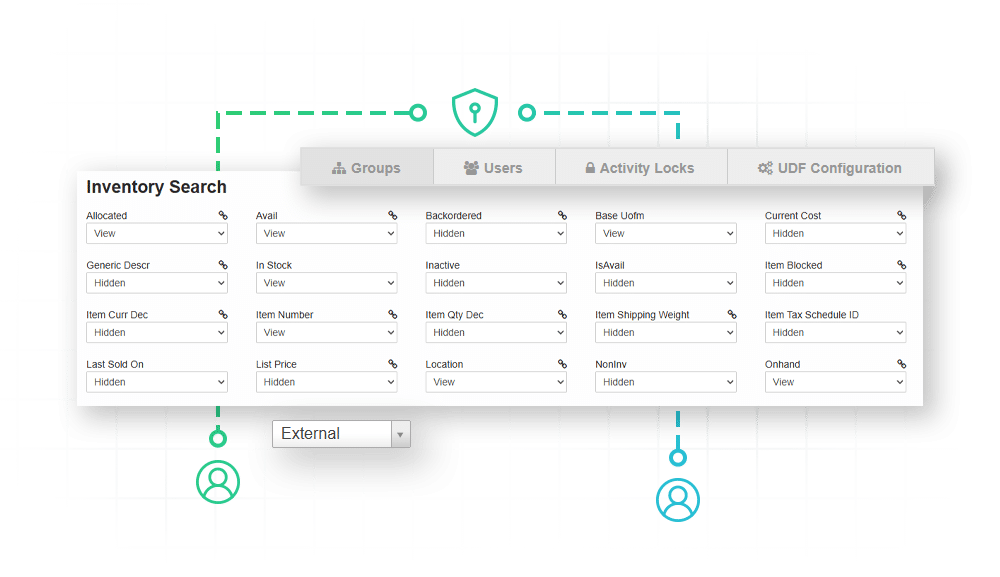
Giving customers direct access to your system only works if you can control exactly what they’re allowed to see, edit, and download.
How Customer Portal Solves it
Customizable user permissions
Custom catalog filtering
Restrict specific items or item classes from showing up for certain customer groups.
Page and field-level permissions
Decide exactly which pages, tabs, and fields a given user group can see or edit.
Printing rules
Control which PDF invoices and reports a customer can download.
Required field enforcement
Set required fields at the group level so submissions come in complete.

Unwavering support for our SalesPad customers.
You’re in control of your timeline.
The Salespad suite
Built to Master Every Distribution Challenge
When standard ERP functionality isn’t enough, SalesPad steps in. Our suite of specialized products is designed to solve the most difficult challenges in distribution—from the field and the warehouse to the shipping dock and beyond.
Standalone Products
Core software sold in a bundle or separately.
Add-ons
Specialized tools that sit on top of SalesPad products.
SalesPad
Drive operational efficiency for sales, purchasing, inventory management, and beyond.
SalesPad Mobile
Empower field reps to enter orders and check inventory on the go.
Inventory Manager
Mobile-first warehouse management for picking, packing, receiving, and more.
ShipCenter
Native shipping platform with carrier integrations and real-time rate shopping.
ShipTo
Connect SalesPad to UPS WorldShip and FedEx Ship Manager.
Web API
Seamlessly connect SalesPad to your external web stores and third-party apps.
Customer Portal
24/7 self-service B2B web application for order creation, inventory visibility, and invoice payments.
Automation Agent
The background engine that automates document transfers, reporting emails, and customer AR communication.
Customer IQ
Identify high-value accounts and detect early churn signs with AI-driven insights. This intelligence triggers automated workflows to prioritize at-risk outreach and protect your most profitable relationships.
Configurator
Build complex made-to-order items with guided attribute selection.
Manufacturing
Specialized tools for work order management and production tracking.
RMA
Unified customer history and streamlined returns management.
Returns Tracker
Deep visibility into return root causes to protect your margins.
Dispatch
Manage your internal fleet with digital routing and delivery confirmation.
Standalone Products
Core software sold in a bundle or separately.
SalesPad
Drive operational efficiency for sales, purchasing, inventory management, and beyond.
SalesPad Mobile
Empower field reps to enter orders and check inventory on the go.
Inventory Manager
Mobile-first warehouse management for picking, packing, receiving, and more.
ShipCenter
Native shipping platform with carrier integrations and real-time rate shopping.
ShipTo
Connect SalesPad to UPS WorldShip and FedEx Ship Manager.
Web API
Seamlessly connect SalesPad to your external web stores and third-party apps.
Customer Portal
24/7 self-service B2B web application for order creation, inventory visibility, and invoice payments.
Add-ons
Specialized tools that sit on top of SalesPad products.
Automation Agent
The background engine that automates document transfers, reporting emails, and customer AR communication.
Customer IQ
Identify high-value accounts and detect early churn signs with AI-driven insights. This intelligence triggers automated workflows to prioritize at-risk outreach and protect your most profitable relationships.
Configurator
Build complex made-to-order items with guided attribute selection.
Manufacturing
Specialized tools for work order management and production tracking.
RMA
Unified customer history and streamlined returns management.
Returns Tracker
Deep visibility into return root causes to protect your margins.
Dispatch
Manage your internal fleet with digital routing and delivery confirmation.
FAQ
What is the SalesPad Customer Portal for Dynamics GP, and how is it different from a retail eCommerce site?
Think of the SalesPad Customer Portal as a private storefront. Your customers log into a browser-based portal to check inventory, place orders, and update account info, but nobody just stumbles in and checks out, like they would on a B2C eCommerce site. Every login gets set up by you ahead of time, and it’s tied to one specific Customer Card in SalesPad, so each customer only ever sees their own account: their own pricing, their own order history, their own everything.
Can B2B customers see orders that were placed offline, such as via phone, email, or EDI?
Yes, and this is one of the portal’s biggest advantages over a typical eCommerce connector. Most of those only show orders placed on the website itself. If a customer calls in an order, emails a rep, or sends one through EDI, it’s invisible to them online. Whereas Customer Portal shows every order tied to a customer’s account, no matter how it got into SalesPad: along with real-time shipping status and tracking.
What order entry capabilities do B2B clients and traveling sales reps have?
It depends on who’s logging in. Customers get a secure, pre-filtered view where they can only see and manage their own quotes, orders, invoices, and returns, plus browse their product catalog. Sales reps get the opposite: full visibility across every customer and item, so they can search accounts, check balances, look up tracking, and log orders from a tablet or laptop while they’re on the road or at a trade show.
Can customers pay invoices directly in the portal?
Yes. Customers can see what they owe, look up paid history, and pay off balances with a card on file through SalesPad’s integrated PayFabric payment processing. Every payment generates a cash receipt in SalesPad automatically, so your accounting team isn’t keying everything in by hand.
Does the portal support real-time inventory checks and warehouse lookups?
Yes. Both customers and reps can search your product inventory right in the portal and see real-time stock availability before placing an order.
Can we enforce our existing business rules and workflows on web orders?
Yes. Orders placed through the portal land in SalesPad the same way any other order does. They move into the right workflow queue, trigger any applicable credit holds, and follow whatever validation rules you already have set up in your workflows.
How does Customer Portal communicate with our ERP, and is port forwarding required?
The portal doesn’t talk to your SQL database directly. Rather, it runs on a background instance of the SalesPad Web API, which calls secure endpoints and pulls real-time updates. Since it’s hosted in your environment, your IT team will need to set up port forwarding so customers and remote reps can reach it from outside your local network.
Are there any screen size or offline limitations?
Two things to know. First, the portal is built to handle data-dense grids and layouts, so it needs a decent-sized screen (like a laptop, desktop, or tablet); it doesn’t support phone screens. Second, it needs an active internet connection, since it queries your Dynamics GP ERP in real time. If your reps need to keep working in spotty service areas, SalesPad Mobile would be the better fit, since it has a dedicated offline sync engine built in.
How does the licensing and scale model work for Customer Portal?
Customer Portal is licensed based on the number of external user logins required. Tiers are structured to accommodate any business size: the Essentials tier supports up to 100 logins, while the Enterprise tier is designed to handle thousands of logins with no performance or speed degradation.