
Supercharge Business Central Sales Order Management
Business Central is the backbone of your operations—a reliable system of record—but it wasn’t designed for complex order orchestration. SalesPad for BC adds the intelligence layer ERP systems lack.
Combining automated order workflows, real-time margin protection, and AI-driven churn prediction, it becomes the “brains” of your operations. Empower your team to go beyond simple transaction entry—start orchestrating a faster, more compliant, and more profitable sales journey today.
Acceleration of order processing through fewer manual touchpoints.
%
Faster approvals with automated conditional routing.
%
Improvement in revenue per employee.
“One business rule in SalesPad saves me seven figures a year.”

Kyle Forman
President, Krowne
Why Business Central Alone Isn’t Enough for Modern Distribution.
While While Business Central excels as a system of record, it isn’t a system of differentiation. As your order complexity grows, the gaps in standard ERP functionality become clear. Without a layer of strategic intelligence, your organization risks:
Manual processes
Pushing orders through the process one step at a time, waiting on someone to take manual action at every turn.
Catching mistakes too late
Discovering low margin or unprofitable orders only after they’ve been invoiced and shipped.
Chasing status
Digging through documents to figure out which orders need attention.
Losing customers silently
No warning when a valuable account starts slipping away.
Developer dependency
Relying on expensive custom code every time your business process needs to change.
the solution
SalesPad for BC
The command center your distribution business demands—SalesPad for BC transforms your sales and service document workflows into a guided, automated, and protected journey—simplifying complex distributor fulfillment scenarios while equipping your team with automated pricing, smart printing, margin protection, and AI insights directly within your familiar Business Central environment.

Order workflow intelligence
Command your sales and service document management with no-code workflows, process automation, and real-time order visibility that streamlines fulfillment and enforces process controls.

Automated pricing logic
Take complete control over your calculation logic. Execute complex customer agreements, specialized cost-plus rules, and targeted exceptions directly at the sales desk without manual calculations.

Automated document & email routing
Orchestrate your entire paperwork flow, instantly routing invoices, pick instructions, and labels to the correct printers based on the unique rules and fields of each transaction.
All within

Real-time margin protection
Protect your bottom line with real-time margin scanning that detects financial risk and flags low-margin or non-compliant orders before they are processed.

AI-powered customer insights
Transform customer data into actionable strategy. Gain immediate visibility into an account’s financial contribution and use AI-powered behavioral analysis to identify customers at risk of leaving.

Integrate essential data
Build custom fields or pull in data from third-party applications natively within Business Central.
Do more with less
See SalesPad in action
Move from reactive processing to guided, automated execution directly inside your BC environment. Add the decision layer your team needs to automate workflows, improve visibility, standardize processes, and protect profitability across every order.
MISSION CONTROL
PROFIT SCAN
CUSTOMER IQ
Mission control
Custom Order Workflow
Mission Control empowers business users to visually map, build, and enforce custom sales and service order workflows. Instantly deploy complex processes that match how your business actually works and keep orders moving—all without touching custom code or waiting for IT.Explore Mission Control
Your process, your rules, without IT.
Built-in guardrails
Set automated rules that block sales and service orders violating company policy—such as credit limit breaches or pricing floors—stopping downstream problems before they start.
Your data, your rules
Build workflows using standard Business Central data or the added flexibility of your own Custom Fields . Trigger actions and enforce rules based on the information that’s vital to how you run your business.
Smart routing
Automatically direct sales and service orders based on specific conditions. Flag low-margin orders for review, trigger white-glove handling for orders over $x, or route exceptions to managers for approval—all without changing your core process.
No-code custom workflows
Design step-by-step order processes that match how your business actually works. Select the conditions and actions that fit your operations—no code, no IT tickets—making sales and service order management simpler and more intuitive for everyone.
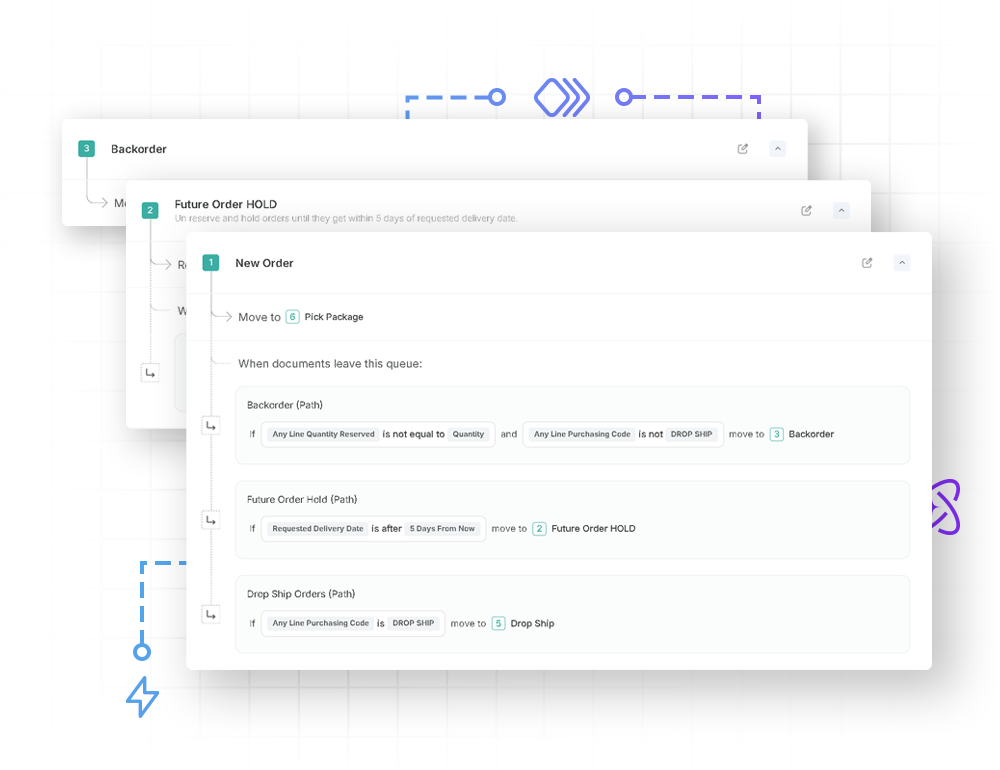

Sales Order Workflows Purpose-Built for Distributors
Automate backorders
Transform manual, order-by-order searches into an automated process that instantly identifies available stock, applies priority rules, and generates pick documents—all without a single click.
Automate inventory reservations
Eliminate “false stockouts” by replacing rigid FIFO reservations with intelligent prioritization—ensuring inventory is always available for customers who need it now, while automatically queuing future shipments for later replenishment.
Single-click drop shipping
Scale drop ship volume without increasing headcount. Replace tedious multi-screen requisitioning with a single-click engine that instantly generates purchase orders and slashes cost-to-serve.
Mission control
Order Visibility
Mission Control displays every step of your sales process and shows exactly which sales and service documents are waiting at each stage. Instead of hunting for problems, your team sees at a glance what requires action: approvals pending, orders awaiting verification, documents stalled in any step you’ve defined. Workflows can also notify users automatically when a document meets specific conditions or enters a review queue, reducing the need for constant monitoring.Explore Mission Control
End the guesswork. See what needs your attention now.
Centralized process visibility
View all your configured workflow steps in one place. Monitor real-time sales and service document counts at each step, then drill down into the full list of orders to resolve bottlenecks before they become backlogs.
Real-time alerts
Surface problems the moment they happen. Trigger email notifications the moment a sales or service order breaks a rule or meets a certain condition, ensuring nothing slips through the cracks.
Full audit trail
Track every touchpoint, status change, and rule evaluation on each sales and service order. Replace guesswork with a definitive history that tracks exactly where, when, and why an order was flagged.

Mission control
Process Automation
Mission Control automates the routine work—generating purchase orders, reserving inventory, processing payments, releasing documents—so sales and service orders move through your process without waiting for a manual push. By eliminating these touchpoints, you can reduce repetitive work, slashing delays and accelerating your order-to-cash cycle while processing more orders with your existing headcount.Explore Mission Control

Increase throughput without adding headcount.
Triggered actions
Automatically execute tasks when a sales or service order hits a specific stage—reserve inventory, create pick documents, generate POs, capture payments, send emails, and more—all without manual intervention.
Automated payment capture
Protect your bottom line by automating the full payment lifecycle. From pre-auth at order entry and triggering capture the moment a shipment is posted, you ensure every sales or service order is funded and every transaction is settled without manual accounting steps.
Fewer touches, fewer mistakes
By removing manual data entry and handoffs, sales and service orders flow from quote to invoice with total accuracy. Eliminate the friction of fulfillment delays, pricing mistakes, and administrative rework before they impact your bottom line.
Advanced Pricing
Automated Pricing Logic
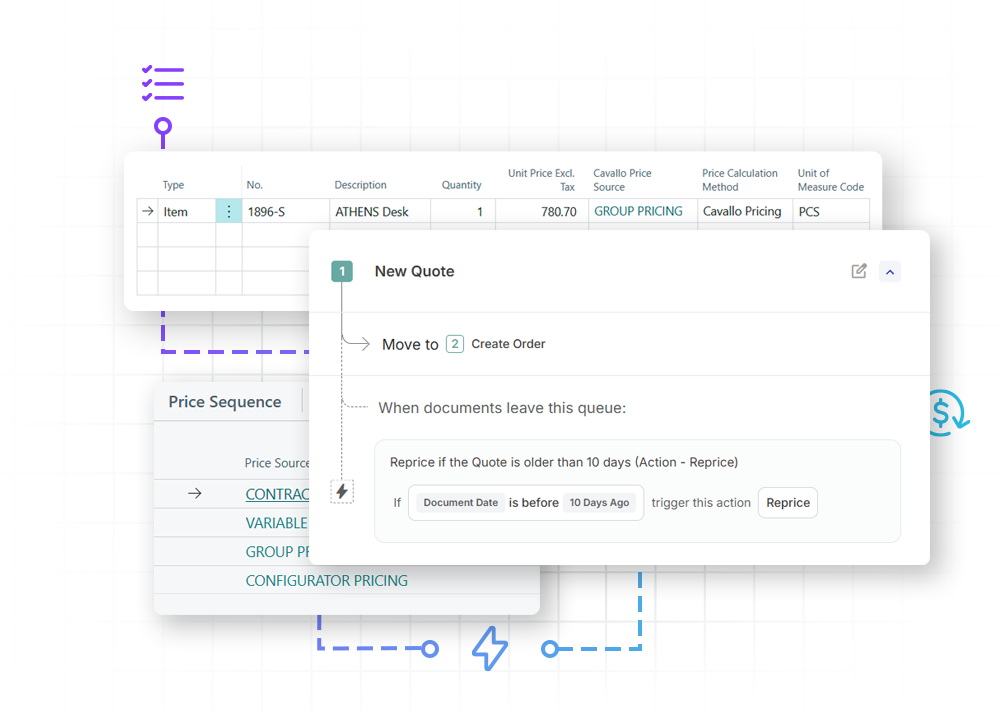
This powerful decision layer for Business Central instantly executes complex matrices, contracts, and cost-plus agreements, eliminating manual spreadsheet lookups while providing full traceability and margin protection right at the sales desk.
Explore Advanced Pricing
Your strategy, your margins, enforced automatically.
Automated contract compliance
Eliminate spreadsheets. Automatically honor customer agreements, volume contracts, and date-driven promotions the second an order is generated at the sales desk.
Dynamic matrix rules
Go beyond basic price lists. Build complex pricing grids based on combinations of customer groups, item categories, order volumes, or unique buying behaviors to maximize yield on every transaction.
Proactive margin protection
Stop errors before they cost you. The pricing engine calculates exact margins in real time, instantly catching manual entry typos, under-priced lines, or outdated promo codes before the order hits the warehouse.
True-cost calculation basis
Price off real-world expenses. Instead of being locked into standard ERP base inventory costs, you can point the engine at custom alternate line cost fields to automatically factor in live landed fees, surcharges, or vendor freight when calculating markups.
Smart Printing
Automated Document and Email Routing
Add an intelligent decision layer over your physical hardware and communications to automate document logistics. By reading Business Central data in real time, the engine evaluates rules at the document, customer, or line level to instantly route invoices, pick tickets, and customer email notifications to the correct printers, trays, and inboxes, completely eliminating manual print dialogs and tedious tray selections.
Hardware agnostic; works instantly with your existing BC printer setup.
Explore Smart Printing
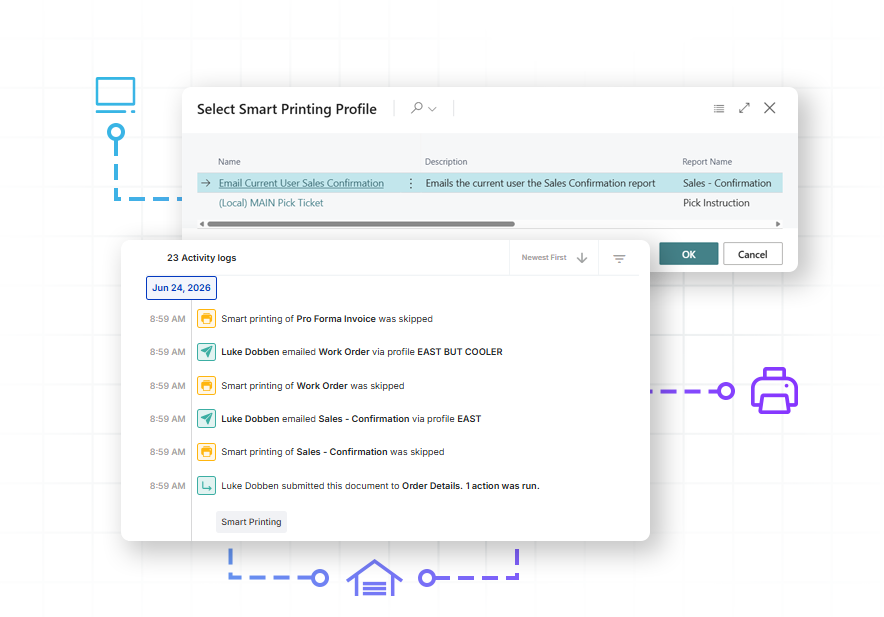
The right document to the right printer, automatically.
Unattended workflow printing
Eliminate manual print commands. Set system triggers that automatically fire off bulk pick tickets for the morning shift, print custom packing slips at the shipping dock, or send automatic customer email notifications the second an operator posts a shipment.
Multivariable routing logic
Take complete control over where documents land. Automatically evaluate data at the document, line, or customer level to path jobs and notification templates dynamically based on physical warehouse zones, assigned salesperson, destination states, or customer communication preferences.
Compliance and safety nets
Protect your business from costly compliance penalties. Automatically trigger specialized auxiliary documentation, such as hazardous material safety sheets or blind-shipping forms, to print or alert internal teams via email the moment a flagged data field is recognized.
Profit scan
Real-Time Margin Protection
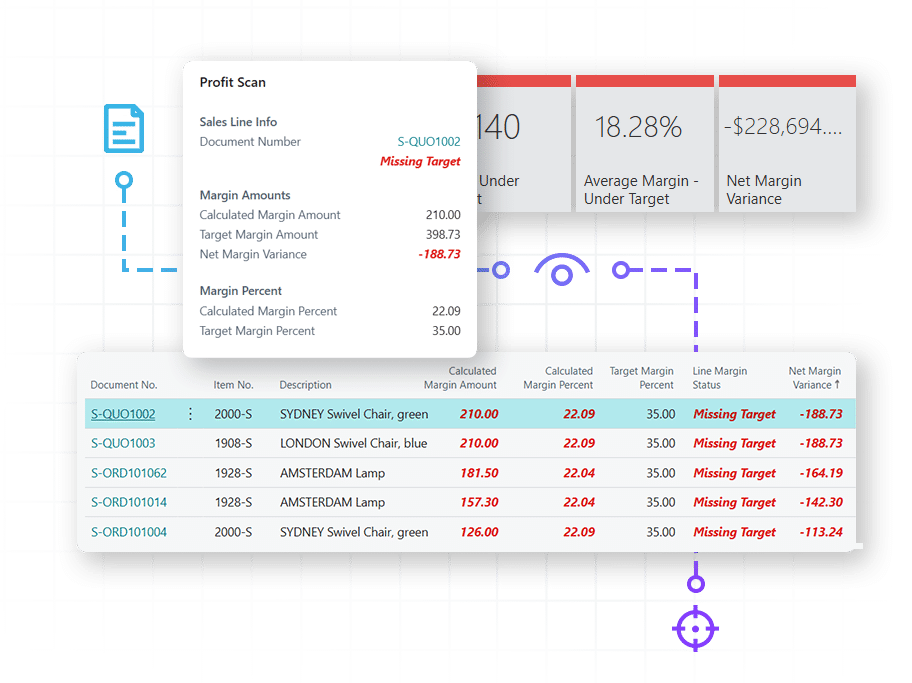
Don’t wait until the end of the month to discover you’ve been selling at a loss. Profit Scan monitors every quote and order against your margin rules—flagging over-discounting, pricing errors, and low-margin deals in real time. Stop selling at a loss without knowing it.Explore Profit Scan
Stop profit leaks before they cost you.
Real-time leak detection
As your team enters orders, any document under your target margin is immediately flagged via color-coded indicators (red, green). This provides instant visibility within your standard Business Central screens, allowing you to correct margin issues before the order is processed.
Configurable margin rules
Protect your bottom line on every quote and order by setting specific margin targets by product line, customer group, or any Business Central dimension. Profit Scan automatically evaluates every document against these rules, feeding directly into your workflow to capture and reroute violations. This ensures no low-margin order is processed without review.
Profitability analytics
Identify which customers, items, or segments are eroding your margins over time. By visualizing these trends, you can pinpoint lost profit and adjust your strategy before small leaks become major financial losses.
customer iq
AI-Powered Customer Insights
Customer IQ combines machine learning powered churn prediction with historical profitability data—giving you the full picture of each account’s value and risk. See which high-value customers need attention to prevent them from leaving, and which low-profit accounts don’t deserve deeper discounts. The right information at the right time leads to better decisions and a healthier bottom line.Explore Customer IQ
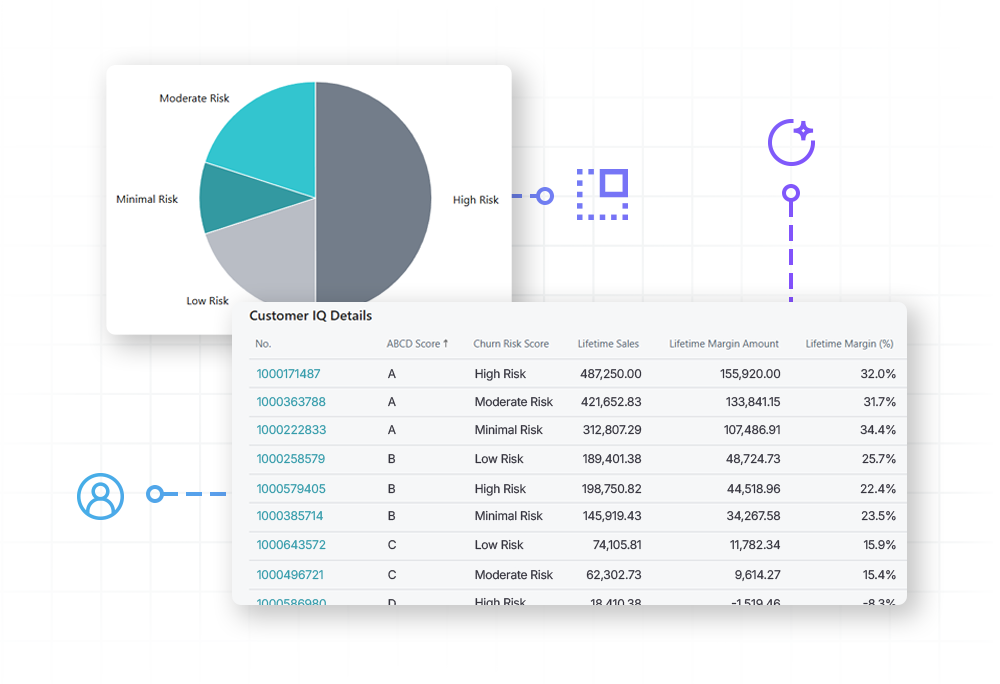
Protect your best customers. Know when to intervene or say no.
Churn prediction
Data science models analyze historical buying patterns to flag accounts showing early signs of risk. Take action—strategic outreach, proactive discounts, priority handling—while there’s still time.
Profitability insights
See each customer’s historical financial value to your business at a glance. Identify which relationships drive growth and which ones are actively eroding your margins.
Profit-based segmentation
Combine risk and value to prioritize your accounts. Protect high-value customers at the first sign of trouble and spend less time chasing accounts that aren’t worth the effort.
Customer Success Story
The Handi-Craft Company
As the manufacturer of Dr. Brown’s baby bottles, Handi-Craft needed a way to manage massive order volumes without losing visibility or increasing overhead. By implementing SalesPad, they replaced manual workarounds with automated, system-enforced workflows that ensure every order moves accurately from entry to fulfillment.
“Since we’ve gone with SalesPad, my job has been easier. I actually have a team of five right now, and if I did not have SalesPad it would be at least seven. Probably eight.”
Gail Perry, Office Manager at The Handi-Craft Company
A Guided Path for Every Stage of your ERP Journey
Whether you are just beginning your migration or looking to optimize an existing environment, SalesPad for BC is designed to scale with your business and provide a clear roadmap for operational excellence.
Already on Business Central?
Stop settling for manual workarounds. Add SalesPad for BC to close process gaps, eliminate rework, and enforce margin rules—all without the cost and delay of custom development.
Current SalesPad Client?
Keep the control you love. We provide a guided path to migrate your proven workflows, business rules, and real-time controls safely into your new Business Central environment. Learn more.
Migrating to Business Central?
Build it right the first time. By embedding strategic intelligence into your implementation from day one, we make your transition to Business Central faster, easier, and significantly less risky.
FAQ
How long does it take to get up and running?
You can begin realizing value in minutes, not months. Because our suite is built as a native extension, tools like Profit Scan and Customer IQ offer near-instant deployment—allowing you to surface margin risks and AI-driven churn insights across Business Central in less than 15 minutes. For deeper orchestration, Mission Control implementation is measured in weeks, rather than months. As a no-code solution, it allows you to begin modeling workflows and enforcing business rules shortly after installation, bypassing the long development cycles and high costs associated with traditional ERP customizations.
How does Mission Control specifically help protect my profit margins?
Mission Control acts as a digital safety net. By setting automated business rules (e.g., “Halt order if margin is below 15%”), you prevent “margin leaks” before they happen. You stop relying on people to catch errors and start relying on a system that refuses to process a non-profitable or non-compliant order.
Can I use my existing Business Central data and custom fields to trigger workflows?
Can Mission Control handle high order volumes?
Can I set different margin targets for different types of products?
What happens if an order falls below my margin target?
Instant visual feedback appears directly on your Business Central sales documents the moment a threshold is breached. Profit Scan surfaces clear alerts—such as a red “negative” or “missing target” status. For proactive protection, Profit Scan and Mission Control work in tandem: a configurable business rule can automatically block any order missing its target, preventing it from being processed and instantly routing it for mandatory review and approval.