
SalesPad for BC
Margin Protection Software
Even a one-point improvement in gross margin can create significant bottom-line value for a distributor or manufacturer. The challenge is that margin erosion rarely comes from one obvious failure. It accumulates through small pricing errors, outdated costs, excessive discounts, freight charges, and inefficient workflows across hundreds or thousands of transactions. Recovering those lost dollars requires more than a month-end report. It requires margin protection software that identifies risk while teams can still act.
Margin protection is the ongoing practice of monitoring the costs, prices, discounts, and operational decisions that determine whether a transaction delivers its intended profit. Margin protection software applies that discipline continuously, giving teams margin visibility across customers, products, quotes, and orders.
For Microsoft Dynamics 365 Business Central users, SalesPad Profit Scan adds real-time profit protection directly to the order process. It scans transactions for low-margin conditions, pricing mistakes, and other financial risks before an order is processed. Rather than discovering a bad deal after it has shipped, sales and operations teams can correct it at the point of entry.
SalesPad for BC brings margin protection into the same Business Central workflows teams use to manage quotes and orders. Profit Scan evaluates transactions for potential margin risk as work happens, helping sales and operations teams identify issues before an order moves further through the process. Request a personalized demo to see how SalesPad for BC can add greater margin visibility and control to your order-to-cash workflow.
Real-time profit control
Protect margins without manual spreadsheets
Spreadsheets can calculate margin, but they cannot continuously protect it. They depend on manual data entry, periodic updates, and employees knowing which transactions need attention. By the time a spreadsheet reveals a problem, the affected quote may have become an order, the order may have reached the warehouse, and the product may already be on its way to the customer.
Each issue may appear minor in isolation. Across a high-volume operation, however, small leaks can materially weaken profitability. SalesPad for BC by Cavallo gives Business Central users multiple ways to address these risks within the order process. Advanced Pricing applies configurable pricing logic, including cost-plus pricing based on alternate cost fields and dynamic repricing scenarios. Simultaneously, Mission Control holds or routes orders for review when established workflow conditions are met, while Profit Scan guards margin on every sales line.
Evaluating open quotes and orders against defined profitability targets, Profit Scan displays clear margin indicators, and quantifies the potential profit at risk. Sales representatives can assess the impact of a discount or pricing decision before completing a transaction, while finance leaders gain a consistent way to enforce margin expectations. The result is more than just better reporting. It is a more disciplined workflow that helps employees protect profit as work happens.
Common sources of margin leakage include:
- Unauthorized or excessive discounts
- Freight, shipping, and landed costs that are not reflected in pricing
- Outdated customer or product pricing
- Supplier cost increases
- Order-entry mistakes
Efficiency meets economics
Margin protection for ERP-connected teams
Effective margin protection software works with the operational data already contained in an enterprise resource planning (ERP) system. Customer records, product information, inventory costs, pricing rules, purchasing activity, and sales transactions provide the foundation for understanding where profit is created or lost.
SalesPad for BC operates directly with Microsoft Dynamics 365 Business Central, extending the ERP with tools for sales order management, automated pricing, workflow control, margin protection, and customer intelligence. As these capabilities work with Business Central data and processes, teams can strengthen margin controls without replacing the ERP environment employees already use.
For organizations that want to examine profitability beyond individual Business Central transactions, Cavallo also offers Profit Max Platform. While SalesPad for BC focuses on operational execution within Business Central, Profit Max Platform provides broader profitability intelligence and recommended actions.

Control at order entry
Why SalesPad for BC margin protection software works
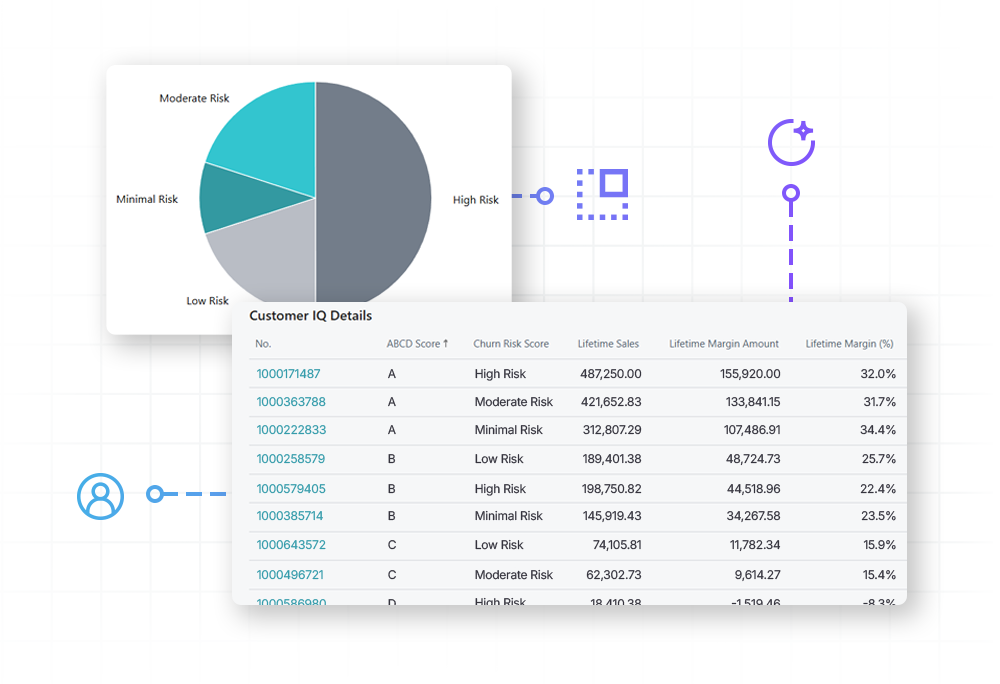
SalesPad for BC helps teams strengthen margin controls directly within Business Central. Real-time margin visibility can expose pricing and cost issues before an order reaches fulfillment, while order- and line-level monitoring shows whether transactions meet established profitability targets. Instead of relying solely on after-the-fact reporting, employees can see potential margin exceptions while they are still working with the transaction.
Customer intelligence is available through SalesPad Customer IQ (.pdf), a separate capability within the SalesPad for BC suite. Revenue alone does not show whether an account is profitable, growing, declining, or exhibiting potential churn signals. Customer IQ evaluates financial contribution and behavioral patterns to give teams additional context when managing customer relationships.
Catch issues early
How margin protection software helps reduce risk
Margin protection should be continuous:
ERP data updates as business activity occurs.
Quotes and orders are evaluated against profitability rules.
Margin exceptions are identified immediately.
Teams see alerts or visual indicators before profit is lost.
Teams can review the flagged transaction and determine whether pricing, cost, or workflow adjustments are appropriate before the order proceeds. This changes margin management from a reactive accounting exercise into an operational control. Instead of asking why margins declined last month, teams can identify the transaction creating risk today.

Step 1
Connect your ERP and centralize profit data
The process starts with the information already supporting daily operations:
- Customer Cards & Lists
- Item & Item Categories
- Sales Price Lists
- Item Ledger Entries & Quantity on Hand
- Unit Cost & Value Entries
- Posted Sales Invoices & Customer Ledger Entries
- Purchase Orders & Item Vendor Catalogs
Connecting these data points creates a unified operational view without forcing teams to abandon established processes. It also reduces the risk of evaluating profitability from incomplete or manually reconciled information.
Step 2
Monitor margin across sales lines and orders
Once the relevant Business Central data is available, Profit Scan can evaluate sales lines and transactions against established margin thresholds. Teams can see when pricing or cost conditions cause an order to fall outside expected profitability parameters and review the transaction before it progresses further.
Customer-level profitability and behavioral analysis are handled separately through SalesPad Customer IQ. Keeping these capabilities distinct allows Profit Scan to focus on transaction-level margin protection while Customer IQ provides additional intelligence about account value and customer behavior.
For example, a sales line may appear acceptable based on revenue alone but fall below the company’s target margin once the applicable cost basis is considered. Profit Scan makes that condition visible during the sales process so the user can investigate the transaction rather than waiting for a later profitability review.

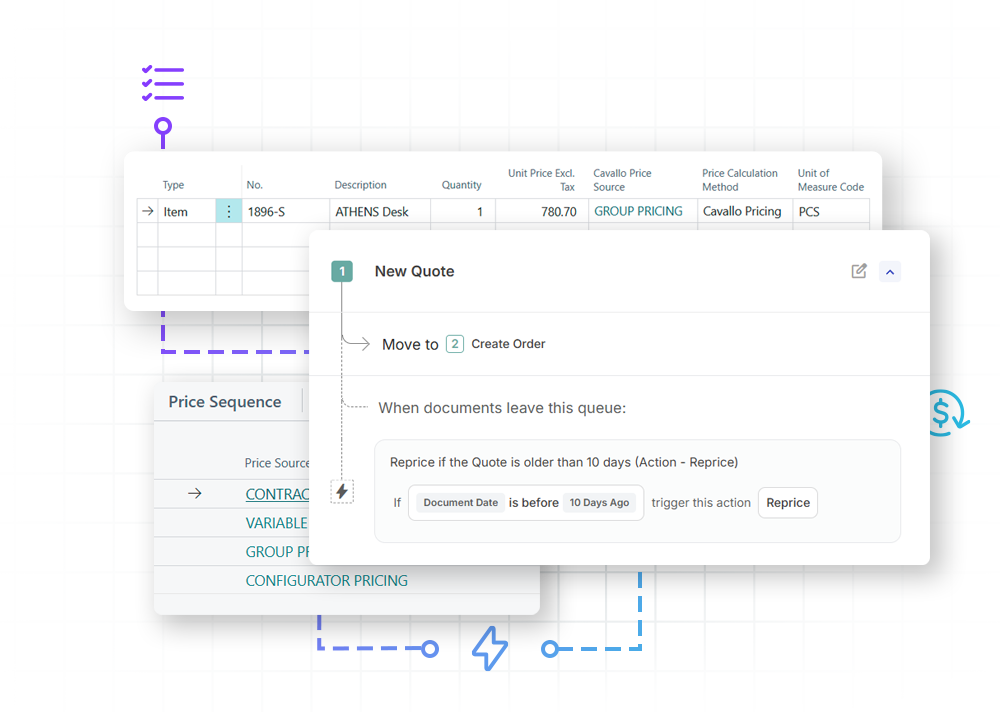
Step 3
Turn insights into action
SalesPad for BC helps teams move beyond passive reporting. Actionable profitability insights can support decisions such as:
- Correcting underpriced orders
- Responding to supplier cost increases
- Preventing margin leakage
- Prioritizing high-value sales opportunities
SalesPad for BC helps distributors and manufacturers turn operational activity into measurable action—protecting margins, improving workflows, retaining valuable customers, and building a more profitable business.