
We are thrilled to announce that SalesPad 5.6.11 is now available! This update is all about empowering your team with data-driven customer insights and making your daily tasks more efficient. This release includes a variety of new features and updates since 5.6.7 (release notes here).
From the debut of our AI-powered Customer IQ to significant improvements in Item Maintenance, this release is designed to help you prioritize what matters most: your customers and your bottom line.
View the full technical release notes here.
Meet Customer IQ: AI-Powered Customer Insights
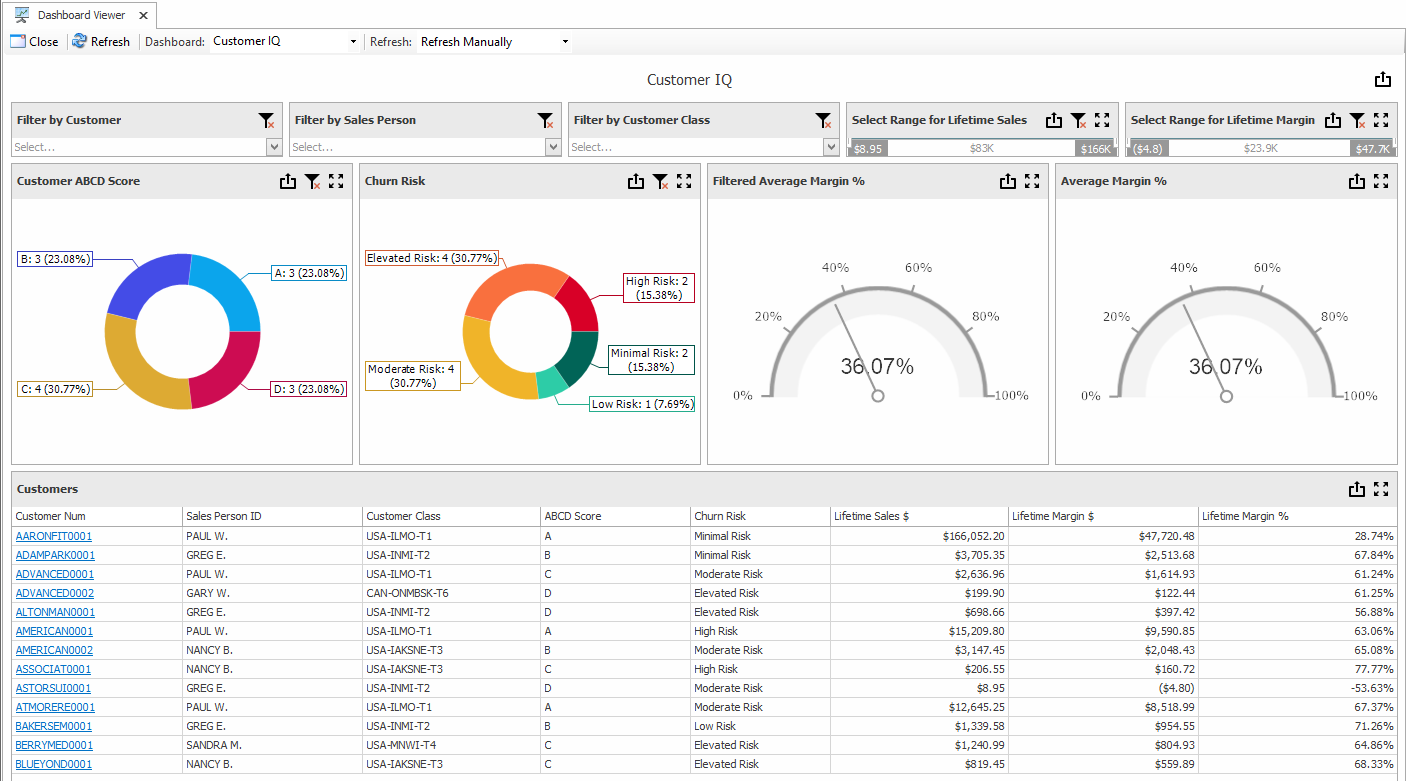
Customer IQ brings AI-powered customer health analysis into SalesPad. It’s designed to help you stop guessing and start growing by categorizing your data into actionable insights:
- ABCD segmentation: Group customers into ABCD buckets based on how much they contribute to your business’s overall profitability.
- AI-powered predictive churn: Leverage AI-calculated churn risk to proactively reconnect with customers before they stop buying from you.
Configurable visual dashboard: Review your overall customer health in a new visual dashboard with a variety of built-in filter options.
- Workflow routing: Automate workflows based on these metrics and use them to prioritize fulfillment for high-value and/or high-risk customers via Inventory Manager’s Directed Picking.
- Structured outreach: Generate customer outreach suggestions on a schedule based on your rules, then work through the outreach list or schedule outreach tasks on the SalesPad Today calendar.
PayFabric Surcharge Updates
- PayFabric credit card surcharges can now also automatically apply for PayLinks. When PayLinks are processed for a posted invoice, SalesPad can create either a secondary sales invoice or a customer A/R invoice for the surcharge amount, with configuration options for how the new document’s fields are assigned.
SalesPad Workflow Enhancements
We’ve added more guardrails and shortcuts to keep your team moving accurately:
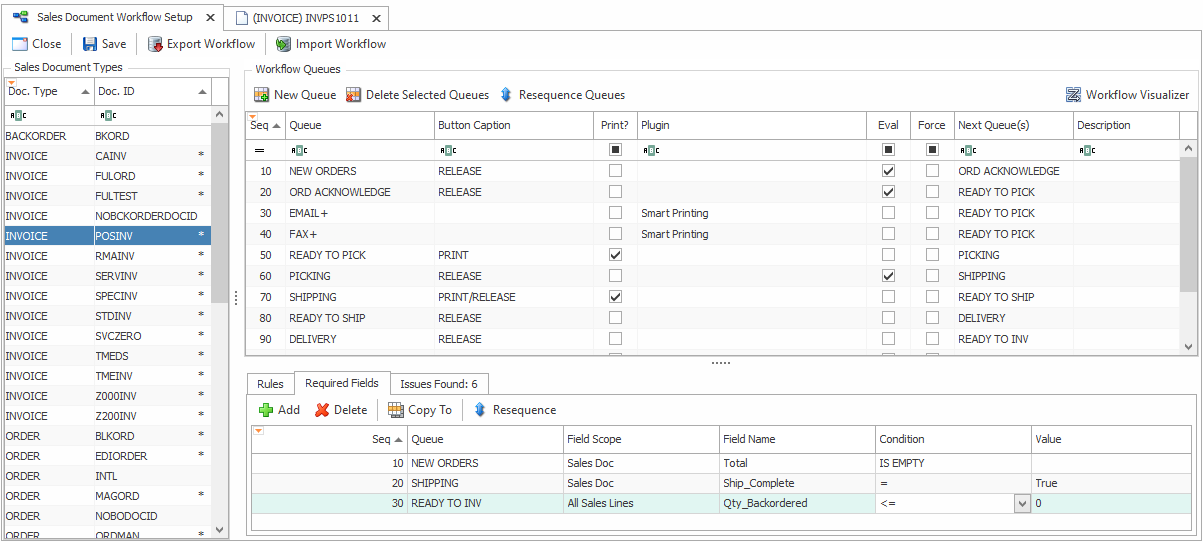
- Required Fields let you build field requirements directly into your workflow so people can’t forward sales orders without critical information. Make sure that new orders have all required fields, certain invoices have a surcharge sales line, and all quotes have sales lines that hit specific margins. These rules are set up for each document type, and missing requirements can be reviewed directly on each sales document.
- Saved filters in Sales Monitor let you save your selected workflow queues so it’s easy to switch between groups of sales documents that you need to review. Instead of checking all those checkboxes and accidentally missing documents if you forget a single queue, just select a saved filter to see everything you need.

Item Maintenance
- ☆☆☆ Item Maintenance is now much faster and easier to use for managing groups of items in sequence. This popup window now displays the list of items from the Inventory Lookup screen so you can switch between items without constantly closing and reopening. There are new buttons that let you jump to the Previous or Next item in a single click, and you can create new items within the Item Maintenance screen and save changes without needing to close the window.
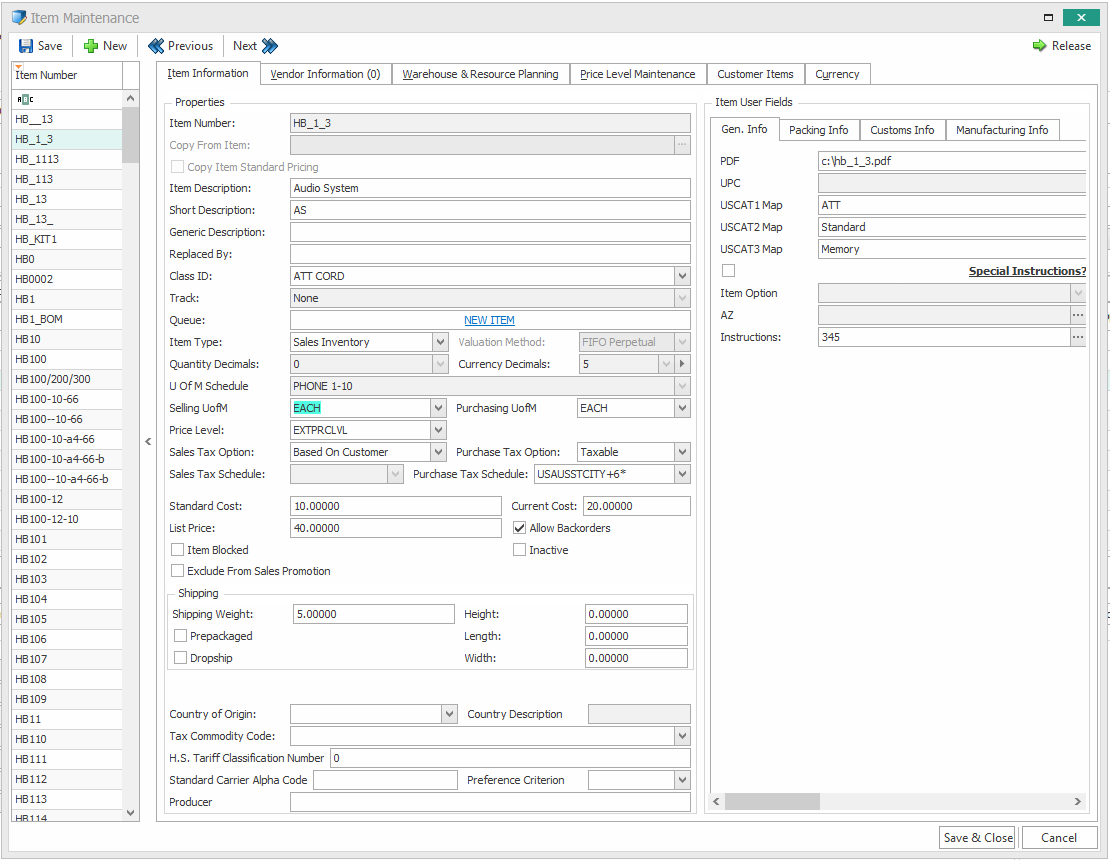
- The warehouse planning tab now only shows assigned warehouses, and it has Assign and Unassign buttons to update warehouse assignments for items.
Other Important Updates
- ☆☆☆ New option for Direct Purchase Order Entry lets you quickly create a new PO with just the vendor number and PO type
- ☆☆☆ Inventory Lookup’s Item Purchases tab now provides visibility of the Committed Qty and Uncommitted Qty for each PO line
- ☆☆☆ Interaction Entry now provides spellcheck for the Notes and Subject fields
- ☆☆☆ New vendor auditing settings allow granular control of which fields audit their before and after values when updating vendors and vendor contacts
- In-Transit Transfer fulfillment now provides hyperlinks for serials and lots for easy drilldown, and ITT emails are now logged to a new Email Audit tab
- The Automation Agent job for Customer Quick Report Email has many new configuration options: multiple priority options for contact matching, a new script option for more complex determination of whom to email, a setting to ensure only one contact for each customer receives an email, and a new Test Run button to test which contacts will be emailed before they’re sent
- New workflow rule for Marked To Post allows rerouting sales invoices to another queue when their destination queue (e.g. READY TO POST) is currently posting
At SalesPad, our product roadmap is driven by you. Many of the features in this release came directly from the community. We are committed to building the tools you need to run a more efficient business.
☆☆☆ – Features marked with stars were requested by our users in the SalesPad Ideas Portal. Thank you for your feedback!
Ready to Get Started?
- View the full release notes
- Schedule a demo of Customer IQ
- Visit the SalesPad Ideas Portal to submit your next suggestion
Questions about upgrading? Reach out to your Account Manager or our Support Team today.