
Managing complex distribution workflows shouldn’t feel like a guessing game. In our latest updates to Mission Control and Profit Scan, we are bringing your business logic to life. With the debut of Visual Workflow Display, you can now see exactly how your documents move through your system at a glance. Combined with a new Leak Dashboard in Profit Scan that shows how much money moved into invoices without proper profit review, this release is designed to give you total visibility into your operations and your margins.
Mission Control Release Notes
New Major Feature: Workflow Visualization
- Visual Workflow Display: Users can now see a complete visualization of their workflows directly in Business Central and Mission Control, making it easier to understand document routing and approval processes at a glance.
- Queue Status Indicators: Workflow queues now display visual status chips that clearly show which queues have business rules or automated actions applied, helping administrators quickly identify configured workflow logic.
- Expandable Workflow Nodes: Users can expand individual workflow nodes to see detailed information about the rules and actions that apply to specific queues, providing deeper insight into workflow behavior.
- Interactive Zoom Controls: The workflow visualization includes intuitive zoom controls with manual input capability, allowing users to type their preferred zoom percentage for optimal viewing of complex workflows.
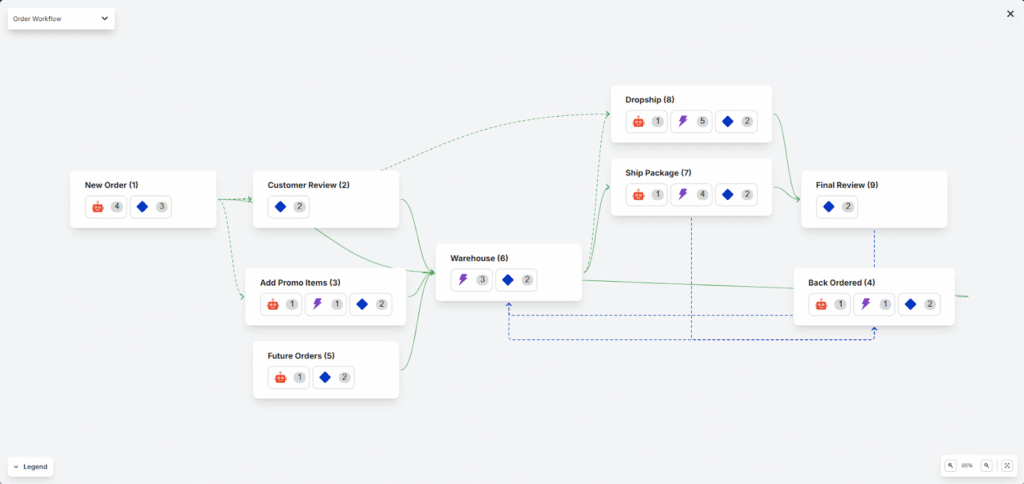
This feature empowers users to better understand, troubleshoot, and optimize their approval workflows without navigating through multiple configuration screens.
New Major Feature: Paylink Support via Workflow
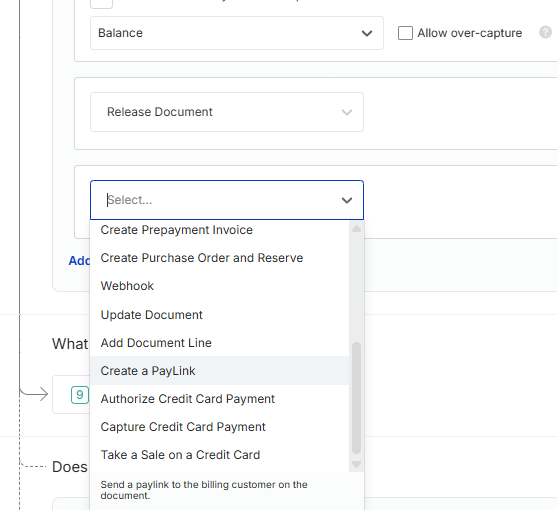
- Workflow-Triggered PayLinks: Payment links can now be automatically triggered through workflow actions, streamlining the payment collection process and reducing manual intervention.
- PayLink Status Tracking: Users now have clear visibility into the status of payment links, making it easier to track which invoices have pending, completed, or failed payment attempts.
- Optimized Cash Receipt Generation: Cash receipts are now generated after customers complete payment rather than when the PayLink is created, ensuring accurate financial records and reducing unnecessary system processing.
Additional Changes In This Release
- Resolved Business Rule Banner Display: Fixed an issue where the business rules banner would briefly appear after document approval and submission, eliminating user confusion during the approval process.
- Corrected Currency Symbol Display: Mission Control tiles in Business Central now correctly display the appropriate currency symbol for each company instead of a hardcoded dollar sign.
- Fixed Workflow Condition Builder: Resolved an issue where “No Results” text would incorrectly persist when tabbing through the workflow condition builder with a populated search value.
- Improved Document Approval Error Handling: Fixed an error message that appeared when approving business rules from the Mission Control monitor, even though documents were successfully submitted.
- Enhanced Keyboard Navigation: Actions and Submit buttons now properly receive focus when tabbing, and business rule lists are fully navigable via keyboard, improving accessibility for all users.
- Fixed Condition Builder Operator Selection: Users can now reselect the same operator after changing a field in the condition builder without needing to select a different operator first.
- Corrected Product Label Display: The product selector in Custom Fields now displays the correct active product name instead of showing “Mission Control” for all companies.
- Resolved Workflow Zoom Increments: Fixed an issue where using Ctrl+Scroll to zoom the workflow visualization would add inconsistent increments instead of smooth 5% adjustments.
- Eliminated Search Bar Display Issue: Removed the “Mega X” icon that would incorrectly appear in the Mission Control search bar after opening other modals.
- Improved Show More/Less Alignment: The “Show More” and “Show Less” buttons now maintain proper alignment regardless of column width.
- Fixed PayFabric Payment Processing: Resolved an issue where PayFabric transactions could report as both successful and failed simultaneously, ensuring accurate payment status reporting.
- Corrected Workflow Submission Race Condition: Fixed a timing issue that could cause PreSubmissionWorkflow errors when multiple processes attempted to update submission status simultaneously.
- Removed Legacy Changelog Processing: Eliminated unnecessary changelog handling logic and maintenance jobs from Mission Control, improving system performance and reducing maintenance overhead. (This is still available as a setting)
Profit Scan Release Notes
New Major Feature: Profit Scan Pro Trials
Profit Scan now includes a comprehensive trial licensing system that enables new users to experience Profit Scan Pro capabilities before committing to a purchase. This enhancement makes it easier for organizations to evaluate the full value of advanced profit management features.
- Free Trial of Profit Scan Pro: Users can now activate a trial license to access premium features, allowing them to test advanced profit scanning capabilities in their own environment before making a purchasing decision.
- Trial Expiration Banner: A clear notification system keeps trial users informed about their remaining trial period, ensuring they have time to evaluate the product and make informed decisions about upgrading.
These changes lower the barrier to entry for new customers and provide transparency throughout the evaluation process.
New Major Feature: Profit Scan Leak Dashboard – Revenue Protection Insights
- Leak Dashboard: A new dashboard provides visibility into revenue leakage by tracking how much money moved into invoices without proper profit review. This empowers executives and finance teams to identify process gaps and quantify the financial impact of bypassed profit controls, enabling data-driven decisions to tighten revenue protection.
- Calculate Historicals: A new button in settings allowing users to look back 365 days and see how they would have performed based on the current margin targets
Additional Changes In This Release
- Fixed Setup Page Access Control: Resolved a security issue where unlicensed users could access the Profit Scan Setup page. Access is now properly restricted to licensed users only, ensuring proper license compliance and system security.
- Corrected Email Formatting: Fixed broken header and footer images in Profit Scan emails. Email notifications now display correctly with proper branding and formatting, improving professional appearance and communication clarity.
- Enhanced Field Integration: Margin Status now appears correctly in the Add Integrated Fields list, making it easier for users to configure and display critical margin information in their workflows.
- Streamlined Product Offering: Removed Profit Scan Essentials tier to simplify the product lineup and focus on delivering the most valuable features through Profit Scan Pro.
Ready to Get Started?
These updates provide the data-driven insights you need to tighten controls and protect your bottom line—whether you are troubleshooting complex approval paths in Mission Control or identifying the process gaps that lead to revenue leakage in Profit Scan. By combining visual workflow clarity with proactive margin protection, we’re helping you eliminate guesswork and run a more secure operation. We’ve also cleared the deck of legacy processes and UI “bugs” to ensure your experience across both products is smoother and faster than ever.