
Distribution orders tend not to be standardized in a simple-to-follow way. They often involve customer-specific pricing and contracts, require payment authorization, include backordered items, or have unique service requirements, among other specifications. That complexity has created a unique need for distributors running on Business Central: one for a better, smarter, and more frictionless way to control what happens to every order after it’s entered.
Enter SalesPad® for Business Central: built to cater to the nuances of sales and service order management only distributors understand.
Today, SalesPad for BC is the command center that distributors rely on to minimize manual order entry, stop chasing order statuses, and fulfill the perfect order every time: all from directly within the Business Central environment they’re already familiar with.
Halfway through 2026, Cavallo is bringing even more enhancements to SalesPad for Business Central, including Advanced Pricing™, Smart Printing™, support for Service Documents (not just Sales Documents) in BC workflows, AI-powered customer insights with Customer IQ™, and Reservation Reassignment (an enhancement to Mission Control™, the workflow automation engine in SalesPad for BC).
SalesPad® for Business Central: Why Distributors Need More Than ERP
Business Central was never designed for complex order orchestration.
So, SalesPad for BC exists to fill that gap: adding on the intelligence layer Business Central lacks for the businesses that need it most, and resulting in:
- 4-5X faster order processing through fewer manual touchpoints
- 30-50% shorter approvals, with automated conditional routing
- 50% jump in revenue generated per employee
- As much as seven figures in savings by automatically enforcing policies via business rules versus doing it manually
“One business rule in SalesPad saves me seven figures a year.”

Kyle Forman
President, Krowne
From custom-order workflows with built-in guardrails to smart document management, with SalesPad for BC, you can take complete control of processes that are too complex to manage in ERP.
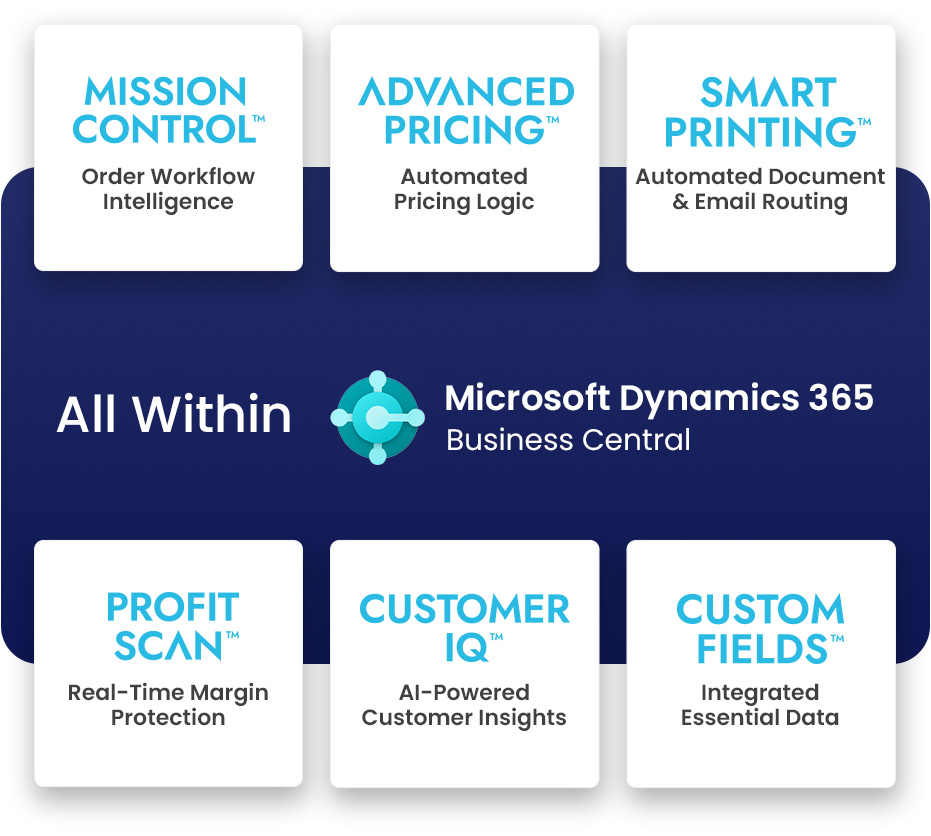
For example, while you can manage pricing in BC directly, the system will default to showing the lowest price first, so complex pricing scenarios, like customer-specific agreements or account-level-based configurations, are much better handled with SalesPad. If Business Central is the backbone, think of SalesPad as the brains behind your operations, giving you maximum flexibility for sales and service order management.
The Latest from Cavallo: What’s New in SalesPad for Business Central?
A distributor is rarely just entering a straightforward order and shipping it the same way each time. Orders can range from single-line parcel shipments to bulk LTL loads, consolidated customer orders, partial or held backorders, vendor dropships, and scheduled blanket releases: each of which is shaped by customer-specific payment, carrier, delivery, and fulfillment rules.
And that variability creates a need for more intelligence and control around how each unique order moves from entry to fulfillment.
Now, as we build out the SalesPad for BC offering to tackle even more unique-to-distribution challenges, here’s what’s new:
1. Advanced Pricing™ (For Fewer Spreadsheets and Guaranteed Rules-Based Logic)
Handling pricing gets harder as distributors grow. Customer agreements, volume discounts, promotions, and changing supplier costs can push teams into reverting back to tedious spreadsheets and manual approval checkpoints. To make matters tougher, Business Central’s native pricing architecture defaults to a rigid “lowest-price-wins” logic, which doesn’t easily cater to complex multi-tiered contract tracking, and doesn’t match the layered, attribute-driven models real distributors tend to rely on.
Advanced Pricing with SalesPad for Business Central means there’s a better, more flexible, and less manual way to get it right at scale.
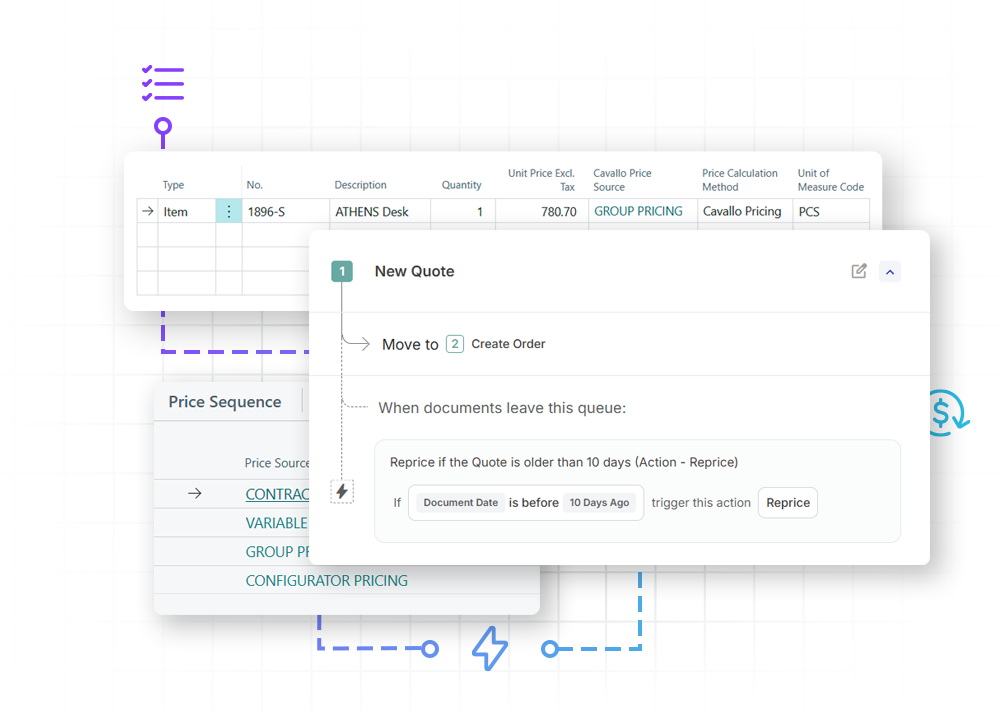
Advanced Pricing layers a powerful rules engine over your order entry: instantly calculating and verifying the expected price the moment a line is entered, and providing a complete audit trail of exactly how every single price was determined.
By centralizing your matrix pricing, contract quantity commitments, and everyday line markups under a single automated framework, Advanced Pricing ensures you’ll always get the exact pricing behavior your business needs, on every transaction. The engine automatically evaluates complex, pre-defined rules the moment an item is added to an order, and instantly determines a predictable winning price for you. Plus, it gives you the option to backtrack and understand how it got there.
This functionality brings complex pricing logic directly into SalesPad for BC, which means:
- Automatically applying the right price to each order line,
- Showing users how that price was calculated,
- And re-pricing open orders when costs change
The result? Faster order entry, fewer disputes, and less margin lost to inconsistent pricing.
2. Smart Printing™ (For Automated Document Routing)
Printing may sound like a small part of your sales process, but when transactions are happening at a high volume, it creates an unexpected amount of friction. Without automation, after an order is placed, the onus falls on distribution teams to decide which subsequent documents to generate, where those documents should go, and whether they should be printed, emailed, or routed elsewhere.
Smart Printing removes those repetitive decisions, ensuring you send the right document to the right destination, automatically, transaction after transaction. (Bonus: it’s hardware-agnostic and works instantly with your existing BC printer setup, so you can go live without replacing a single piece of hardware, drivers, or servers).
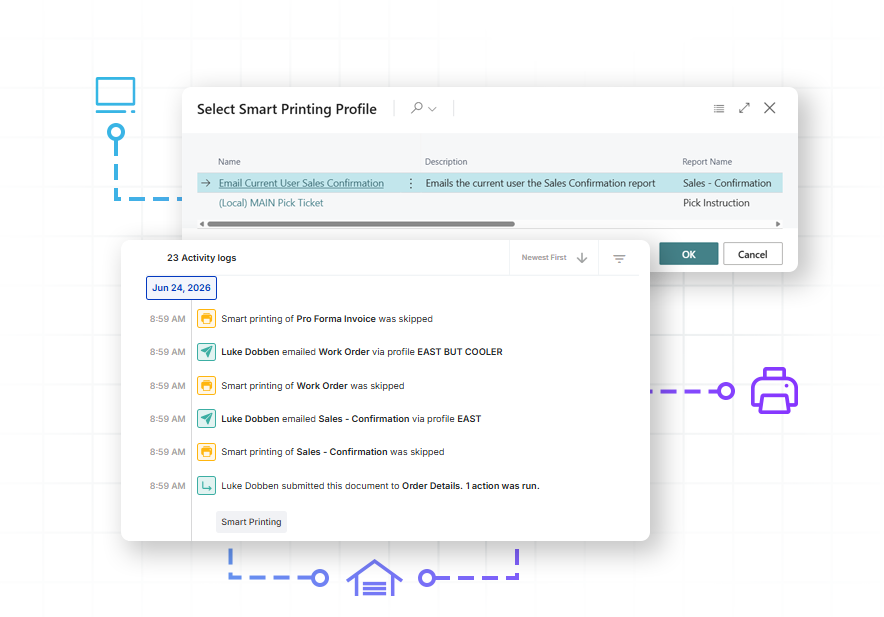
Standard Business Central requires constant human interaction to sort, trigger, and route basic paperwork to physical workstations or manually send out routine customer emails.
But using order data and workflow rules, SalesPad for BC’s Smart Printing capability automatically sends pick instructions, labels, invoices, and other documents to the correct printer, tray, warehouse, or recipient instead. That makes the process human-intervention-free (as much as possible), and keeps fulfillment moving. It can route by warehouse, item, customer, document type, or custom field while supporting existing printers and report layouts.
In turn, your team can be confident they’ll face no more lost or incorrect paperwork, nor fulfillment delays or compliance mistakes, again.
3. AI Customer Insights via Customer IQ (To Proactively Rescue At-Risk Customer Accounts)
Managing thousands of SKUs and hundreds of accounts makes it impossible to manually track every shift in behavior. A dedicated customer intelligence tool is the key to distributors letting go of reacting to churn, and being able to predict and avoid it instead.
Customer IQ for SalesPad for BC identifies shifting patterns in your Dynamics 365 Business Central data to flag at-risk accounts. By applying AI to your sales transaction data, it quantifies customer health for you (rated from Minimal to High), so your sales team knows exactly which accounts require immediate attention or fast action.
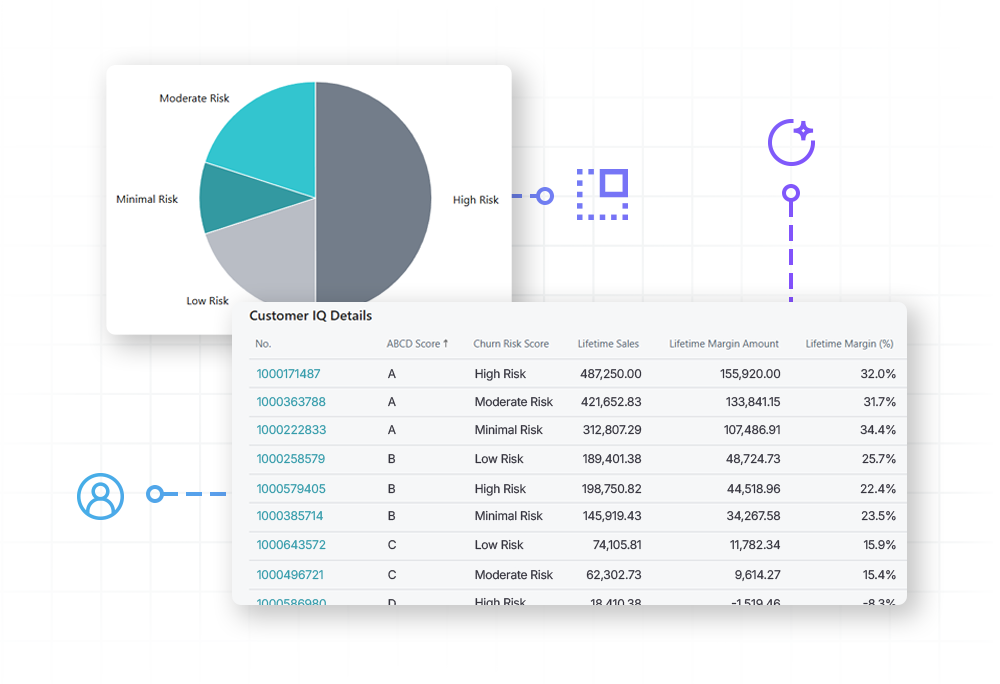
Customer IQ uses AI to analyze purchasing behavior, score each customer’s churn risk, and group accounts by how much they contribute to revenue or margin. Those scores appear directly in SalesPad and can even trigger workflows, like flagging a high-risk customer for review or applying different handling rules to lower-value accounts.
Customer IQ lets you create your own opportunity to act on high-risk customer accounts before lost business shows up in the numbers. Your team, as a result, is empowered to action at-risk accounts while the relationship is still active, turning potential revenue losses into proactive revenue rescues.
4. Service Document Automation (To Extend Mission Control Beyond Sales Documents)
In distribution, sales orders are only one part of the operational picture. Distributors that also handle repairs, maintenance, warranties, or field service need the same control over service quotes, service orders, and service invoices that they have over their sales documents. Now, that’s all possible.
Mission Control (the order workflow automation engine within SalesPad for BC) has long supported workflows for sales documents, including sales quotes, sales orders, sales invoices, and sales returns.
Cavallo’s latest release now extends that capability to service documents, including service quotes, service orders, and service invoices: using the same patterns and conventions users already know. With it, teams will be able to route service documents through queues, apply business rules, manage approvals, update or release documents, send reports, and track activity. That means that service work can now follow the same controlled, visible process as sales orders, and doesn’t require having someone manually managing paperwork on every individual order.escues.
5. Reservation Reassignment (To Protect Inventory for Priority Customers)
Managing committed inventory becomes harder than ever when distributors serve buying groups, key accounts, or customers with guaranteed allocations of inventory. Without clear controls, reserved stock can be consumed by general demand, especially if it’s high: leaving teams to manually move reservations and resolve fulfillment issues one by one.
Inventory Reservation Reassignment (a new enhancement to Mission Control within SalesPad for BC) protects allocated inventory on holding orders and automatically transfers it to eligible customer orders: all based on policies you can configure as you please. As orders move through Mission Control, the system matches the customer, item, location, and variant, then reassigns the appropriate reservation without manual intervention.

Here’s how it works:
- Step 1: You create placeholder sales orders in Business Central and reserve inventory against them. These orders “lock” or “hold” the inventory so it cannot be claimed by other orders.
- Step 2: Using Cavallo’s Reservation Reassignment Policies screen in Business Central, you create policies that specify which customers can draw from which holding orders. Policies use filters to match customers (e.g., all customers with a specific attribute, or specific customers) to source documents (e.g., holding orders for a particular buying group).
- Step 3 (Automated): When a qualifying customer’s order moves through Mission Control with the “Reassign Sales Order Reservations” action, the system instantly transfers reservations from the holding order to the real order.
Just three steps, and what you get at the end of the day is more reliable customer commitments, less operational work, and better control over how limited inventory is distributed.
The Latest from Cavallo: What’s New in SalesPad for Business Central?
Process complexity is the primary reason distributors struggle to scale with Business Central, but fortunately, SalesPad works like distribution thinks.
That’s why SalesPad is the operational control layer distributors need, sitting on top of their ERP, and why it’s uniquely positioned to help put that frustrating complexity behind them.
By helping them decide, automate, and monitor what happens to each order, SalesPad for Business Central guarantees faster fulfillment, more order control, and improved profitability for distributors constantly battling thinning margins (especially as we approach 2027). Think: SalesPad for BC means more orders without needing more people to manually check, route, reserve, approve, and release every one. And now, it’s a better and more powerful tool than ever.
To learn more about SalesPad for BC, how it works, and where it plugs into distributors’ order management processes, visit our product overview page or get in touch for a demo.