
If a sales order can’t skip an approval, a service order shouldn’t be able to either (and yet, that’s the setup in lots of Business Central environments today).
Sales documents move through rules, queues, and sign-offs, while service quotes, orders, and invoices move on email threads or often-forgotten spreadsheets, if even that.
For distributors that repair, maintain, or install equipment, that split leaves some of your highest-touch customer work with the least amount of structure built around it.
If you’re used to handling service documents just using Business Central, here’s a peek at the possibilities that open up when service quotes, orders, and invoices run through Mission Control™ in SalesPad® for Business Central instead.
SalesPad for BC and Mission Control™: One Workflow for Sales and Service
SalesPad for Business Central is a comprehensive order management suite for distributors. It runs inside Business Central to fill the gap between what BC does out of the box and how distributors need their ERP and order management to work in practice.
Within SalesPad for BC, Mission Control is where you build your process: queues for each step, rules that decide what moves where, and actions that fire along the way. It covers service quotes, service orders, and service invoices, using the same patterns your team already uses for sales.
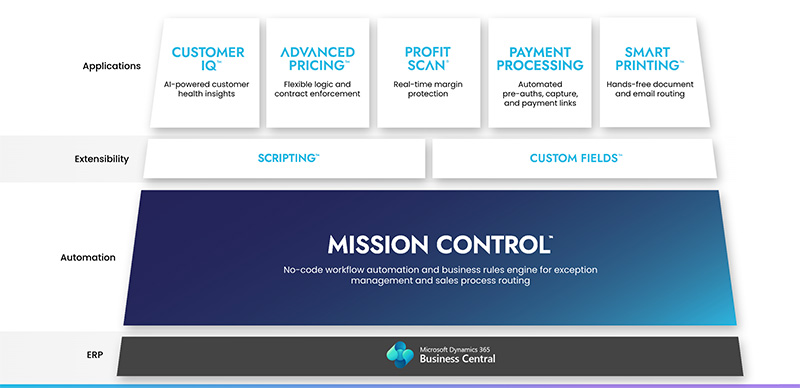
For a service team, that comes down to three things: knowing where every document stands, notifying the right people when a document meets specific criteria, and routing documents based on your own conditions.
Here’s what that looks like in practice:
1. Separate workflows for service quotes, orders, and invoices
Service quote, service order, and service invoice workflows sit on the Workflows screen right next to your sales workflows in SalesPad. Each one gets its own queues and steps, and only service-related options appear when you configure them, so sales and service setups stay clean.
2. Business rules that are built on your service data
Business rules can evaluate service document header fields, service item line fields, dimensions, and customer data, plus any custom fields you’ve added to service documents. That means a rule can key off a service type, a priority, a specific customer, or a field that only matters to your business.
3. Workflow actions that handle routine, manual work
Mission Control™ for SalesPad for Business Central makes it so that each queue in a service workflow can trigger actions automatically, like to:
- Send an email report using a report template from Business Central
- Update a field on the service document
- Release the service document
- Reopen a released service document
4. Hands-free handoffs from quote to order to invoice
In SalesPad for BC, with Mission Control™, alternate paths can transfer a service quote to a service order, and a service order to a service invoice — once the conditions you set have been met.
Note: those conditions can be based on document fields or dimensions, the customer, or service item line data.
When a service order transfers to an invoice, you can also choose to email the invoice automatically, so a finished job doesn’t wait on someone to send the bill.
5. Workflow status, right on the service document
In SalesPad for BC, service quote, order, and invoice cards show the document’s current workflow queue. From there, your team can submit a document to workflow, move it to a different queue, review errors, and open the activity log without leaving the page. You can also browse a complete list of any rules the document has broken, and service list pages add columns for workflow queue, workflow status, broken rules, and document errors, so you can sort and filter by what needs attention.
6. Service approvals in the same place as sales approvals
When a service document hits an approval step, it shows up in the same place your managers already use for sales document approvals.
Approvers with the right permission, which you set in Mission Control™, can approve or reject broken business rules from the queue, the document card, or the fact card.
That means your managers work with one approval queue instead of two.
7. Full workflow history on every quote, order, and invoice
Service documents keep the same activity logs as sales documents. When a customer asks what happened with their job, every workflow event is recorded on the document itself.
Bringing Service Work Under the Same Controls as Sales
If your service team is managing quotes, repairs, and invoices outside the workflow your sales team relies on, Mission Control™ gives you one set of rules, a single approval queue, and a unified place to see where everything stands.
(Explore Mission Control or request a demo to see it in action.)
That’s a Wrap on Order Exceptions Tips (For Now)
Throughout this series, we’ve covered the orders that break the normal process, like: a price that doesn’t match the agreement, an approval stuck in an inbox, someone trying to order inventory you’ve already promised, a document headed to the wrong place, and now, service work running outside the controls you use for sales.
Each order exception has an accompanying manual workaround teams have learned to default to, but with SalesPad for Business Central, each one can run as a rule, and even better, much of it can run automatically.
For an overview of what’s new in SalesPad for BC, dive in here.